

43
Image Filtering, Enhancement, and Restoration
S
S
(a) Dark
Light
r
r
(b) Dark
Light
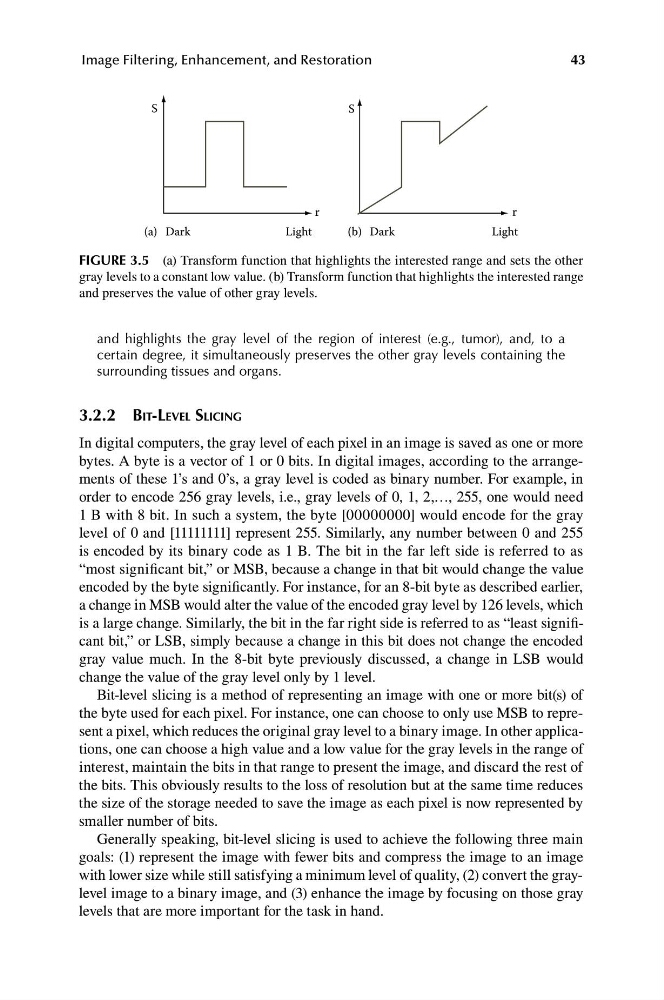
FIGURE 3.5 (a) Transform function that highlights the interested range and sets the other
gray levels to a constant low value. (b) Transform function that highlights the interested range
and preserves the value of other gray levels.
and highlights the gray level of the region of interest (e.g., tumor), and, to a
certain degree, it simultaneously preserves the other gray levels containing the
surrounding tissues and organs.
3.2.2 BIT-LEVEL SLICING
In digital computers, the gray level of each pixel in an image is saved as one or more
bytes. A byte is a vector of 1 or 0 bits. In digital images, according to the arrangements of these 1’s and 0’s, a gray level is coded as binary number. For example, in
order to encode 256 gray levels, i.e., gray levels of 0, 1, 2,…, 255, one would need
1 B with 8 bit. In such a system, the byte [00000000] would encode for the gray
level of 0 and [11111111] represent 255. Similarly, any number between 0 and 255
is encoded by its binary code as 1 B. The bit in the far left side is referred to as
“most significant bit,” or MSB, because a change in that bit would change the value
encoded by the byte significantly. For instance, for an 8-bit byte as described earlier,
a change in MSB would alter the value of the encoded gray level by 126 levels, which
is a large change. Similarly, the bit in the far right side is referred to as “least significant bit,” or LSB, simply because a change in this bit does not change the encoded
gray value much. In the 8-bit byte previously discussed, a change in LSB would
change the value of the gray level only by 1 level.
Bit-level slicing is a method of representing an image with one or more bit(s) of
the byte used for each pixel. For instance, one can choose to only use MSB to represent a pixel, which reduces the original gray level to a binary image. In other applications, one can choose a high value and a low value for the gray levels in the range of
interest, maintain the bits in that range to present the image, and discard the rest of
the bits. This obviously results to the loss of resolution but at the same time reduces
the size of the storage needed to save the image as each pixel is now represented by
smaller number of bits.
Generally speaking, bit-level slicing is used to achieve the following three main
goals: (1) represent the image with fewer bits and compress the image to an image
with lower size while still satisfying a minimum level of quality, (2) convert the graylevel image to a binary image, and (3) enhance the image by focusing on those gray
levels that are more important for the task in hand.
Image Filtering, Enhancement, and Restoration
S
S
(a) Dark
Light
r
r
(b) Dark
Light
FIGURE 3.5 (a) Transform function that highlights the interested range and sets the other
gray levels to a constant low value. (b) Transform function that highlights the interested range
and preserves the value of other gray levels.
and highlights the gray level of the region of interest (e.g., tumor), and, to a
certain degree, it simultaneously preserves the other gray levels containing the
surrounding tissues and organs.
3.2.2 BIT-LEVEL SLICING
In digital computers, the gray level of each pixel in an image is saved as one or more
bytes. A byte is a vector of 1 or 0 bits. In digital images, according to the arrangements of these 1’s and 0’s, a gray level is coded as binary number. For example, in
order to encode 256 gray levels, i.e., gray levels of 0, 1, 2,…, 255, one would need
1 B with 8 bit. In such a system, the byte [00000000] would encode for the gray
level of 0 and [11111111] represent 255. Similarly, any number between 0 and 255
is encoded by its binary code as 1 B. The bit in the far left side is referred to as
“most significant bit,” or MSB, because a change in that bit would change the value
encoded by the byte significantly. For instance, for an 8-bit byte as described earlier,
a change in MSB would alter the value of the encoded gray level by 126 levels, which
is a large change. Similarly, the bit in the far right side is referred to as “least significant bit,” or LSB, simply because a change in this bit does not change the encoded
gray value much. In the 8-bit byte previously discussed, a change in LSB would
change the value of the gray level only by 1 level.
Bit-level slicing is a method of representing an image with one or more bit(s) of
the byte used for each pixel. For instance, one can choose to only use MSB to represent a pixel, which reduces the original gray level to a binary image. In other applications, one can choose a high value and a low value for the gray levels in the range of
interest, maintain the bits in that range to present the image, and discard the rest of
the bits. This obviously results to the loss of resolution but at the same time reduces
the size of the storage needed to save the image as each pixel is now represented by
smaller number of bits.
Generally speaking, bit-level slicing is used to achieve the following three main
goals: (1) represent the image with fewer bits and compress the image to an image
with lower size while still satisfying a minimum level of quality, (2) convert the graylevel image to a binary image, and (3) enhance the image by focusing on those gray
levels that are more important for the task in hand.