

150
Biomedical Signal and Image Processing
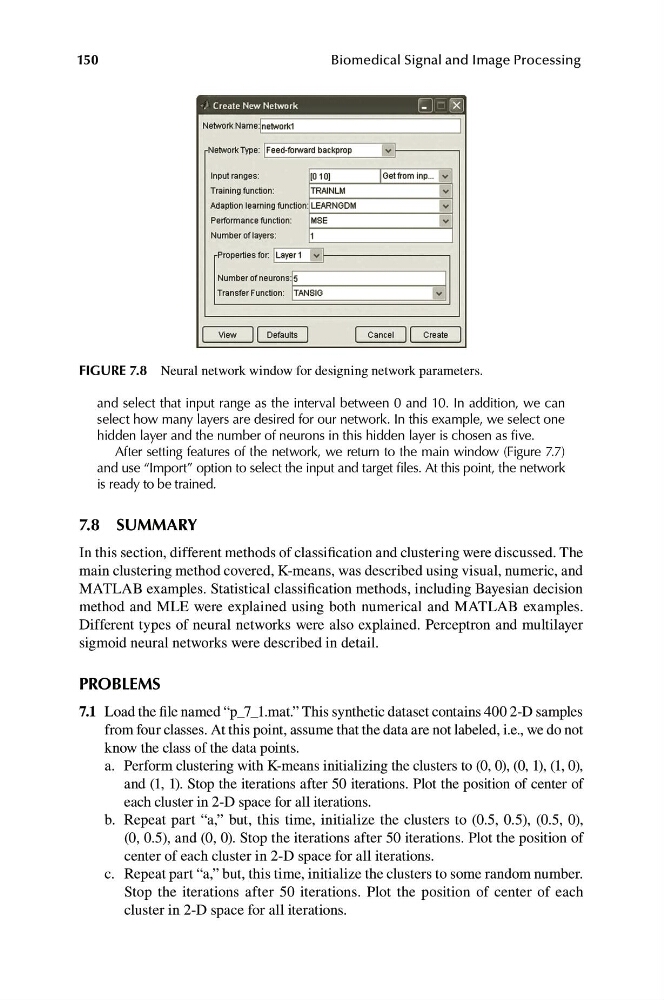
FIGURE 7.8 Neural network window for designing network parameters.
and select that input range as the interval between 0 and 10. In addition, we can
select how many layers are desired for our network. In this example, we select one
hidden layer and the number of neurons in this hidden layer is chosen as five.
After setting features of the network, we return to the main window (Figure 7.7)
and use “Import” option to select the input and target files. At this point, the network
is ready to be trained.
7.8 SUMMARY
In this section, different methods of classification and clustering were discussed. The
main clustering method covered, K-means, was described using visual, numeric, and
MATLAB examples. Statistical classification methods, including Bayesian decision
method and MLE were explained using both numerical and MATLAB examples.
Different types of neural networks were also explained. Perceptron and multilayer
sigmoid neural networks were described in detail.
PROBLEMS
7.1 Load the file named “p_7_1.mat.” This synthetic dataset contains 400 2-D samples
from four classes. At this point, assume that the data are not labeled, i.e., we do not
know the class of the data points.
a. P erform clustering with K-means initializing the clusters to (0, 0), (0, 1), (1, 0),
and (1, 1). Stop the iterations after 50 iterations. Plot the position of center of
each cluster in 2-D space for all iterations.
b. R epeat part “a,” but, this time, initialize the clusters to (0.5, 0.5), (0.5, 0),
(0, 0.5), and (0, 0). Stop the iterations after 50 iterations. Plot the position of
center of each cluster in 2-D space for all iterations.
c. R epeat part “a,” but, this time, initialize the clusters to some random number.
Stop the iterations after 50 iterations. Plot the position of center of each
cluster in 2-D space for all iterations.
Biomedical Signal and Image Processing
FIGURE 7.8 Neural network window for designing network parameters.
and select that input range as the interval between 0 and 10. In addition, we can
select how many layers are desired for our network. In this example, we select one
hidden layer and the number of neurons in this hidden layer is chosen as five.
After setting features of the network, we return to the main window (Figure 7.7)
and use “Import” option to select the input and target files. At this point, the network
is ready to be trained.
7.8 SUMMARY
In this section, different methods of classification and clustering were discussed. The
main clustering method covered, K-means, was described using visual, numeric, and
MATLAB examples. Statistical classification methods, including Bayesian decision
method and MLE were explained using both numerical and MATLAB examples.
Different types of neural networks were also explained. Perceptron and multilayer
sigmoid neural networks were described in detail.
PROBLEMS
7.1 Load the file named “p_7_1.mat.” This synthetic dataset contains 400 2-D samples
from four classes. At this point, assume that the data are not labeled, i.e., we do not
know the class of the data points.
a. P erform clustering with K-means initializing the clusters to (0, 0), (0, 1), (1, 0),
and (1, 1). Stop the iterations after 50 iterations. Plot the position of center of
each cluster in 2-D space for all iterations.
b. R epeat part “a,” but, this time, initialize the clusters to (0.5, 0.5), (0.5, 0),
(0, 0.5), and (0, 0). Stop the iterations after 50 iterations. Plot the position of
center of each cluster in 2-D space for all iterations.
c. R epeat part “a,” but, this time, initialize the clusters to some random number.
Stop the iterations after 50 iterations. Plot the position of center of each
cluster in 2-D space for all iterations.