

Clustering and Classification
149
manner, the weights of steps t and t − 1 are considered in updating of the weights in
step t + 1, i.e.,
w t
( + =
) w t + ad z + m w ( ) − w (t −1)⎤
(7.32)
jk
1
jk ( )
k j
⎡ ⎣ jk t
jk
⎦
v t
( 1) v + ad j x + m v t
ij ( ) − v t − )
ij
+ = ij t
( )
i
⎡ ⎣
ij ( 1 ⎤ ⎦
(7.33)
where μ is the momentum parameter and is in the range from 0 to 1. The larger μ is
used, the more robust the training algorithm becomes. By adjusting the value of the
momentum parameter, μ, large weight adjustment can be achieved, and, at the same
time, the convergence of weights to desired values can be expedited.
7.7.3 MATLAB ® FOR NEURAL NETWORKS
Since not meaningful, backpropagation example is short enough to be handled
manually; at this point, we start describing the use of MATLAB for training of
multilayer sigmoid feedforward neural networks.
Example 7.8
In this example, we show how to use neural network toolbox of MATLAB to create
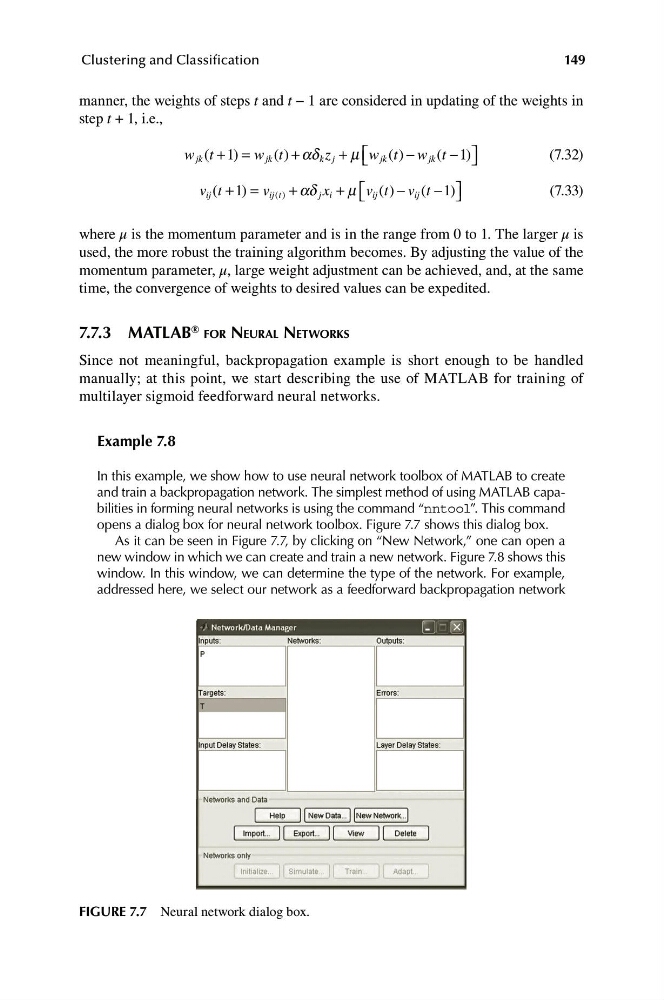
and train a backpropagation network. The simplest method of using MATLAB capabilities in forming neural networks is using the command “nntool”. This command
opens a dialog box for neural network toolbox. Figure 7.7 shows this dialog box.
As it can be seen in Figure 7.7, by clicking on “New Network,” one can open a
new window in which we can create and train a new network. Figure 7.8 shows this
window. In this window, we can determine the type of the network. For example,
addressed here, we select our network as a feedforward backpropagation network
FIGURE 7.7 Neural network dialog box.
149
manner, the weights of steps t and t − 1 are considered in updating of the weights in
step t + 1, i.e.,
w t
( + =
) w t + ad z + m w ( ) − w (t −1)⎤
(7.32)
jk
1
jk ( )
k j
⎡ ⎣ jk t
jk
⎦
v t
( 1) v + ad j x + m v t
ij ( ) − v t − )
ij
+ = ij t
( )
i
⎡ ⎣
ij ( 1 ⎤ ⎦
(7.33)
where μ is the momentum parameter and is in the range from 0 to 1. The larger μ is
used, the more robust the training algorithm becomes. By adjusting the value of the
momentum parameter, μ, large weight adjustment can be achieved, and, at the same
time, the convergence of weights to desired values can be expedited.
7.7.3 MATLAB ® FOR NEURAL NETWORKS
Since not meaningful, backpropagation example is short enough to be handled
manually; at this point, we start describing the use of MATLAB for training of
multilayer sigmoid feedforward neural networks.
Example 7.8
In this example, we show how to use neural network toolbox of MATLAB to create
and train a backpropagation network. The simplest method of using MATLAB capabilities in forming neural networks is using the command “nntool”. This command
opens a dialog box for neural network toolbox. Figure 7.7 shows this dialog box.
As it can be seen in Figure 7.7, by clicking on “New Network,” one can open a
new window in which we can create and train a new network. Figure 7.8 shows this
window. In this window, we can determine the type of the network. For example,
addressed here, we select our network as a feedforward backpropagation network
FIGURE 7.7 Neural network dialog box.