

220
16 Astrometry
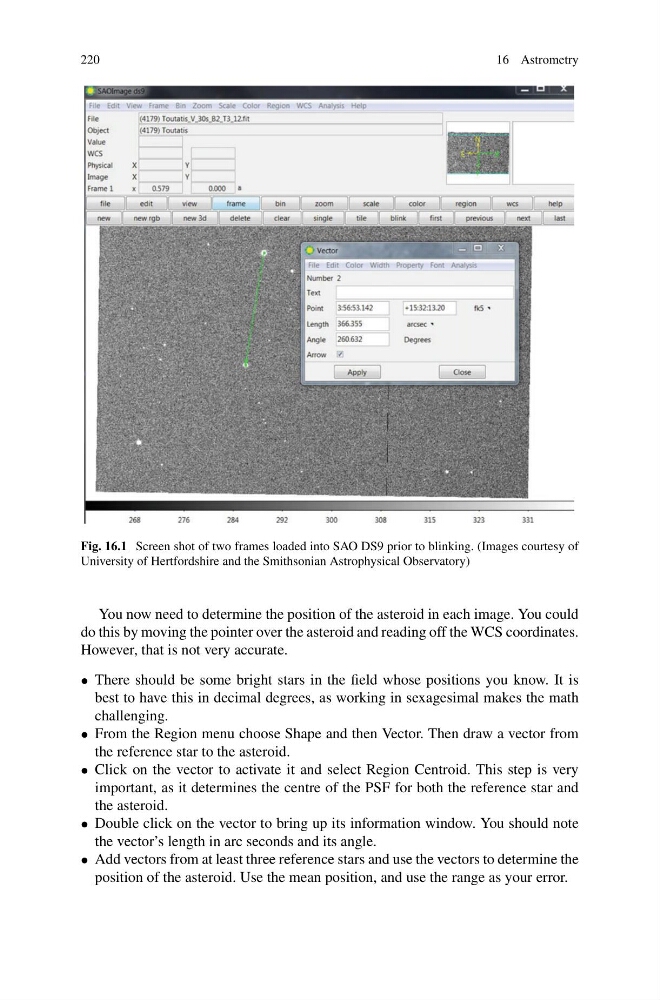
Fig. 16.1 Screen shot of two frames loaded into SAO DS9 prior to blinking. (Images courtesy of
University of Hertfordshire and the Smithsonian Astrophysical Observatory)
You now need to determine the position of the asteroid in each image. You could
do this by moving the pointer over the asteroid and reading off the WCS coordinates.
However, that is not very accurate.
• There should be some bright stars in the field whose positions you know. It is
best to have this in decimal degrees, as working in sexagesimal makes the math
challenging.
• From the Region menu choose Shape and then Vector. Then draw a vector from
the reference star to the asteroid.
• Click on the vector to activate it and select Region Centroid. This step is very
important, as it determines the centre of the PSF for both the reference star and
the asteroid.
• Double click on the vector to bring up its information window. You should note
the vector’s length in arc seconds and its angle.
• Add vectors from at least three reference stars and use the vectors to determine the
position of the asteroid. Use the mean position, and use the range as your error.
16 Astrometry
Fig. 16.1 Screen shot of two frames loaded into SAO DS9 prior to blinking. (Images courtesy of
University of Hertfordshire and the Smithsonian Astrophysical Observatory)
You now need to determine the position of the asteroid in each image. You could
do this by moving the pointer over the asteroid and reading off the WCS coordinates.
However, that is not very accurate.
• There should be some bright stars in the field whose positions you know. It is
best to have this in decimal degrees, as working in sexagesimal makes the math
challenging.
• From the Region menu choose Shape and then Vector. Then draw a vector from
the reference star to the asteroid.
• Click on the vector to activate it and select Region Centroid. This step is very
important, as it determines the centre of the PSF for both the reference star and
the asteroid.
• Double click on the vector to bring up its information window. You should note
the vector’s length in arc seconds and its angle.
• Add vectors from at least three reference stars and use the vectors to determine the
position of the asteroid. Use the mean position, and use the range as your error.