

2.6 Cookies Spyware
181
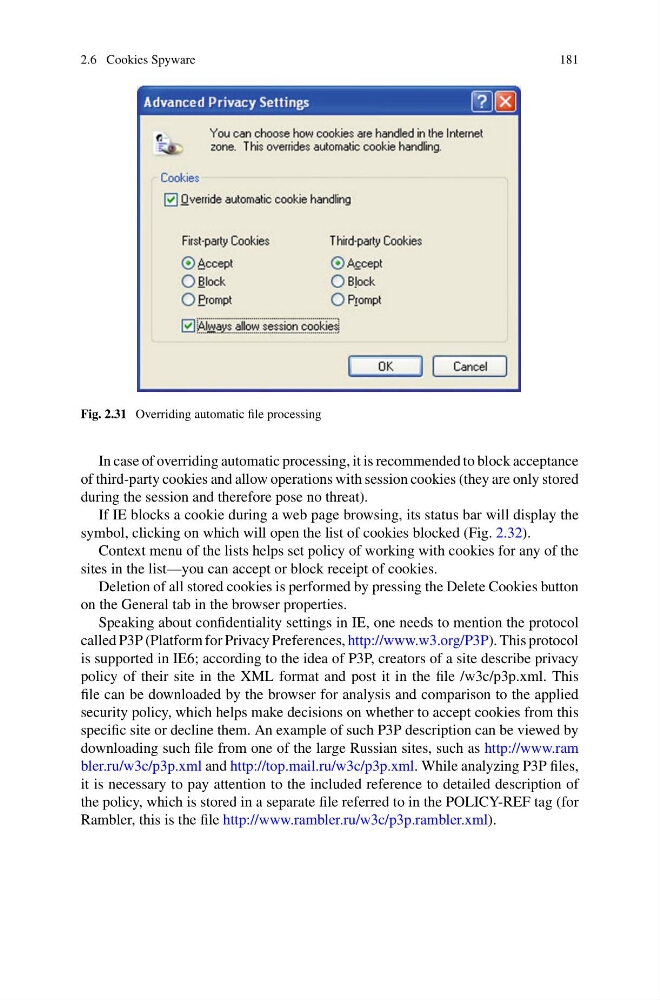
Fig. 2.31 Overriding automatic file processing
In case of overriding automatic processing, it is recommended to block acceptance
of third-party cookies and allow operations with session cookies (they are only stored
during the session and therefore pose no threat).
If IE blocks a cookie during a web page browsing, its status bar will display the
symbol, clicking on which will open the list of cookies blocked (Fig. 2.32).
Context menu of the lists helps set policy of working with cookies for any of the
sites in the list—you can accept or block receipt of cookies.
Deletion of all stored cookies is performed by pressing the Delete Cookies button
on the General tab in the browser properties.
Speaking about confidentiality settings in IE, one needs to mention the protocol
called P3P (Platform for Privacy Preferences, http://www.w3.org/P3P). This protocol
is supported in IE6; according to the idea of P3P, creators of a site describe privacy
policy of their site in the XML format and post it in the file /w3c/p3p.xml. This
file can be downloaded by the browser for analysis and comparison to the applied
security policy, which helps make decisions on whether to accept cookies from this
specific site or decline them. An example of such P3P description can be viewed by
downloading such file from one of the large Russian sites, such as http://www.ram
bler.ru/w3c/p3p.xml and http://top.mail.ru/w3c/p3p.xml. While analyzing P3P files,
it is necessary to pay attention to the included reference to detailed description of
the policy, which is stored in a separate file referred to in the POLICY-REF tag (for
Rambler, this is the file http://www.rambler.ru/w3c/p3p.rambler.xml).
181
Fig. 2.31 Overriding automatic file processing
In case of overriding automatic processing, it is recommended to block acceptance
of third-party cookies and allow operations with session cookies (they are only stored
during the session and therefore pose no threat).
If IE blocks a cookie during a web page browsing, its status bar will display the
symbol, clicking on which will open the list of cookies blocked (Fig. 2.32).
Context menu of the lists helps set policy of working with cookies for any of the
sites in the list—you can accept or block receipt of cookies.
Deletion of all stored cookies is performed by pressing the Delete Cookies button
on the General tab in the browser properties.
Speaking about confidentiality settings in IE, one needs to mention the protocol
called P3P (Platform for Privacy Preferences, http://www.w3.org/P3P). This protocol
is supported in IE6; according to the idea of P3P, creators of a site describe privacy
policy of their site in the XML format and post it in the file /w3c/p3p.xml. This
file can be downloaded by the browser for analysis and comparison to the applied
security policy, which helps make decisions on whether to accept cookies from this
specific site or decline them. An example of such P3P description can be viewed by
downloading such file from one of the large Russian sites, such as http://www.ram
bler.ru/w3c/p3p.xml and http://top.mail.ru/w3c/p3p.xml. While analyzing P3P files,
it is necessary to pay attention to the included reference to detailed description of
the policy, which is stored in a separate file referred to in the POLICY-REF tag (for
Rambler, this is the file http://www.rambler.ru/w3c/p3p.rambler.xml).