

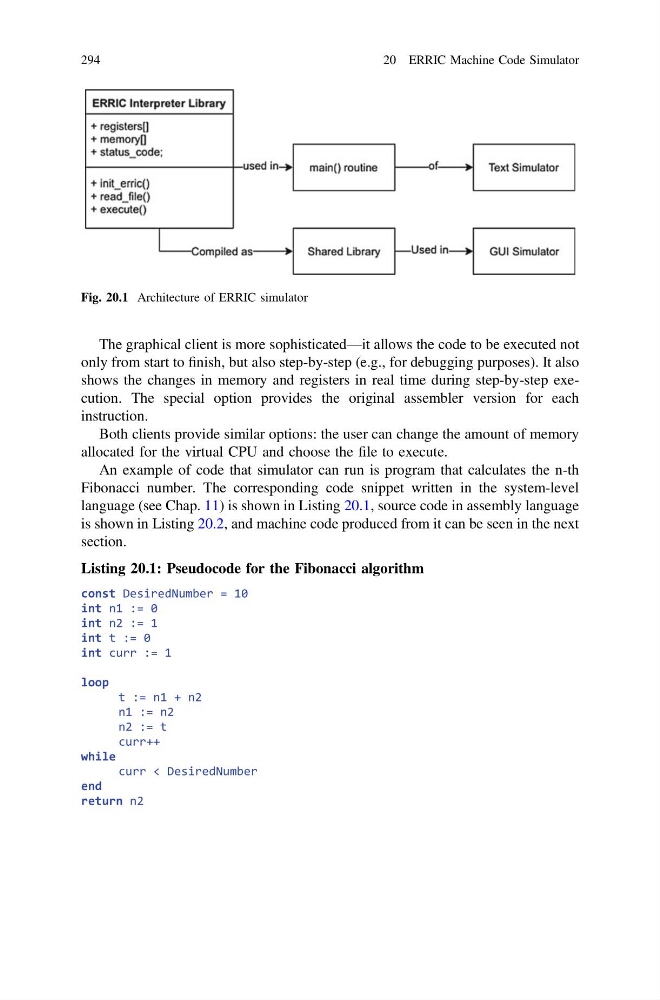
The graphical client is more sophisticated—it allows the code to be executed not
only from start to finish, but also step-by-step (e.g., for debugging purposes). It also
shows the changes in memory and registers in real time during step-by-step execution. The special option provides the original assembler version for each
instruction.
Both clients provide similar options: the user can change the amount of memory
allocated for the virtual CPU and choose the file to execute.
An example of code that simulator can run is program that calculates the n-th
Fibonacci number. The corresponding code snippet written in the system-level
language (see Chap. 11) is shown in Listing 20.1, source code in assembly language
is shown in Listing 20.2, and machine code produced from it can be seen in the next
section.
Listing 20.1: Pseudocode for the Fibonacci algorithm
const DesiredNumber = 10
int n1 := 0
int n2 := 1
int t := 0
int curr := 1
loop
t := n1 + n2
n1 := n2
n2 := t
curr++
while
curr < DesiredNumber
end
return n2
Fig. 20.1 Architecture of ERRIC simulator
294
20 ERRIC Machine Code Simulator
only from start to finish, but also step-by-step (e.g., for debugging purposes). It also
shows the changes in memory and registers in real time during step-by-step execution. The special option provides the original assembler version for each
instruction.
Both clients provide similar options: the user can change the amount of memory
allocated for the virtual CPU and choose the file to execute.
An example of code that simulator can run is program that calculates the n-th
Fibonacci number. The corresponding code snippet written in the system-level
language (see Chap. 11) is shown in Listing 20.1, source code in assembly language
is shown in Listing 20.2, and machine code produced from it can be seen in the next
section.
Listing 20.1: Pseudocode for the Fibonacci algorithm
const DesiredNumber = 10
int n1 := 0
int n2 := 1
int t := 0
int curr := 1
loop
t := n1 + n2
n1 := n2
n2 := t
curr++
while
curr < DesiredNumber
end
return n2
Fig. 20.1 Architecture of ERRIC simulator
294
20 ERRIC Machine Code Simulator