

76
2 Description of the Wolfram SystemModeler
Here, it can be seen that the spring stiffness has a negligible effect on the displacement during the entire simulation time. Mass has the most significant effect, and its
effect increases when the time is equal 2 sec and decreases as the oscillations decay.
2.5.3 Example of Using the Spring Pendulum Component:
Multi-link
As an example, we consider an articulated pendulum (this model can be easily built
using the built-in library) and build on it a multi-link model. Please note that this
example is also available in the IntroductoryExamples library. But we will create
it anew, using the principles of component modeling.
The components needed to create a chain link are available in the Modelica Standard Library, which is part of SystemModeler. The basis of the chain link is a
pendulum from the Modelica.Mechanics.MultiBody library, consisting of a body
rotating around a pivot joint. To add friction to the rotation, a damper is connected
to the pivot joint.
Start by creating a new model, which we will call ChainLink.
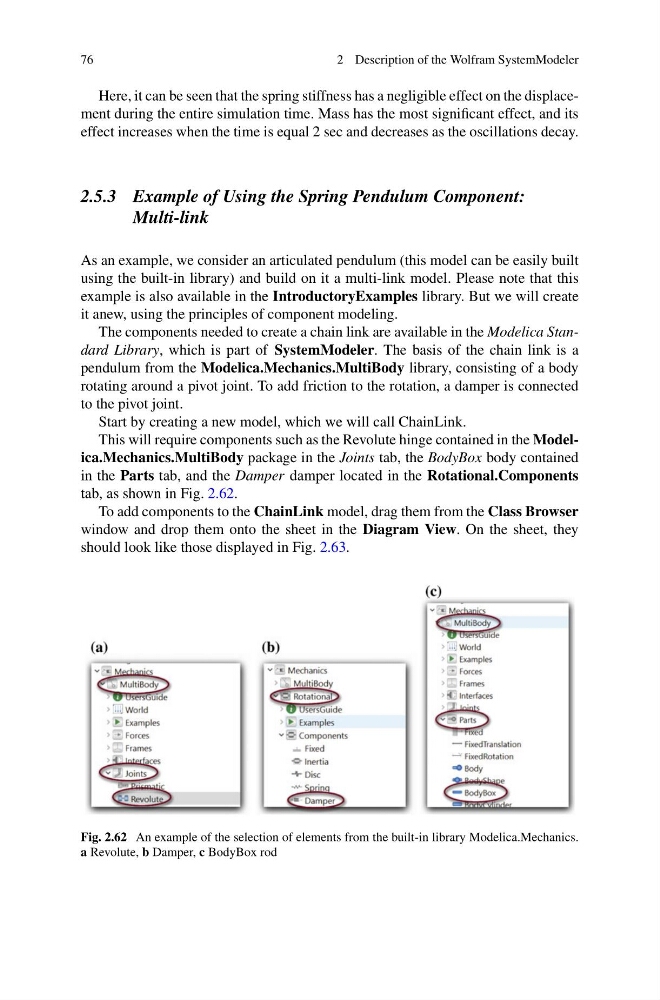
This will require components such as the Revolute hinge contained in the Modelica.Mechanics.MultiBody package in the Joints tab, the BodyBox body contained
in the Parts tab, and the Damper damper located in the Rotational.Components
tab, as shown in Fig. 2.62.
To add components to the ChainLink model, drag them from the Class Browser
window and drop them onto the sheet in the Diagram View. On the sheet, they
should look like those displayed in Fig. 2.63.
Fig. 2.62 An example of the selection of elements from the built-in library Modelica.Mechanics.
a Revolute, b Damper, c BodyBox rod
2 Description of the Wolfram SystemModeler
Here, it can be seen that the spring stiffness has a negligible effect on the displacement during the entire simulation time. Mass has the most significant effect, and its
effect increases when the time is equal 2 sec and decreases as the oscillations decay.
2.5.3 Example of Using the Spring Pendulum Component:
Multi-link
As an example, we consider an articulated pendulum (this model can be easily built
using the built-in library) and build on it a multi-link model. Please note that this
example is also available in the IntroductoryExamples library. But we will create
it anew, using the principles of component modeling.
The components needed to create a chain link are available in the Modelica Standard Library, which is part of SystemModeler. The basis of the chain link is a
pendulum from the Modelica.Mechanics.MultiBody library, consisting of a body
rotating around a pivot joint. To add friction to the rotation, a damper is connected
to the pivot joint.
Start by creating a new model, which we will call ChainLink.
This will require components such as the Revolute hinge contained in the Modelica.Mechanics.MultiBody package in the Joints tab, the BodyBox body contained
in the Parts tab, and the Damper damper located in the Rotational.Components
tab, as shown in Fig. 2.62.
To add components to the ChainLink model, drag them from the Class Browser
window and drop them onto the sheet in the Diagram View. On the sheet, they
should look like those displayed in Fig. 2.63.
Fig. 2.62 An example of the selection of elements from the built-in library Modelica.Mechanics.
a Revolute, b Damper, c BodyBox rod