

68
2 Description of the Wolfram SystemModeler
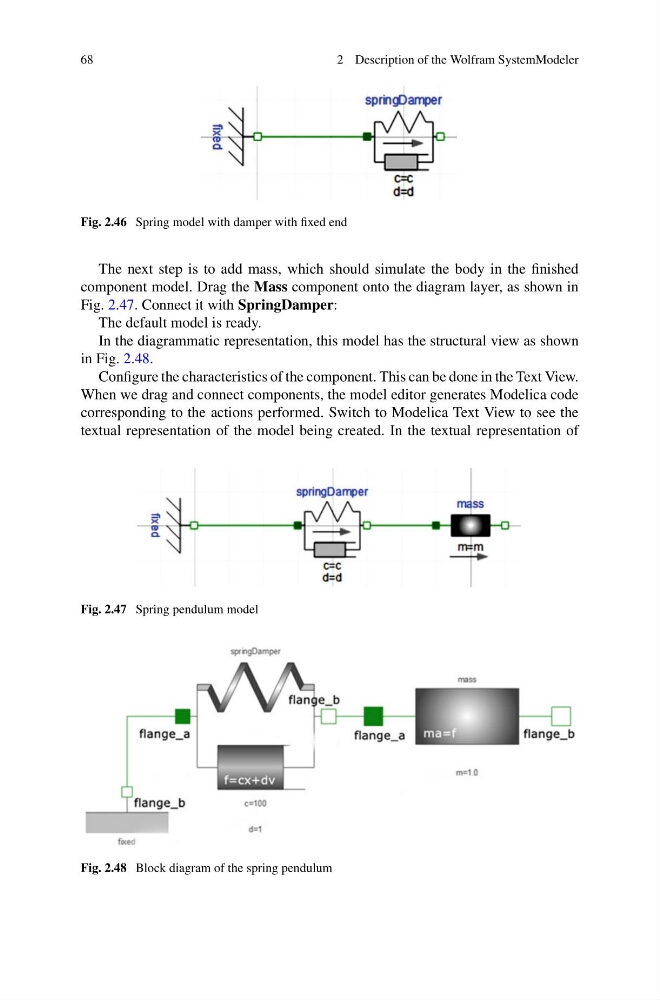
Fig. 2.46 Spring model with damper with fixed end
The next step is to add mass, which should simulate the body in the finished
component model. Drag the Mass component onto the diagram layer, as shown in
Fig. 2.47. Connect it with SpringDamper:
The default model is ready.
In the diagrammatic representation, this model has the structural view as shown
in Fig. 2.48.
Configure the characteristics of the component. This can be done in the Text View.
When we drag and connect components, the model editor generates Modelica code
corresponding to the actions performed. Switch to Modelica Text View to see the
textual representation of the model being created. In the textual representation of
Fig. 2.47 Spring pendulum model
Fig. 2.48 Block diagram of the spring pendulum
2 Description of the Wolfram SystemModeler
Fig. 2.46 Spring model with damper with fixed end
The next step is to add mass, which should simulate the body in the finished
component model. Drag the Mass component onto the diagram layer, as shown in
Fig. 2.47. Connect it with SpringDamper:
The default model is ready.
In the diagrammatic representation, this model has the structural view as shown
in Fig. 2.48.
Configure the characteristics of the component. This can be done in the Text View.
When we drag and connect components, the model editor generates Modelica code
corresponding to the actions performed. Switch to Modelica Text View to see the
textual representation of the model being created. In the textual representation of
Fig. 2.47 Spring pendulum model
Fig. 2.48 Block diagram of the spring pendulum