

2.4 Creating a Dynamic Model in Wolfram SystemModeler
55
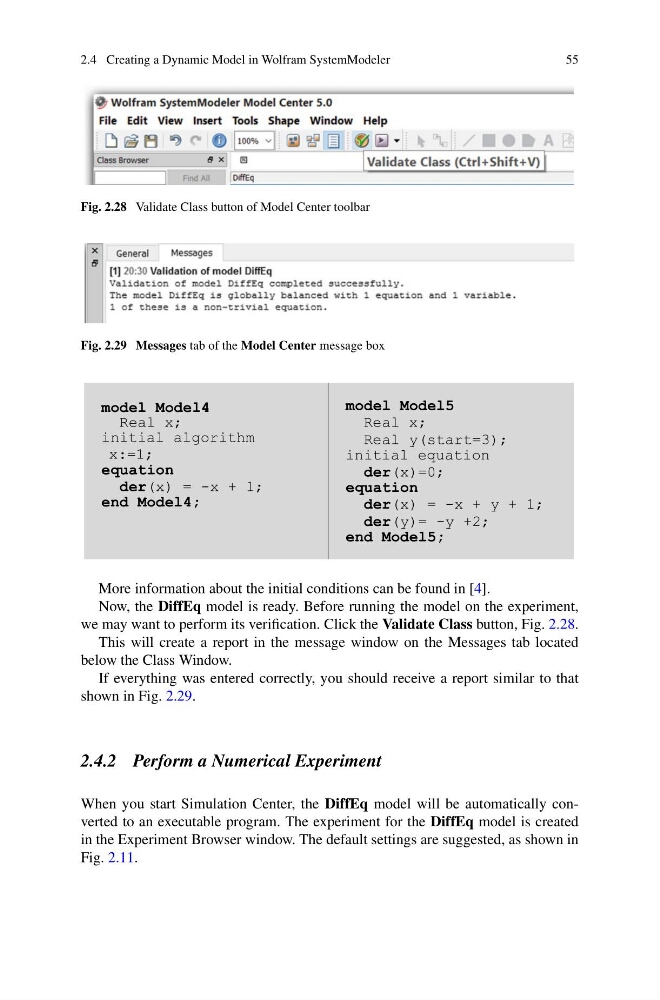
Fig. 2.28 Validate Class button of Model Center toolbar
Fig. 2.29 Messages tab of the Model Center message box
model Model4
Real x;
initial algorithm
x:=1;
equation
der(x) = -x + 1;
end Model4;
model Model5
Real x;
Real y(start=3);
initial equation
der(x)=0;
equation
der(x) = -x + y + 1;
der(y)= -y +2;
end Model5;
More information about the initial conditions can be found in [4].
Now, the DiffEq model is ready. Before running the model on the experiment,
we may want to perform its verification. Click the Validate Class button, Fig. 2.28.
This will create a report in the message window on the Messages tab located
below the Class Window.
If everything was entered correctly, you should receive a report similar to that
shown in Fig. 2.29.
2.4.2 Perform a Numerical Experiment
When you start Simulation Center, the DiffEq model will be automatically converted to an executable program. The experiment for the DiffEq model is created
in the Experiment Browser window. The default settings are suggested, as shown in
Fig. 2.11.
55
Fig. 2.28 Validate Class button of Model Center toolbar
Fig. 2.29 Messages tab of the Model Center message box
model Model4
Real x;
initial algorithm
x:=1;
equation
der(x) = -x + 1;
end Model4;
model Model5
Real x;
Real y(start=3);
initial equation
der(x)=0;
equation
der(x) = -x + y + 1;
der(y)= -y +2;
end Model5;
More information about the initial conditions can be found in [4].
Now, the DiffEq model is ready. Before running the model on the experiment,
we may want to perform its verification. Click the Validate Class button, Fig. 2.28.
This will create a report in the message window on the Messages tab located
below the Class Window.
If everything was entered correctly, you should receive a report similar to that
shown in Fig. 2.29.
2.4.2 Perform a Numerical Experiment
When you start Simulation Center, the DiffEq model will be automatically converted to an executable program. The experiment for the DiffEq model is created
in the Experiment Browser window. The default settings are suggested, as shown in
Fig. 2.11.