

32
2 Description of the Wolfram SystemModeler
Table 2.2 List of class attributes
Class attributes Description
Specialization
Allows you to select a class type
Name
Class name
Description
Text explanation for the class. Optional attribute
Insert into
Allows you to specify the location of the created class to create a hierarchy.
This field specifies the name of the class into which the given is inserted into
the class tree. Optional attribute
Extends
The field for specifying the parent class, while the class being created inherits
the variables and equations from the parent. Optional attribute
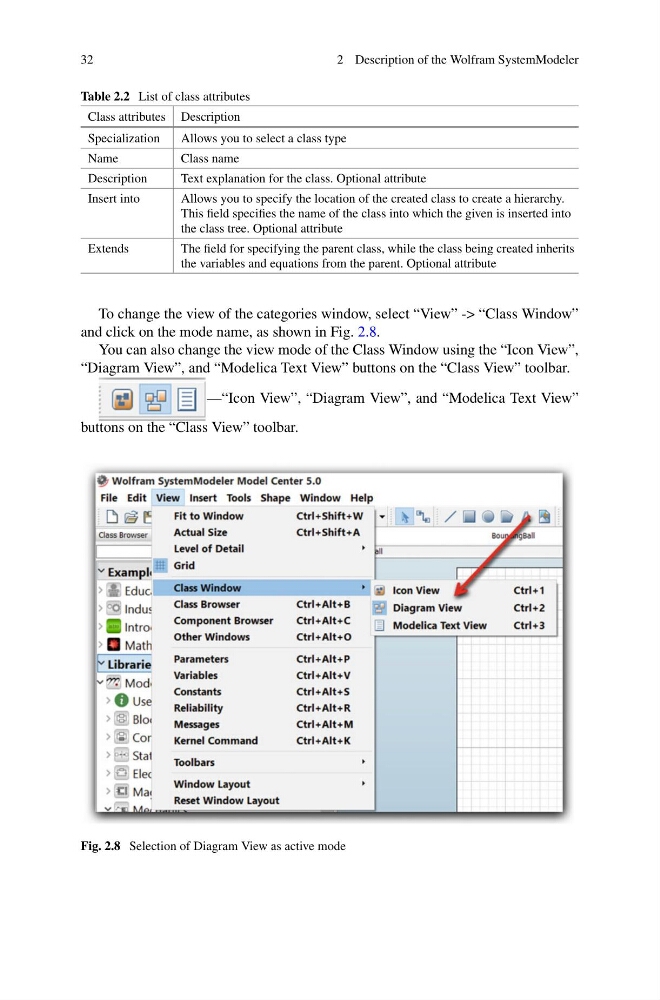
To change the view of the categories window, select “View” -> “Class Window”
and click on the mode name, as shown in Fig. 2.8.
You can also change the view mode of the Class Window using the “Icon View”,
“Diagram View”, and “Modelica Text View” buttons on the “Class View” toolbar.
—“Icon View”, “Diagram View”, and “Modelica Text View”
buttons on the “Class View” toolbar.
Fig. 2.8 Selection of Diagram View as active mode
2 Description of the Wolfram SystemModeler
Table 2.2 List of class attributes
Class attributes Description
Specialization
Allows you to select a class type
Name
Class name
Description
Text explanation for the class. Optional attribute
Insert into
Allows you to specify the location of the created class to create a hierarchy.
This field specifies the name of the class into which the given is inserted into
the class tree. Optional attribute
Extends
The field for specifying the parent class, while the class being created inherits
the variables and equations from the parent. Optional attribute
To change the view of the categories window, select “View” -> “Class Window”
and click on the mode name, as shown in Fig. 2.8.
You can also change the view mode of the Class Window using the “Icon View”,
“Diagram View”, and “Modelica Text View” buttons on the “Class View” toolbar.
—“Icon View”, “Diagram View”, and “Modelica Text View”
buttons on the “Class View” toolbar.
Fig. 2.8 Selection of Diagram View as active mode