

26
2 Description of the Wolfram SystemModeler
The elements of classes in Modelica can have two levels of visibility: public or
protected. By default, all classes are public. The standard class for describing an
executable model is the model class.
Class loading
Modelica classes are usually stored one per file (extensions * .mo, * .moe). At any
time, you can load one or more Modelica classes into the Model Center by selecting
«File» -> «Open». In addition, files can be opened using the drag-and-drop principle;
i.e., the required file can be dragged from the explorer to an arbitrary location in the
Model Center.
Recently used files are available in the File -> Recent Files menu. To download
the desired file, simply click on it. The number of files available in the “Recent Files”
menu can be configured in the “General” tab of the “Options” dialog box located in
the “Tools” tool menu.
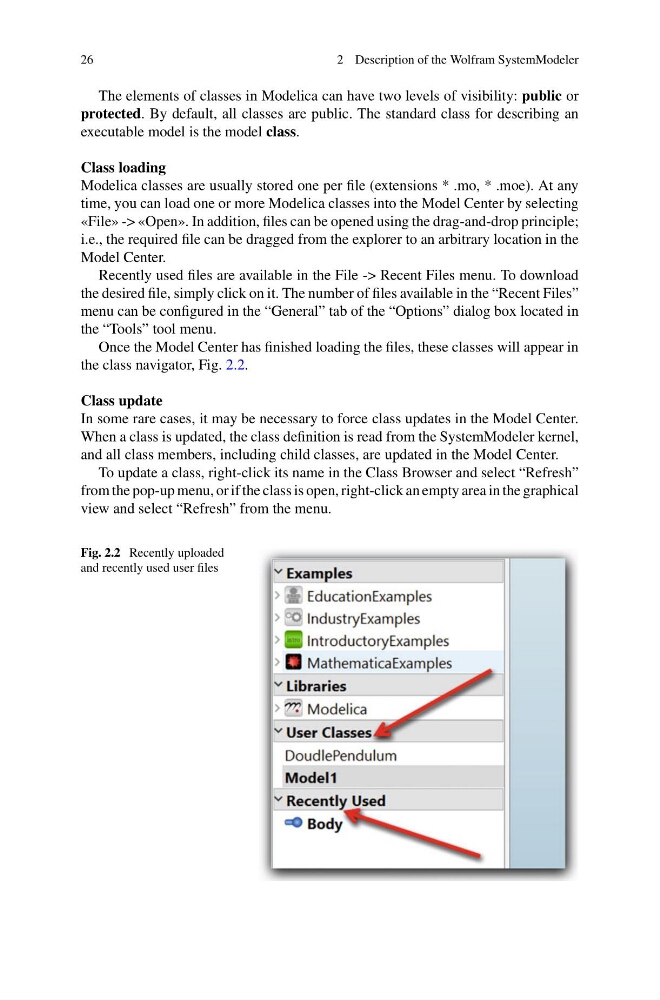
Once the Model Center has finished loading the files, these classes will appear in
the class navigator, Fig. 2.2.
Class update
In some rare cases, it may be necessary to force class updates in the Model Center.
When a class is updated, the class definition is read from the SystemModeler kernel,
and all class members, including child classes, are updated in the Model Center.
To update a class, right-click its name in the Class Browser and select “Refresh”
from the pop-up menu, or if the class is open, right-click an empty area in the graphical
view and select “Refresh” from the menu.
Fig. 2.2 Recently uploaded
and recently used user files
2 Description of the Wolfram SystemModeler
The elements of classes in Modelica can have two levels of visibility: public or
protected. By default, all classes are public. The standard class for describing an
executable model is the model class.
Class loading
Modelica classes are usually stored one per file (extensions * .mo, * .moe). At any
time, you can load one or more Modelica classes into the Model Center by selecting
«File» -> «Open». In addition, files can be opened using the drag-and-drop principle;
i.e., the required file can be dragged from the explorer to an arbitrary location in the
Model Center.
Recently used files are available in the File -> Recent Files menu. To download
the desired file, simply click on it. The number of files available in the “Recent Files”
menu can be configured in the “General” tab of the “Options” dialog box located in
the “Tools” tool menu.
Once the Model Center has finished loading the files, these classes will appear in
the class navigator, Fig. 2.2.
Class update
In some rare cases, it may be necessary to force class updates in the Model Center.
When a class is updated, the class definition is read from the SystemModeler kernel,
and all class members, including child classes, are updated in the Model Center.
To update a class, right-click its name in the Class Browser and select “Refresh”
from the pop-up menu, or if the class is open, right-click an empty area in the graphical
view and select “Refresh” from the menu.
Fig. 2.2 Recently uploaded
and recently used user files