

3. To analyze a list of genes, data must be uploaded. The user can
upload a list of genes or microarray experiments. One useful
feature of VirtualPlant is that for microarray analysis “.CEL”
files can be uploaded and normalized (GCRMA or MAS5
methods) using VirtualPlant.
4. In the dark blue toolbar click on “Upload Data” followed by
“Click here to upload one or more list of genes” and paste your
list of genes or upload a file following the format described at
the top of the page, or paste your list of genes, i.e., paste the
AGI IDs from the list of genes upregulated in LEC1OX plants
[10]. Download the file here (see Note 1) if you didn’t already
for the AraCyc OMICS viewer section and open it with Excel
to copy the first column of AGI IDs. Click “Submit.” Our list
of genes is now uploaded to the “My Genes” folder. Click
“Analyze” in the navigation bar. The analysis window shows
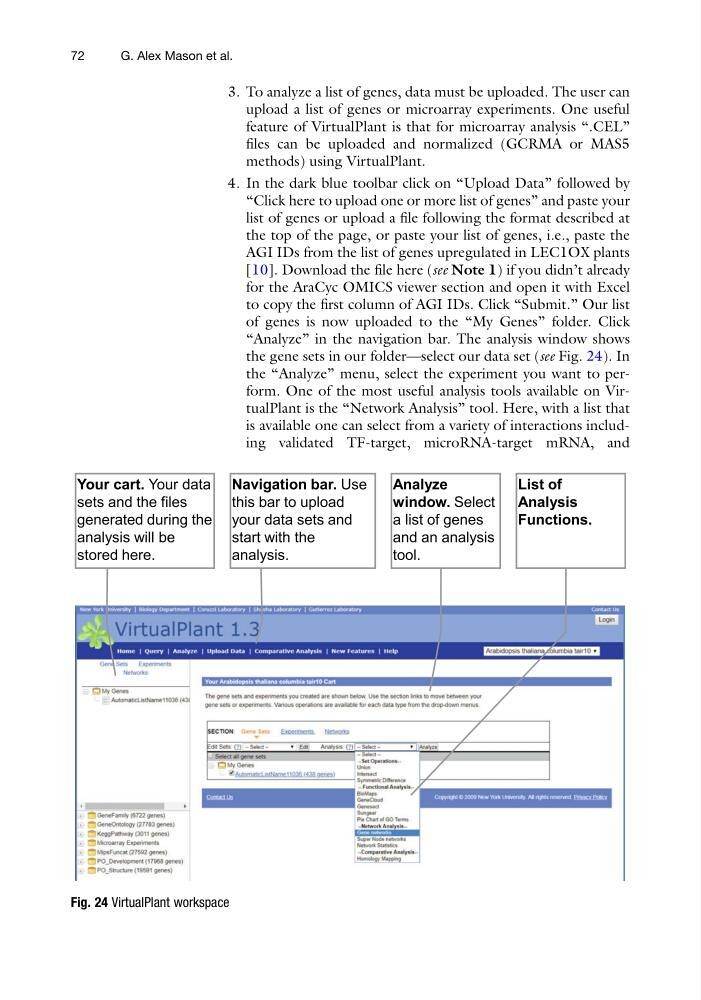
the gene sets in our folder—select our data set (see Fig. 24). In
the “Analyze” menu, select the experiment you want to perform. One of the most useful analysis tools available on VirtualPlant is the “Network Analysis” tool. Here, with a list that
is available one can select from a variety of interactions including validated TF-target, microRNA-target mRNA, and
Fig. 24 VirtualPlant workspace
72
G. Alex Mason et al.
upload a list of genes or microarray experiments. One useful
feature of VirtualPlant is that for microarray analysis “.CEL”
files can be uploaded and normalized (GCRMA or MAS5
methods) using VirtualPlant.
4. In the dark blue toolbar click on “Upload Data” followed by
“Click here to upload one or more list of genes” and paste your
list of genes or upload a file following the format described at
the top of the page, or paste your list of genes, i.e., paste the
AGI IDs from the list of genes upregulated in LEC1OX plants
[10]. Download the file here (see Note 1) if you didn’t already
for the AraCyc OMICS viewer section and open it with Excel
to copy the first column of AGI IDs. Click “Submit.” Our list
of genes is now uploaded to the “My Genes” folder. Click
“Analyze” in the navigation bar. The analysis window shows
the gene sets in our folder—select our data set (see Fig. 24). In
the “Analyze” menu, select the experiment you want to perform. One of the most useful analysis tools available on VirtualPlant is the “Network Analysis” tool. Here, with a list that
is available one can select from a variety of interactions including validated TF-target, microRNA-target mRNA, and
Fig. 24 VirtualPlant workspace
72
G. Alex Mason et al.