

2. At the top of the page, use the search bar to find “CHH_ago4_Stroud_2013” [20]. Click the search result. On the right
hand of the page under experiment details, click “add to Notebook.” You will be prompted to search for your notebook
name. After searching for the notebook to add this experimental data to, click “Add items.”
3. Repeat these steps for the following data sets: CHH_Col0_Stroud_2013 (use id224), H3K27me1_Roudier_2011 (use
id36), H3K27me3_Roudier_2011 (use id31), H3K36me3_Roudier_2011 (use id35), H3K4me2_Roudier_2011 (use
id33), H3K4me3_Roudier_2011 (use id32) [20, 21] .
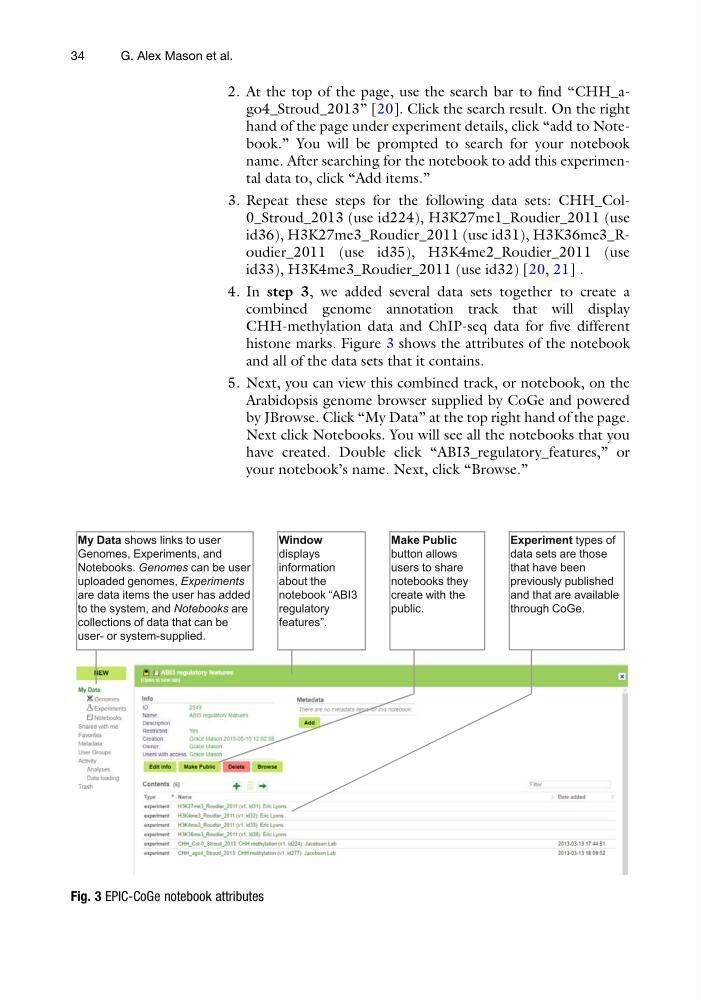
4. In step 3, we added several data sets together to create a
combined genome annotation track that will display
CHH-methylation data and ChIP-seq data for five different
histone marks. Figure 3 shows the attributes of the notebook
and all of the data sets that it contains.
5. Next, you can view this combined track, or notebook, on the
Arabidopsis genome browser supplied by CoGe and powered
by JBrowse. Click “My Data” at the top right hand of the page.
Next click Notebooks. You will see all the notebooks that you
have created. Double click “ABI3_regulatory_features,” or
your notebook’s name. Next, click “Browse.”
Fig. 3 EPIC-CoGe notebook attributes
34
G. Alex Mason et al.
hand of the page under experiment details, click “add to Notebook.” You will be prompted to search for your notebook
name. After searching for the notebook to add this experimental data to, click “Add items.”
3. Repeat these steps for the following data sets: CHH_Col0_Stroud_2013 (use id224), H3K27me1_Roudier_2011 (use
id36), H3K27me3_Roudier_2011 (use id31), H3K36me3_Roudier_2011 (use id35), H3K4me2_Roudier_2011 (use
id33), H3K4me3_Roudier_2011 (use id32) [20, 21] .
4. In step 3, we added several data sets together to create a
combined genome annotation track that will display
CHH-methylation data and ChIP-seq data for five different
histone marks. Figure 3 shows the attributes of the notebook
and all of the data sets that it contains.
5. Next, you can view this combined track, or notebook, on the
Arabidopsis genome browser supplied by CoGe and powered
by JBrowse. Click “My Data” at the top right hand of the page.
Next click Notebooks. You will see all the notebooks that you
have created. Double click “ABI3_regulatory_features,” or
your notebook’s name. Next, click “Browse.”
Fig. 3 EPIC-CoGe notebook attributes
34
G. Alex Mason et al.