

MATLAB saves the thumbnail image in the folder specified by the Output folder option in the
Publish settings pane.
Save a Publish Setting
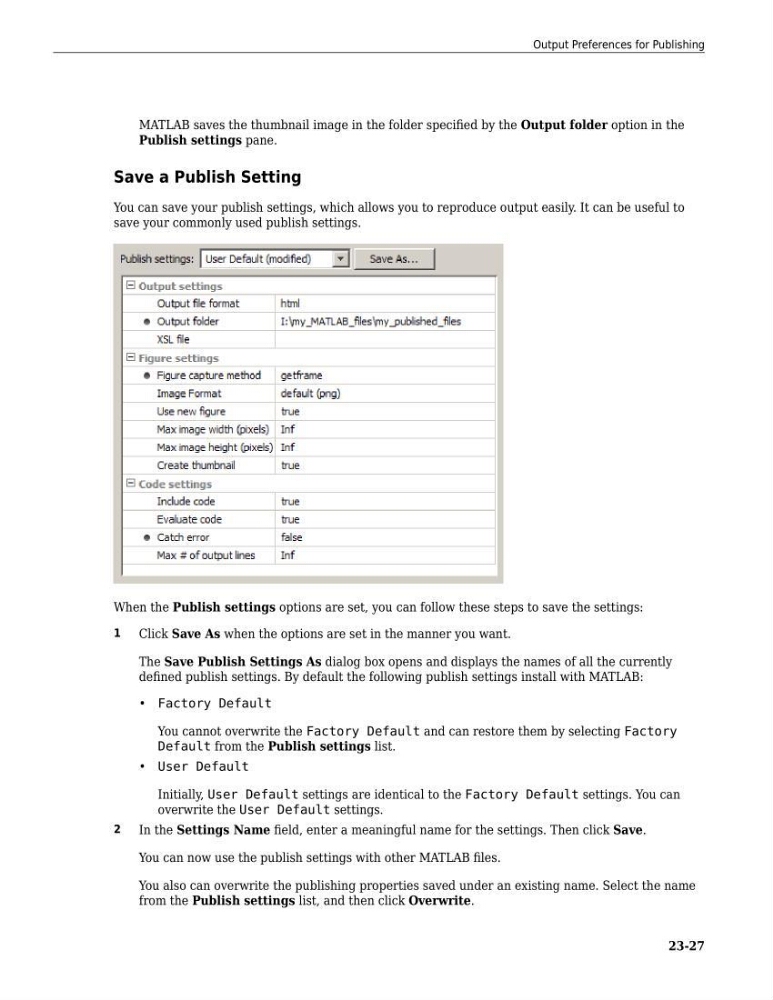
You can save your publish settings, which allows you to reproduce output easily. It can be useful to
save your commonly used publish settings.
When the Publish settings options are set, you can follow these steps to save the settings:
1
Click Save As when the options are set in the manner you want.
The Save Publish Settings As dialog box opens and displays the names of all the currently
defined publish settings. By default the following publish settings install with MATLAB:
• Factory Default
You cannot overwrite the Factory Default and can restore them by selecting Factory
Default from the Publish settings list.
• User Default
Initially, User Default settings are identical to the Factory Default settings. You can
overwrite the User Default settings.
2
In the Settings Name field, enter a meaningful name for the settings. Then click Save.
You can now use the publish settings with other MATLAB files.
You also can overwrite the publishing properties saved under an existing name. Select the name
from the Publish settings list, and then click Overwrite.
Output Preferences for Publishing
23-27
Publish settings pane.
Save a Publish Setting
You can save your publish settings, which allows you to reproduce output easily. It can be useful to
save your commonly used publish settings.
When the Publish settings options are set, you can follow these steps to save the settings:
1
Click Save As when the options are set in the manner you want.
The Save Publish Settings As dialog box opens and displays the names of all the currently
defined publish settings. By default the following publish settings install with MATLAB:
• Factory Default
You cannot overwrite the Factory Default and can restore them by selecting Factory
Default from the Publish settings list.
• User Default
Initially, User Default settings are identical to the Factory Default settings. You can
overwrite the User Default settings.
2
In the Settings Name field, enter a meaningful name for the settings. Then click Save.
You can now use the publish settings with other MATLAB files.
You also can overwrite the publishing properties saved under an existing name. Select the name
from the Publish settings list, and then click Overwrite.
Output Preferences for Publishing
23-27