

Result in Output
Example of Corresponding File Markup
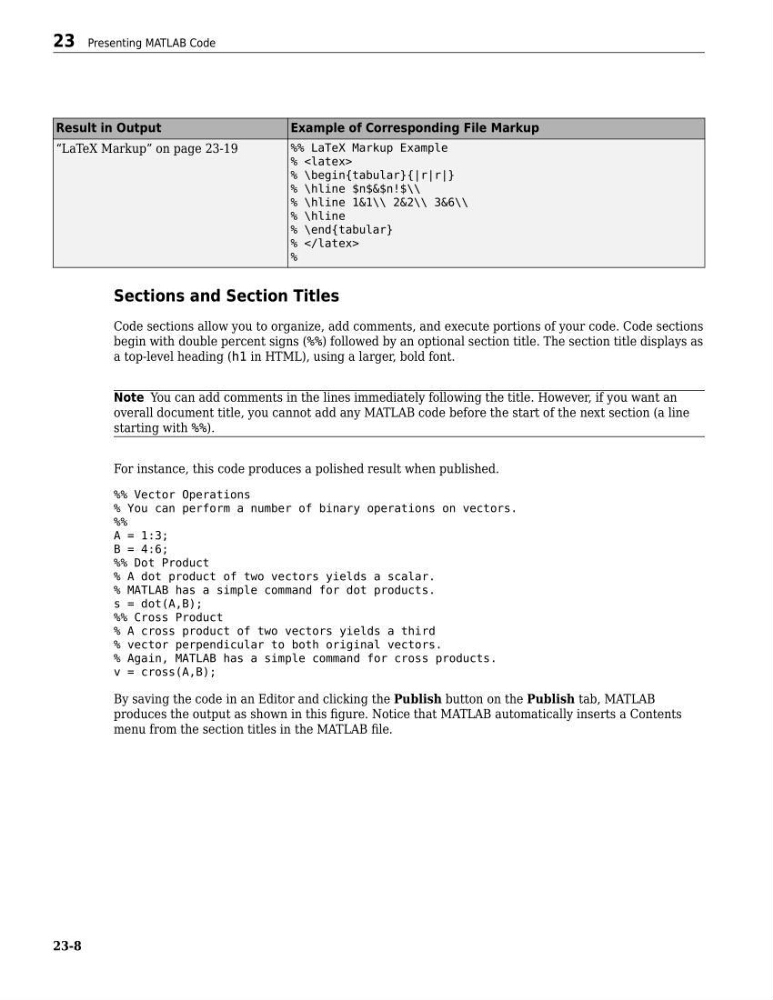
“LaTeX Markup” on page 23-19
%% LaTeX Markup Example
%
% \begin{tabular}{|r|r|}
% \hline $n$&$n!$\\
% \hline 1&1\\ 2&2\\ 3&6\\
% \hline
% \end{tabular}
%
%
Sections and Section Titles
Code sections allow you to organize, add comments, and execute portions of your code. Code sections
begin with double percent signs (%%) followed by an optional section title. The section title displays as
a top-level heading (h1 in HTML), using a larger, bold font.
Note You can add comments in the lines immediately following the title. However, if you want an
overall document title, you cannot add any MATLAB code before the start of the next section (a line
starting with %%).
For instance, this code produces a polished result when published.
%% Vector Operations
% You can perform a number of binary operations on vectors.
%%
A = 1:3;
B = 4:6;
%% Dot Product
% A dot product of two vectors yields a scalar.
% MATLAB has a simple command for dot products.
s = dot(A,B);
%% Cross Product
% A cross product of two vectors yields a third
% vector perpendicular to both original vectors.
% Again, MATLAB has a simple command for cross products.
v = cross(A,B);
By saving the code in an Editor and clicking the Publish button on the Publish tab, MATLAB
produces the output as shown in this figure. Notice that MATLAB automatically inserts a Contents
menu from the section titles in the MATLAB file.
23 Presenting MATLAB Code
23-8
Example of Corresponding File Markup
“LaTeX Markup” on page 23-19
%% LaTeX Markup Example
%
% \begin{tabular}{|r|r|}
% \hline $n$&$n!$\\
% \hline 1&1\\ 2&2\\ 3&6\\
% \hline
% \end{tabular}
%
%
Sections and Section Titles
Code sections allow you to organize, add comments, and execute portions of your code. Code sections
begin with double percent signs (%%) followed by an optional section title. The section title displays as
a top-level heading (h1 in HTML), using a larger, bold font.
Note You can add comments in the lines immediately following the title. However, if you want an
overall document title, you cannot add any MATLAB code before the start of the next section (a line
starting with %%).
For instance, this code produces a polished result when published.
%% Vector Operations
% You can perform a number of binary operations on vectors.
%%
A = 1:3;
B = 4:6;
%% Dot Product
% A dot product of two vectors yields a scalar.
% MATLAB has a simple command for dot products.
s = dot(A,B);
%% Cross Product
% A cross product of two vectors yields a third
% vector perpendicular to both original vectors.
% Again, MATLAB has a simple command for cross products.
v = cross(A,B);
By saving the code in an Editor and clicking the Publish button on the Publish tab, MATLAB
produces the output as shown in this figure. Notice that MATLAB automatically inserts a Contents
menu from the section titles in the MATLAB file.
23 Presenting MATLAB Code
23-8