

Accelerate Exploratory Programming Using the Live Editor
The following is an example of how to use the Live Editor to accelerate exploratory programming.
This example demonstrates how you can use the Live Editor to:
• See output together with the code that produced it.
• Divide your program into sections to evaluate blocks of code individually.
• Include visualizations.
• Experiment with parameter values using controls.
• Summarize and share your findings.
Load Highway Fatality Data
The Live Editor displays output together with the code that produced it. To run a section, go to the
Live Editor tab and select the Run Section button. You can also click the blue bar that appears
when you move your mouse to the left edge of a section.
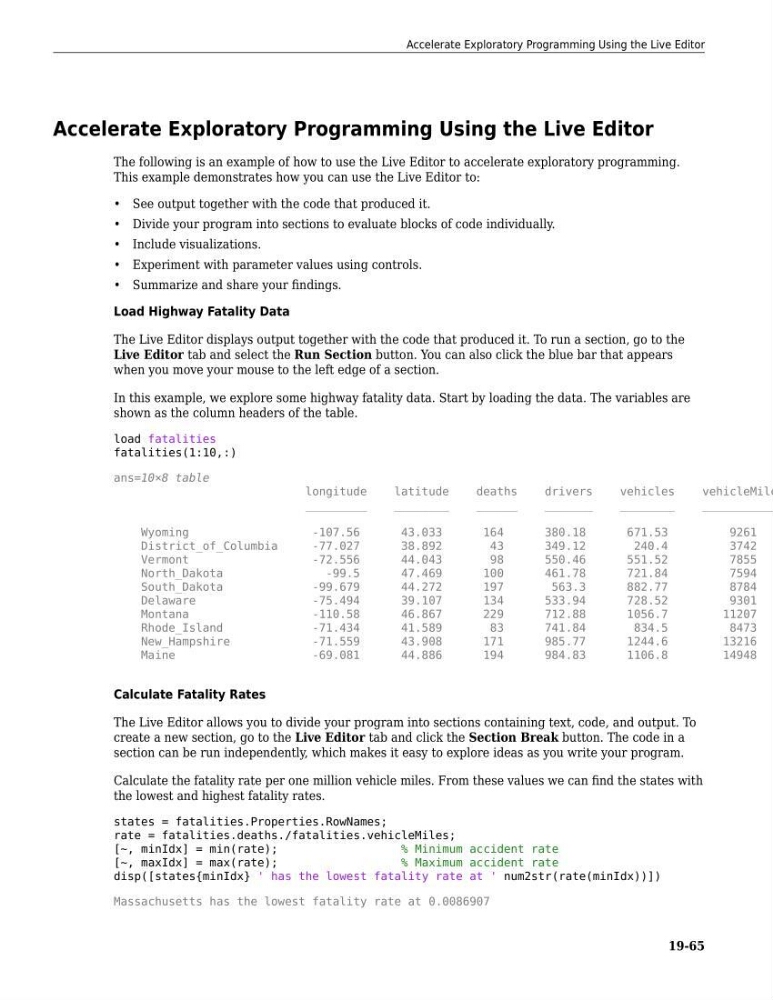
In this example, we explore some highway fatality data. Start by loading the data. The variables are
shown as the column headers of the table.
load fatalities
fatalities(1:10,:)
ans=10×8 table
longitude
latitude
deaths
drivers
vehicles
vehicleMile
_________
________
______
_______
________
___________
Wyoming
-107.56
43.033
164
380.18
671.53
9261
District_of_Columbia
-77.027
38.892
43
349.12
240.4
3742
Vermont
-72.556
44.043
98
550.46
551.52
7855
North_Dakota
-99.5
47.469
100
461.78
721.84
7594
South_Dakota
-99.679
44.272
197
563.3
882.77
8784
Delaware
-75.494
39.107
134
533.94
728.52
9301
Montana
-110.58
46.867
229
712.88
1056.7
11207
Rhode_Island
-71.434
41.589
83
741.84
834.5
8473
New_Hampshire
-71.559
43.908
171
985.77
1244.6
13216
Maine
-69.081
44.886
194
984.83
1106.8
14948
Calculate Fatality Rates
The Live Editor allows you to divide your program into sections containing text, code, and output. To
create a new section, go to the Live Editor tab and click the Section Break button. The code in a
section can be run independently, which makes it easy to explore ideas as you write your program.
Calculate the fatality rate per one million vehicle miles. From these values we can find the states with
the lowest and highest fatality rates.
states = fatalities.Properties.RowNames;
rate = fatalities.deaths./fatalities.vehicleMiles;
[~, minIdx] = min(rate);
% Minimum accident rate
[~, maxIdx] = max(rate);
% Maximum accident rate
disp([states{minIdx} ' has the lowest fatality rate at ' num2str(rate(minIdx))])
Massachusetts has the lowest fatality rate at 0.0086907
Accelerate Exploratory Programming Using the Live Editor
19-65
The following is an example of how to use the Live Editor to accelerate exploratory programming.
This example demonstrates how you can use the Live Editor to:
• See output together with the code that produced it.
• Divide your program into sections to evaluate blocks of code individually.
• Include visualizations.
• Experiment with parameter values using controls.
• Summarize and share your findings.
Load Highway Fatality Data
The Live Editor displays output together with the code that produced it. To run a section, go to the
Live Editor tab and select the Run Section button. You can also click the blue bar that appears
when you move your mouse to the left edge of a section.
In this example, we explore some highway fatality data. Start by loading the data. The variables are
shown as the column headers of the table.
load fatalities
fatalities(1:10,:)
ans=10×8 table
longitude
latitude
deaths
drivers
vehicles
vehicleMile
_________
________
______
_______
________
___________
Wyoming
-107.56
43.033
164
380.18
671.53
9261
District_of_Columbia
-77.027
38.892
43
349.12
240.4
3742
Vermont
-72.556
44.043
98
550.46
551.52
7855
North_Dakota
-99.5
47.469
100
461.78
721.84
7594
South_Dakota
-99.679
44.272
197
563.3
882.77
8784
Delaware
-75.494
39.107
134
533.94
728.52
9301
Montana
-110.58
46.867
229
712.88
1056.7
11207
Rhode_Island
-71.434
41.589
83
741.84
834.5
8473
New_Hampshire
-71.559
43.908
171
985.77
1244.6
13216
Maine
-69.081
44.886
194
984.83
1106.8
14948
Calculate Fatality Rates
The Live Editor allows you to divide your program into sections containing text, code, and output. To
create a new section, go to the Live Editor tab and click the Section Break button. The code in a
section can be run independently, which makes it easy to explore ideas as you write your program.
Calculate the fatality rate per one million vehicle miles. From these values we can find the states with
the lowest and highest fatality rates.
states = fatalities.Properties.RowNames;
rate = fatalities.deaths./fatalities.vehicleMiles;
[~, minIdx] = min(rate);
% Minimum accident rate
[~, maxIdx] = max(rate);
% Maximum accident rate
disp([states{minIdx} ' has the lowest fatality rate at ' num2str(rate(minIdx))])
Massachusetts has the lowest fatality rate at 0.0086907
Accelerate Exploratory Programming Using the Live Editor
19-65