

Add Help
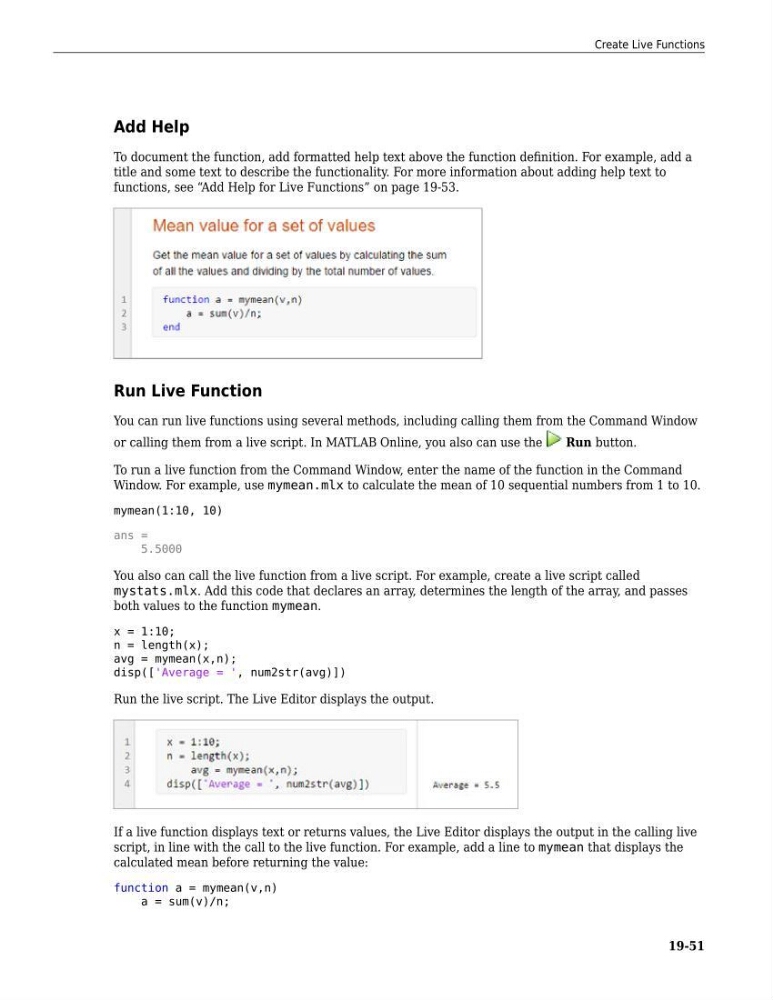
To document the function, add formatted help text above the function definition. For example, add a
title and some text to describe the functionality. For more information about adding help text to
functions, see “Add Help for Live Functions” on page 19-53.
Run Live Function
You can run live functions using several methods, including calling them from the Command Window
or calling them from a live script. In MATLAB Online, you also can use the
Run button.
To run a live function from the Command Window, enter the name of the function in the Command
Window. For example, use mymean.mlx to calculate the mean of 10 sequential numbers from 1 to 10.
mymean(1:10, 10)
ans =
5.5000
You also can call the live function from a live script. For example, create a live script called
mystats.mlx. Add this code that declares an array, determines the length of the array, and passes
both values to the function mymean.
x = 1:10;
n = length(x);
avg = mymean(x,n);
disp(['Average = ', num2str(avg)])
Run the live script. The Live Editor displays the output.
If a live function displays text or returns values, the Live Editor displays the output in the calling live
script, in line with the call to the live function. For example, add a line to mymean that displays the
calculated mean before returning the value:
function a = mymean(v,n)
a = sum(v)/n;
Create Live Functions
19-51
To document the function, add formatted help text above the function definition. For example, add a
title and some text to describe the functionality. For more information about adding help text to
functions, see “Add Help for Live Functions” on page 19-53.
Run Live Function
You can run live functions using several methods, including calling them from the Command Window
or calling them from a live script. In MATLAB Online, you also can use the
Run button.
To run a live function from the Command Window, enter the name of the function in the Command
Window. For example, use mymean.mlx to calculate the mean of 10 sequential numbers from 1 to 10.
mymean(1:10, 10)
ans =
5.5000
You also can call the live function from a live script. For example, create a live script called
mystats.mlx. Add this code that declares an array, determines the length of the array, and passes
both values to the function mymean.
x = 1:10;
n = length(x);
avg = mymean(x,n);
disp(['Average = ', num2str(avg)])
Run the live script. The Live Editor displays the output.
If a live function displays text or returns values, the Live Editor displays the output in the calling live
script, in line with the call to the live function. For example, add a line to mymean that displays the
calculated mean before returning the value:
function a = mymean(v,n)
a = sum(v)/n;
Create Live Functions
19-51