

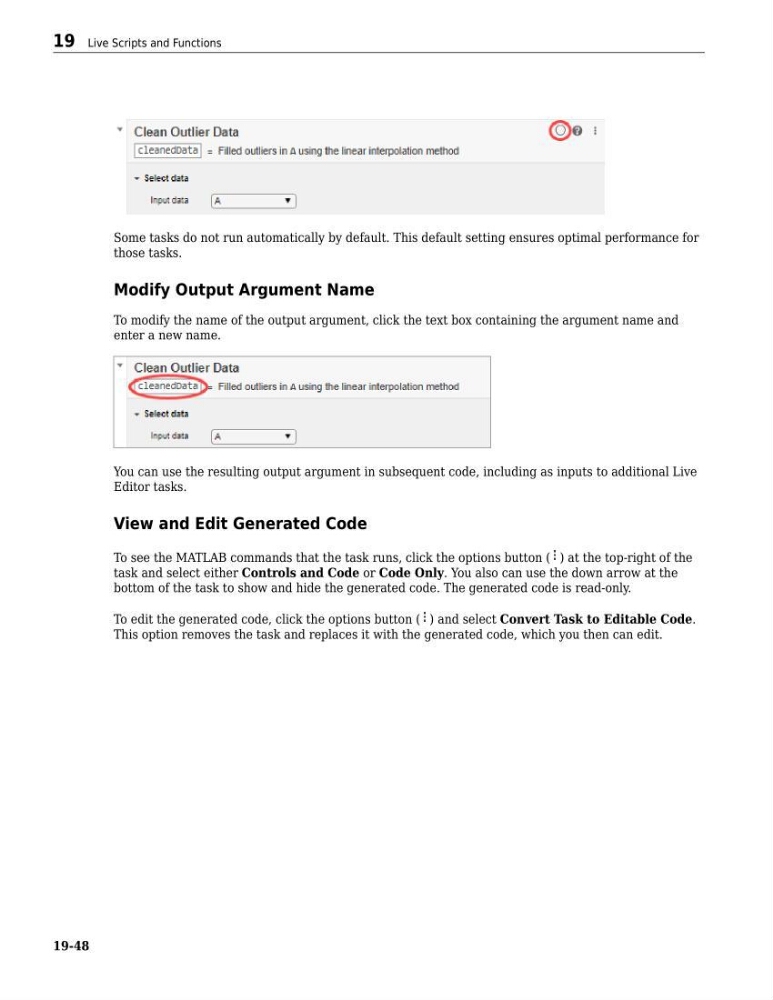
Some tasks do not run automatically by default. This default setting ensures optimal performance for
those tasks.
Modify Output Argument Name
To modify the name of the output argument, click the text box containing the argument name and
enter a new name.
You can use the resulting output argument in subsequent code, including as inputs to additional Live
Editor tasks.
View and Edit Generated Code
To see the MATLAB commands that the task runs, click the options button ( ) at the top-right of the
task and select either Controls and Code or Code Only. You also can use the down arrow at the
bottom of the task to show and hide the generated code. The generated code is read-only.
To edit the generated code, click the options button ( ) and select Convert Task to Editable Code.
This option removes the task and replaces it with the generated code, which you then can edit.
19 Live Scripts and Functions
19-48
those tasks.
Modify Output Argument Name
To modify the name of the output argument, click the text box containing the argument name and
enter a new name.
You can use the resulting output argument in subsequent code, including as inputs to additional Live
Editor tasks.
View and Edit Generated Code
To see the MATLAB commands that the task runs, click the options button ( ) at the top-right of the
task and select either Controls and Code or Code Only. You also can use the down arrow at the
bottom of the task to show and hide the generated code. The generated code is read-only.
To edit the generated code, click the options button ( ) and select Convert Task to Editable Code.
This option removes the task and replaces it with the generated code, which you then can edit.
19 Live Scripts and Functions
19-48