

Format Text
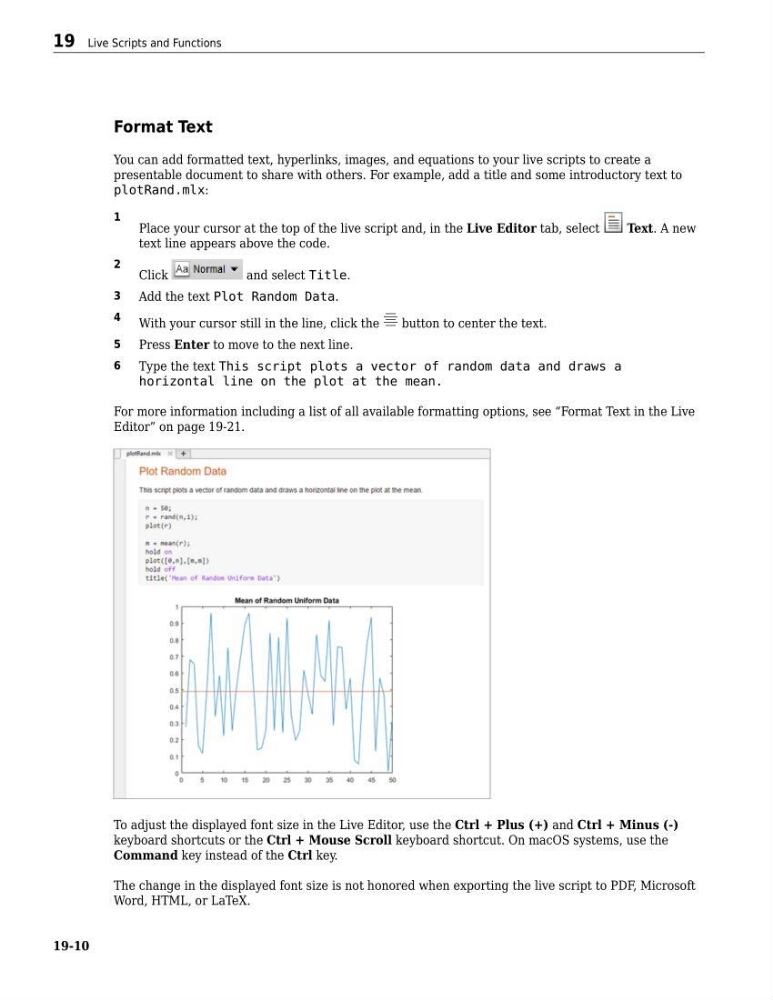
You can add formatted text, hyperlinks, images, and equations to your live scripts to create a
presentable document to share with others. For example, add a title and some introductory text to
plotRand.mlx:
1
Place your cursor at the top of the live script and, in the Live Editor tab, select
Text. A new
text line appears above the code.
2
Click
and select Title.
3
Add the text Plot Random Data.
4
With your cursor still in the line, click the
button to center the text.
5
Press Enter to move to the next line.
6
Type the text This script plots a vector of random data and draws a
horizontal line on the plot at the mean.
For more information including a list of all available formatting options, see “Format Text in the Live
Editor” on page 19-21.
To adjust the displayed font size in the Live Editor, use the Ctrl + Plus (+) and Ctrl + Minus (-)
keyboard shortcuts or the Ctrl + Mouse Scroll keyboard shortcut. On macOS systems, use the
Command key instead of the Ctrl key.
The change in the displayed font size is not honored when exporting the live script to PDF, Microsoft
Word, HTML, or LaTeX.
19 Live Scripts and Functions
19-10
You can add formatted text, hyperlinks, images, and equations to your live scripts to create a
presentable document to share with others. For example, add a title and some introductory text to
plotRand.mlx:
1
Place your cursor at the top of the live script and, in the Live Editor tab, select
Text. A new
text line appears above the code.
2
Click
and select Title.
3
Add the text Plot Random Data.
4
With your cursor still in the line, click the
button to center the text.
5
Press Enter to move to the next line.
6
Type the text This script plots a vector of random data and draws a
horizontal line on the plot at the mean.
For more information including a list of all available formatting options, see “Format Text in the Live
Editor” on page 19-21.
To adjust the displayed font size in the Live Editor, use the Ctrl + Plus (+) and Ctrl + Minus (-)
keyboard shortcuts or the Ctrl + Mouse Scroll keyboard shortcut. On macOS systems, use the
Command key instead of the Ctrl key.
The change in the displayed font size is not honored when exporting the live script to PDF, Microsoft
Word, HTML, or LaTeX.
19 Live Scripts and Functions
19-10