

Operation
Instructions
Run to a specific line of code
and pause.
Click the
Run to Here button to the left of the line. If the selected
line cannot be reached, MATLAB continues running until the end of
the file is reached or a breakpoint is encountered.
In the Editor, the
Run to Here button is available only for code
that has been saved. In the Live Editor, the
Run to Here button is
available for all code, whether it is saved or not. In functions and
classes, the
Run to Here button is available only when evaluation
is paused.
For more information, see “Debug MATLAB Code Files” on page 222.
Increment Values in Sections
You can increment numeric values within a section, rerunning that section after every change. This
helps you fine-tune and experiment with your code.
To increment a numeric value within a section, use controls in the Live Editor. For example, this code
calculates the factorial of the variable x.
x = 5;
y = factorial(x)
y =
120
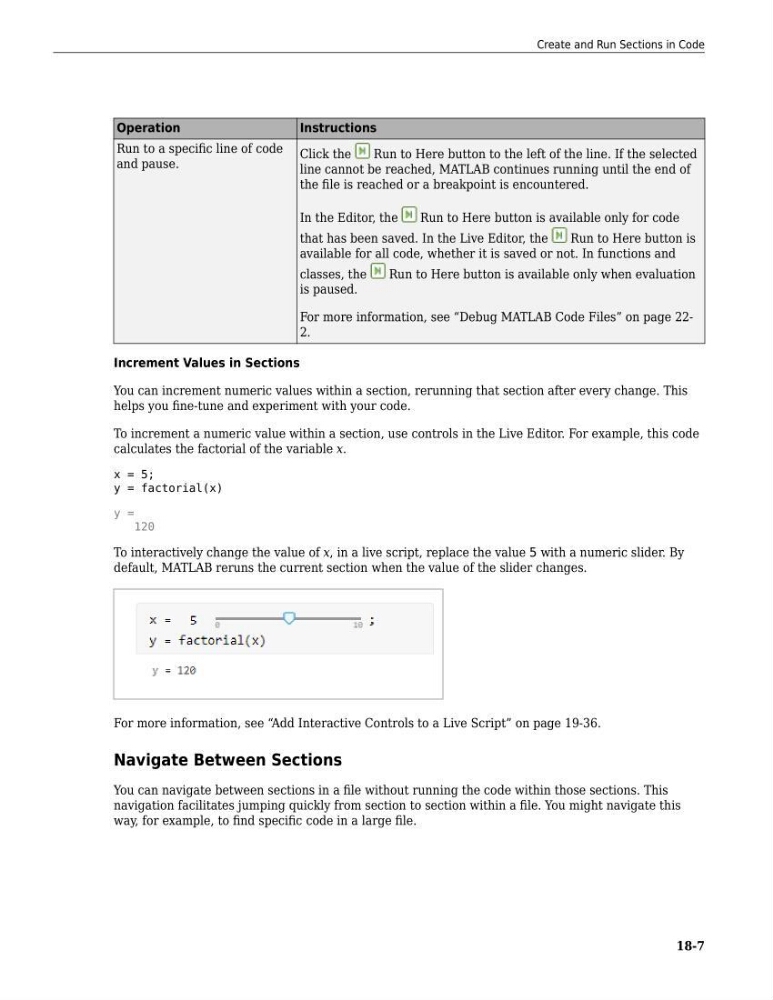
To interactively change the value of x, in a live script, replace the value 5 with a numeric slider. By
default, MATLAB reruns the current section when the value of the slider changes.
For more information, see “Add Interactive Controls to a Live Script” on page 19-36.
Navigate Between Sections
You can navigate between sections in a file without running the code within those sections. This
navigation facilitates jumping quickly from section to section within a file. You might navigate this
way, for example, to find specific code in a large file.
Create and Run Sections in Code
18-7
Instructions
Run to a specific line of code
and pause.
Click the
Run to Here button to the left of the line. If the selected
line cannot be reached, MATLAB continues running until the end of
the file is reached or a breakpoint is encountered.
In the Editor, the
Run to Here button is available only for code
that has been saved. In the Live Editor, the
Run to Here button is
available for all code, whether it is saved or not. In functions and
classes, the
Run to Here button is available only when evaluation
is paused.
For more information, see “Debug MATLAB Code Files” on page 222.
Increment Values in Sections
You can increment numeric values within a section, rerunning that section after every change. This
helps you fine-tune and experiment with your code.
To increment a numeric value within a section, use controls in the Live Editor. For example, this code
calculates the factorial of the variable x.
x = 5;
y = factorial(x)
y =
120
To interactively change the value of x, in a live script, replace the value 5 with a numeric slider. By
default, MATLAB reruns the current section when the value of the slider changes.
For more information, see “Add Interactive Controls to a Live Script” on page 19-36.
Navigate Between Sections
You can navigate between sections in a file without running the code within those sections. This
navigation facilitates jumping quickly from section to section within a file. You might navigate this
way, for example, to find specific code in a large file.
Create and Run Sections in Code
18-7