

Ways to Organize Data in Structure Arrays
There are at least two ways you can organize data in a structure array: plane organization and
element-by-element organization. The method that best fits your data depends on how you plan to
access the data, and, for very large data sets, whether you have system memory constraints.
Plane organization allows easier access to all values within a field. Element-by-element organization
allows easier access to all information related to a single element or record. The following sections
include an example of each type of organization:
• “Plane Organization” on page 11-15
• “Element-by-Element Organization” on page 11-16
When you create a structure array, MATLAB stores information about each element and field in the
array header. As a result, structures with more elements and fields require more memory than
simpler structures that contain the same data.
Plane Organization
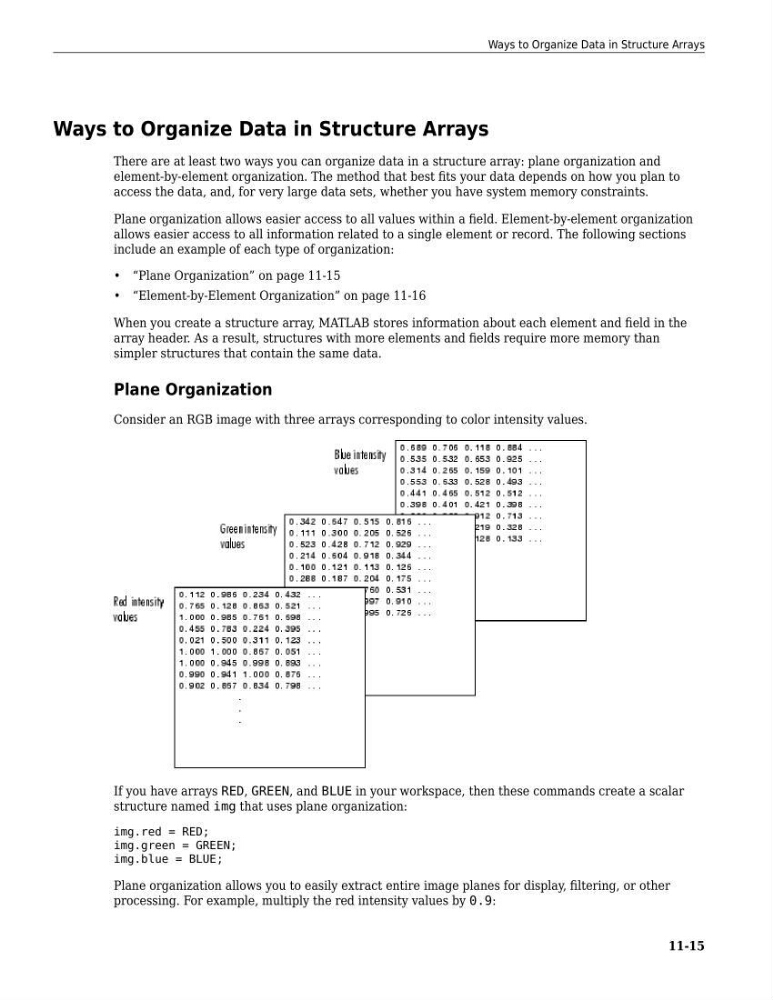
Consider an RGB image with three arrays corresponding to color intensity values.
If you have arrays RED, GREEN, and BLUE in your workspace, then these commands create a scalar
structure named img that uses plane organization:
img.red = RED;
img.green = GREEN;
img.blue = BLUE;
Plane organization allows you to easily extract entire image planes for display, filtering, or other
processing. For example, multiply the red intensity values by 0.9:
Ways to Organize Data in Structure Arrays
11-15
There are at least two ways you can organize data in a structure array: plane organization and
element-by-element organization. The method that best fits your data depends on how you plan to
access the data, and, for very large data sets, whether you have system memory constraints.
Plane organization allows easier access to all values within a field. Element-by-element organization
allows easier access to all information related to a single element or record. The following sections
include an example of each type of organization:
• “Plane Organization” on page 11-15
• “Element-by-Element Organization” on page 11-16
When you create a structure array, MATLAB stores information about each element and field in the
array header. As a result, structures with more elements and fields require more memory than
simpler structures that contain the same data.
Plane Organization
Consider an RGB image with three arrays corresponding to color intensity values.
If you have arrays RED, GREEN, and BLUE in your workspace, then these commands create a scalar
structure named img that uses plane organization:
img.red = RED;
img.green = GREEN;
img.blue = BLUE;
Plane organization allows you to easily extract entire image planes for display, filtering, or other
processing. For example, multiply the red intensity values by 0.9:
Ways to Organize Data in Structure Arrays
11-15