

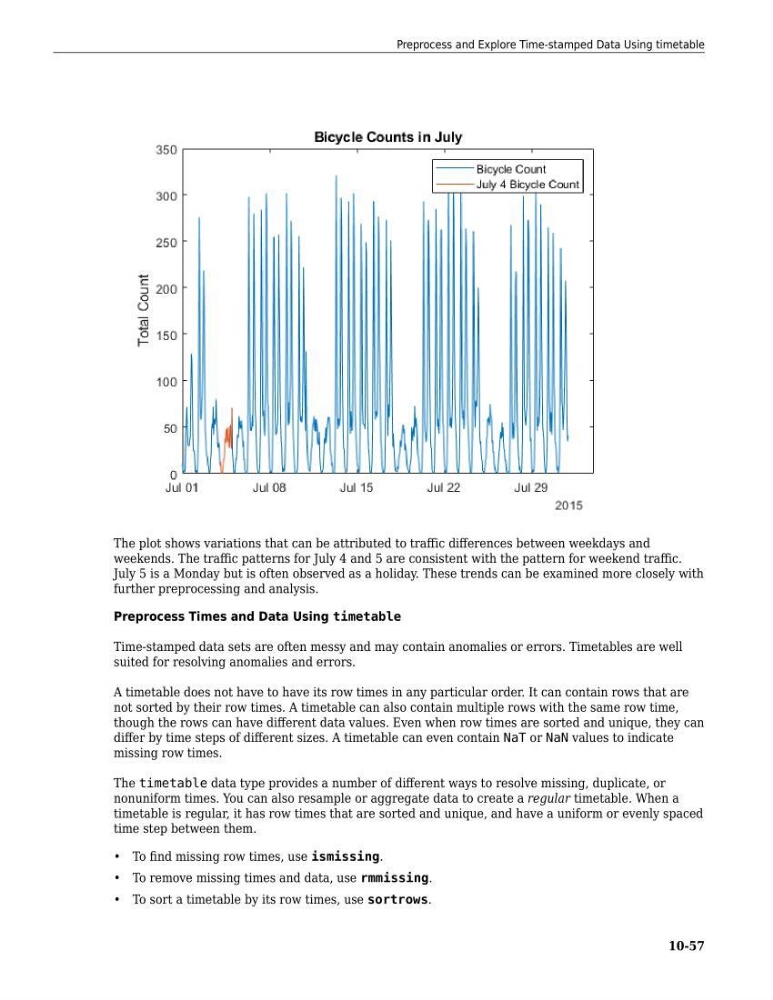
The plot shows variations that can be attributed to traffic differences between weekdays and
weekends. The traffic patterns for July 4 and 5 are consistent with the pattern for weekend traffic.
July 5 is a Monday but is often observed as a holiday. These trends can be examined more closely with
further preprocessing and analysis.
Preprocess Times and Data Using timetable
Time-stamped data sets are often messy and may contain anomalies or errors. Timetables are well
suited for resolving anomalies and errors.
A timetable does not have to have its row times in any particular order. It can contain rows that are
not sorted by their row times. A timetable can also contain multiple rows with the same row time,
though the rows can have different data values. Even when row times are sorted and unique, they can
differ by time steps of different sizes. A timetable can even contain NaT or NaN values to indicate
missing row times.
The timetable data type provides a number of different ways to resolve missing, duplicate, or
nonuniform times. You can also resample or aggregate data to create a regular timetable. When a
timetable is regular, it has row times that are sorted and unique, and have a uniform or evenly spaced
time step between them.
• To find missing row times, use ismissing.
• To remove missing times and data, use rmmissing.
• To sort a timetable by its row times, use sortrows.
Preprocess and Explore Time-stamped Data Using timetable
10-57
weekends. The traffic patterns for July 4 and 5 are consistent with the pattern for weekend traffic.
July 5 is a Monday but is often observed as a holiday. These trends can be examined more closely with
further preprocessing and analysis.
Preprocess Times and Data Using timetable
Time-stamped data sets are often messy and may contain anomalies or errors. Timetables are well
suited for resolving anomalies and errors.
A timetable does not have to have its row times in any particular order. It can contain rows that are
not sorted by their row times. A timetable can also contain multiple rows with the same row time,
though the rows can have different data values. Even when row times are sorted and unique, they can
differ by time steps of different sizes. A timetable can even contain NaT or NaN values to indicate
missing row times.
The timetable data type provides a number of different ways to resolve missing, duplicate, or
nonuniform times. You can also resample or aggregate data to create a regular timetable. When a
timetable is regular, it has row times that are sorted and unique, and have a uniform or evenly spaced
time step between them.
• To find missing row times, use ismissing.
• To remove missing times and data, use rmmissing.
• To sort a timetable by its row times, use sortrows.
Preprocess and Explore Time-stamped Data Using timetable
10-57