

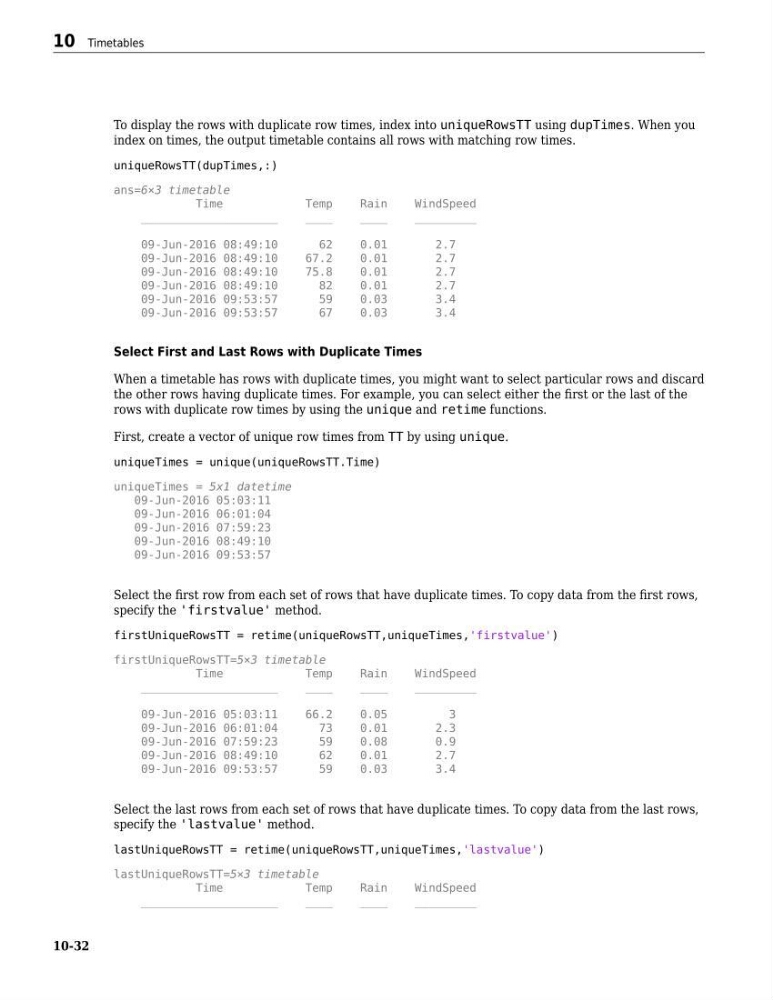
To display the rows with duplicate row times, index into uniqueRowsTT using dupTimes. When you
index on times, the output timetable contains all rows with matching row times.
uniqueRowsTT(dupTimes,:)
ans=6×3 timetable
Time
Temp
Rain
WindSpeed
____________________
____
____
_________
09-Jun-2016 08:49:10
62
0.01
2.7
09-Jun-2016 08:49:10
67.2
0.01
2.7
09-Jun-2016 08:49:10
75.8
0.01
2.7
09-Jun-2016 08:49:10
82
0.01
2.7
09-Jun-2016 09:53:57
59
0.03
3.4
09-Jun-2016 09:53:57
67
0.03
3.4
Select First and Last Rows with Duplicate Times
When a timetable has rows with duplicate times, you might want to select particular rows and discard
the other rows having duplicate times. For example, you can select either the first or the last of the
rows with duplicate row times by using the unique and retime functions.
First, create a vector of unique row times from TT by using unique.
uniqueTimes = unique(uniqueRowsTT.Time)
uniqueTimes = 5x1 datetime
09-Jun-2016 05:03:11
09-Jun-2016 06:01:04
09-Jun-2016 07:59:23
09-Jun-2016 08:49:10
09-Jun-2016 09:53:57
Select the first row from each set of rows that have duplicate times. To copy data from the first rows,
specify the 'firstvalue' method.
firstUniqueRowsTT = retime(uniqueRowsTT,uniqueTimes,'firstvalue')
firstUniqueRowsTT=5×3 timetable
Time
Temp
Rain
WindSpeed
____________________
____
____
_________
09-Jun-2016 05:03:11
66.2
0.05
3
09-Jun-2016 06:01:04
73
0.01
2.3
09-Jun-2016 07:59:23
59
0.08
0.9
09-Jun-2016 08:49:10
62
0.01
2.7
09-Jun-2016 09:53:57
59
0.03
3.4
Select the last rows from each set of rows that have duplicate times. To copy data from the last rows,
specify the 'lastvalue' method.
lastUniqueRowsTT = retime(uniqueRowsTT,uniqueTimes,'lastvalue')
lastUniqueRowsTT=5×3 timetable
Time
Temp
Rain
WindSpeed
____________________
____
____
_________
10 Timetables
10-32
index on times, the output timetable contains all rows with matching row times.
uniqueRowsTT(dupTimes,:)
ans=6×3 timetable
Time
Temp
Rain
WindSpeed
____________________
____
____
_________
09-Jun-2016 08:49:10
62
0.01
2.7
09-Jun-2016 08:49:10
67.2
0.01
2.7
09-Jun-2016 08:49:10
75.8
0.01
2.7
09-Jun-2016 08:49:10
82
0.01
2.7
09-Jun-2016 09:53:57
59
0.03
3.4
09-Jun-2016 09:53:57
67
0.03
3.4
Select First and Last Rows with Duplicate Times
When a timetable has rows with duplicate times, you might want to select particular rows and discard
the other rows having duplicate times. For example, you can select either the first or the last of the
rows with duplicate row times by using the unique and retime functions.
First, create a vector of unique row times from TT by using unique.
uniqueTimes = unique(uniqueRowsTT.Time)
uniqueTimes = 5x1 datetime
09-Jun-2016 05:03:11
09-Jun-2016 06:01:04
09-Jun-2016 07:59:23
09-Jun-2016 08:49:10
09-Jun-2016 09:53:57
Select the first row from each set of rows that have duplicate times. To copy data from the first rows,
specify the 'firstvalue' method.
firstUniqueRowsTT = retime(uniqueRowsTT,uniqueTimes,'firstvalue')
firstUniqueRowsTT=5×3 timetable
Time
Temp
Rain
WindSpeed
____________________
____
____
_________
09-Jun-2016 05:03:11
66.2
0.05
3
09-Jun-2016 06:01:04
73
0.01
2.3
09-Jun-2016 07:59:23
59
0.08
0.9
09-Jun-2016 08:49:10
62
0.01
2.7
09-Jun-2016 09:53:57
59
0.03
3.4
Select the last rows from each set of rows that have duplicate times. To copy data from the last rows,
specify the 'lastvalue' method.
lastUniqueRowsTT = retime(uniqueRowsTT,uniqueTimes,'lastvalue')
lastUniqueRowsTT=5×3 timetable
Time
Temp
Rain
WindSpeed
____________________
____
____
_________
10 Timetables
10-32