

09-Jun-2016 06:01:04
73
0.01
2.3
09-Jun-2016 07:59:23
59
0.08
0.9
09-Jun-2016 09:53:57
59
0.03
3.4
09-Jun-2016 09:53:57
67
0.03
3.4
09-Jun-2016 09:53:57
67
0.03
3.4
09-Jun-2016 08:49:10
62
0.01
2.7
09-Jun-2016 08:49:10
75.8
0.01
2.7
09-Jun-2016 08:49:10
82
0.01
2.7
09-Jun-2016 05:03:11
66.2
0.05
3
09-Jun-2016 08:49:10
67.2
0.01
2.7
09-Jun-2016 04:12:00
58.8
NaN
NaN
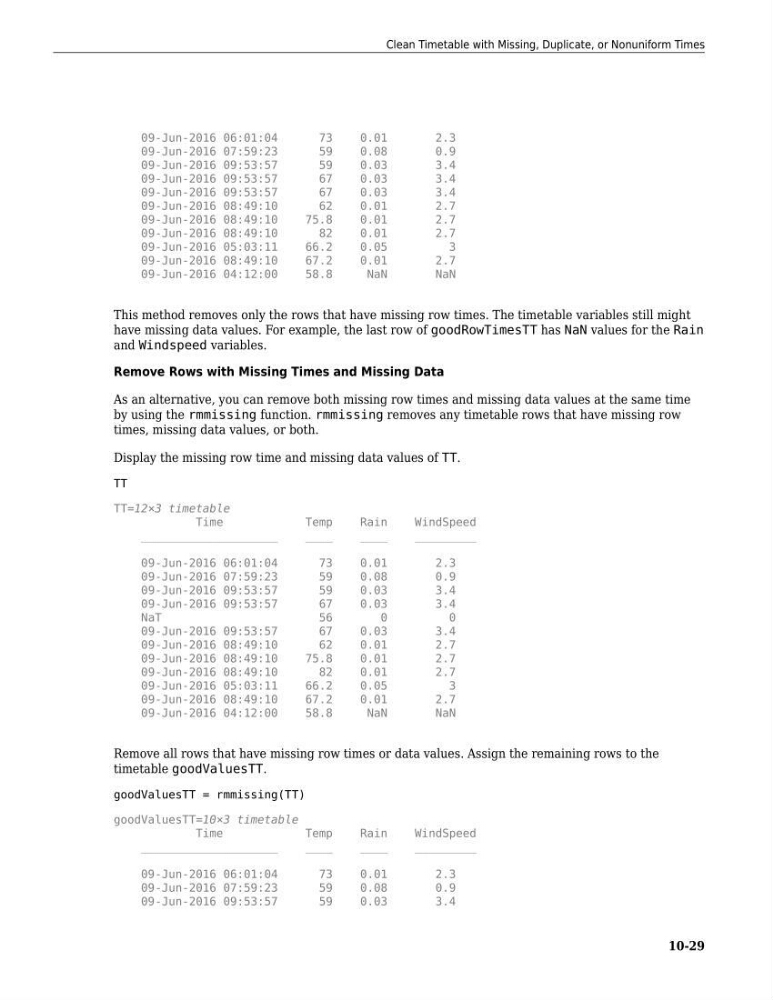
This method removes only the rows that have missing row times. The timetable variables still might
have missing data values. For example, the last row of goodRowTimesTT has NaN values for the Rain
and Windspeed variables.
Remove Rows with Missing Times and Missing Data
As an alternative, you can remove both missing row times and missing data values at the same time
by using the rmmissing function. rmmissing removes any timetable rows that have missing row
times, missing data values, or both.
Display the missing row time and missing data values of TT.
TT
TT=12×3 timetable
Time
Temp
Rain
WindSpeed
____________________
____
____
_________
09-Jun-2016 06:01:04
73
0.01
2.3
09-Jun-2016 07:59:23
59
0.08
0.9
09-Jun-2016 09:53:57
59
0.03
3.4
09-Jun-2016 09:53:57
67
0.03
3.4
NaT
56
0
0
09-Jun-2016 09:53:57
67
0.03
3.4
09-Jun-2016 08:49:10
62
0.01
2.7
09-Jun-2016 08:49:10
75.8
0.01
2.7
09-Jun-2016 08:49:10
82
0.01
2.7
09-Jun-2016 05:03:11
66.2
0.05
3
09-Jun-2016 08:49:10
67.2
0.01
2.7
09-Jun-2016 04:12:00
58.8
NaN
NaN
Remove all rows that have missing row times or data values. Assign the remaining rows to the
timetable goodValuesTT.
goodValuesTT = rmmissing(TT)
goodValuesTT=10×3 timetable
Time
Temp
Rain
WindSpeed
____________________
____
____
_________
09-Jun-2016 06:01:04
73
0.01
2.3
09-Jun-2016 07:59:23
59
0.08
0.9
09-Jun-2016 09:53:57
59
0.03
3.4
Clean Timetable with Missing, Duplicate, or Nonuniform Times
10-29
73
0.01
2.3
09-Jun-2016 07:59:23
59
0.08
0.9
09-Jun-2016 09:53:57
59
0.03
3.4
09-Jun-2016 09:53:57
67
0.03
3.4
09-Jun-2016 09:53:57
67
0.03
3.4
09-Jun-2016 08:49:10
62
0.01
2.7
09-Jun-2016 08:49:10
75.8
0.01
2.7
09-Jun-2016 08:49:10
82
0.01
2.7
09-Jun-2016 05:03:11
66.2
0.05
3
09-Jun-2016 08:49:10
67.2
0.01
2.7
09-Jun-2016 04:12:00
58.8
NaN
NaN
This method removes only the rows that have missing row times. The timetable variables still might
have missing data values. For example, the last row of goodRowTimesTT has NaN values for the Rain
and Windspeed variables.
Remove Rows with Missing Times and Missing Data
As an alternative, you can remove both missing row times and missing data values at the same time
by using the rmmissing function. rmmissing removes any timetable rows that have missing row
times, missing data values, or both.
Display the missing row time and missing data values of TT.
TT
TT=12×3 timetable
Time
Temp
Rain
WindSpeed
____________________
____
____
_________
09-Jun-2016 06:01:04
73
0.01
2.3
09-Jun-2016 07:59:23
59
0.08
0.9
09-Jun-2016 09:53:57
59
0.03
3.4
09-Jun-2016 09:53:57
67
0.03
3.4
NaT
56
0
0
09-Jun-2016 09:53:57
67
0.03
3.4
09-Jun-2016 08:49:10
62
0.01
2.7
09-Jun-2016 08:49:10
75.8
0.01
2.7
09-Jun-2016 08:49:10
82
0.01
2.7
09-Jun-2016 05:03:11
66.2
0.05
3
09-Jun-2016 08:49:10
67.2
0.01
2.7
09-Jun-2016 04:12:00
58.8
NaN
NaN
Remove all rows that have missing row times or data values. Assign the remaining rows to the
timetable goodValuesTT.
goodValuesTT = rmmissing(TT)
goodValuesTT=10×3 timetable
Time
Temp
Rain
WindSpeed
____________________
____
____
_________
09-Jun-2016 06:01:04
73
0.01
2.3
09-Jun-2016 07:59:23
59
0.08
0.9
09-Jun-2016 09:53:57
59
0.03
3.4
Clean Timetable with Missing, Duplicate, or Nonuniform Times
10-29