

BothStations=7×5 timetable
Date
Tmax
Tmin
PrecipTotal
WXEvent
Pressure
___________
____
______
___________
___________
________
04-May-2017
60
44
0.2
Hail
995
05-May-2017
62
45
0
None
1003
06-May-2017
60
43.333
0
1013
07-May-2017
58
41.667
0
1018
08-May-2017
56
40
0
None
1006
09-May-2017
59
42
0.15
Thunder
NaN
10-May-2017
60
45
0
None
NaN
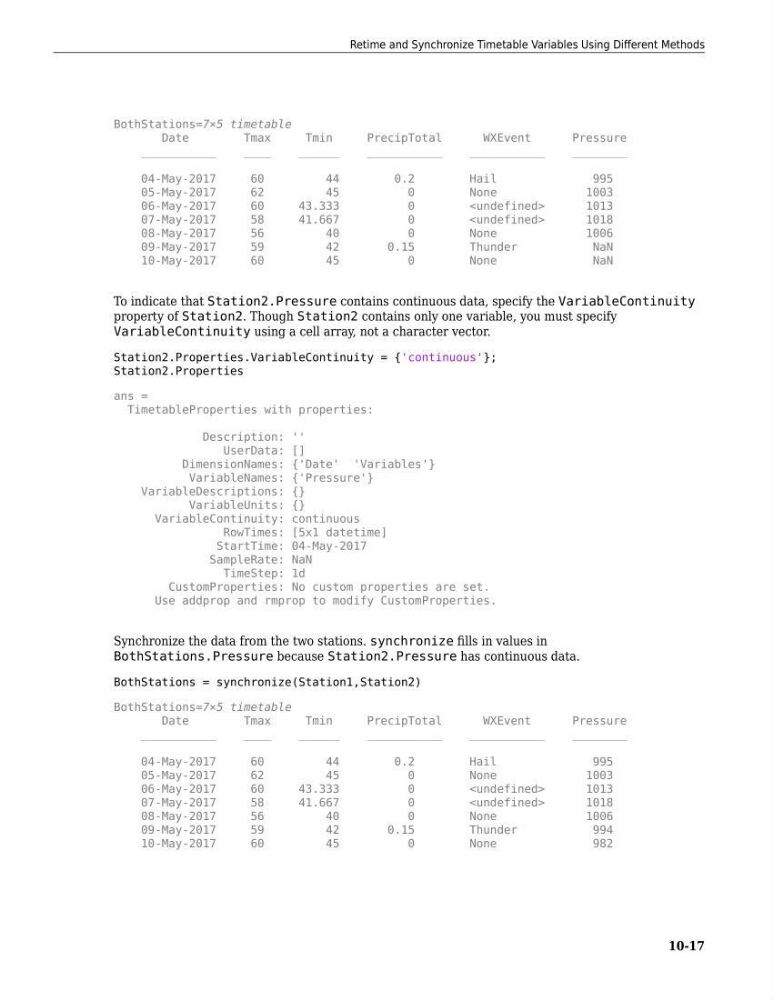
To indicate that Station2.Pressure contains continuous data, specify the VariableContinuity
property of Station2. Though Station2 contains only one variable, you must specify
VariableContinuity using a cell array, not a character vector.
Station2.Properties.VariableContinuity = {'continuous'};
Station2.Properties
ans =
TimetableProperties with properties:
Description: ''
UserData: []
DimensionNames: {'Date' 'Variables'}
VariableNames: {'Pressure'}
VariableDescriptions: {}
VariableUnits: {}
VariableContinuity: continuous
RowTimes: [5x1 datetime]
StartTime: 04-May-2017
SampleRate: NaN
TimeStep: 1d
CustomProperties: No custom properties are set.
Use addprop and rmprop to modify CustomProperties.
Synchronize the data from the two stations. synchronize fills in values in
BothStations.Pressure because Station2.Pressure has continuous data.
BothStations = synchronize(Station1,Station2)
BothStations=7×5 timetable
Date
Tmax
Tmin
PrecipTotal
WXEvent
Pressure
___________
____
______
___________
___________
________
04-May-2017
60
44
0.2
Hail
995
05-May-2017
62
45
0
None
1003
06-May-2017
60
43.333
0
1013
07-May-2017
58
41.667
0
1018
08-May-2017
56
40
0
None
1006
09-May-2017
59
42
0.15
Thunder
994
10-May-2017
60
45
0
None
982
Retime and Synchronize Timetable Variables Using Different Methods
10-17
Date
Tmax
Tmin
PrecipTotal
WXEvent
Pressure
___________
____
______
___________
___________
________
04-May-2017
60
44
0.2
Hail
995
05-May-2017
62
45
0
None
1003
06-May-2017
60
43.333
0
1013
07-May-2017
58
41.667
0
1018
08-May-2017
56
40
0
None
1006
09-May-2017
59
42
0.15
Thunder
NaN
10-May-2017
60
45
0
None
NaN
To indicate that Station2.Pressure contains continuous data, specify the VariableContinuity
property of Station2. Though Station2 contains only one variable, you must specify
VariableContinuity using a cell array, not a character vector.
Station2.Properties.VariableContinuity = {'continuous'};
Station2.Properties
ans =
TimetableProperties with properties:
Description: ''
UserData: []
DimensionNames: {'Date' 'Variables'}
VariableNames: {'Pressure'}
VariableDescriptions: {}
VariableUnits: {}
VariableContinuity: continuous
RowTimes: [5x1 datetime]
StartTime: 04-May-2017
SampleRate: NaN
TimeStep: 1d
CustomProperties: No custom properties are set.
Use addprop and rmprop to modify CustomProperties.
Synchronize the data from the two stations. synchronize fills in values in
BothStations.Pressure because Station2.Pressure has continuous data.
BothStations = synchronize(Station1,Station2)
BothStations=7×5 timetable
Date
Tmax
Tmin
PrecipTotal
WXEvent
Pressure
___________
____
______
___________
___________
________
04-May-2017
60
44
0.2
Hail
995
05-May-2017
62
45
0
None
1003
06-May-2017
60
43.333
0
1013
07-May-2017
58
41.667
0
1018
08-May-2017
56
40
0
None
1006
09-May-2017
59
42
0.15
Thunder
994
10-May-2017
60
45
0
None
982
Retime and Synchronize Timetable Variables Using Different Methods
10-17