

then the unique values across the grouping variables are 'a' 0, 'a' 1, and 'b' 0, defining three
groups.
The Split-Apply-Combine Workflow
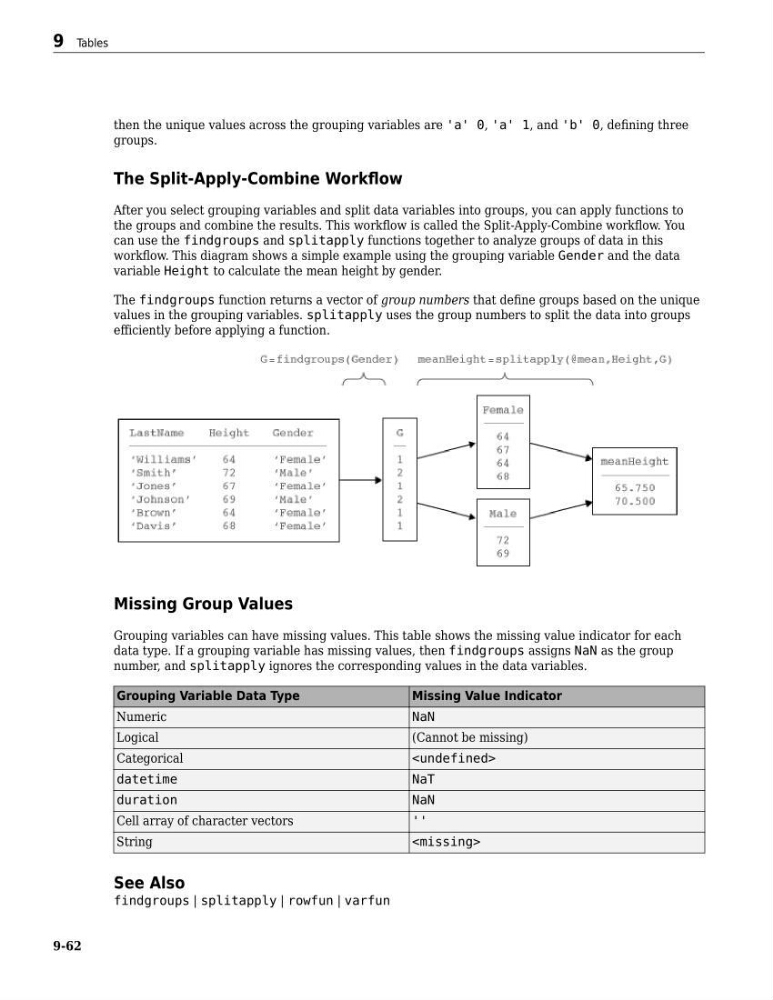
After you select grouping variables and split data variables into groups, you can apply functions to
the groups and combine the results. This workflow is called the Split-Apply-Combine workflow. You
can use the findgroups and splitapply functions together to analyze groups of data in this
workflow. This diagram shows a simple example using the grouping variable Gender and the data
variable Height to calculate the mean height by gender.
The findgroups function returns a vector of group numbers that define groups based on the unique
values in the grouping variables. splitapply uses the group numbers to split the data into groups
efficiently before applying a function.
Missing Group Values
Grouping variables can have missing values. This table shows the missing value indicator for each
data type. If a grouping variable has missing values, then findgroups assigns NaN as the group
number, and splitapply ignores the corresponding values in the data variables.
Grouping Variable Data Type
Missing Value Indicator
Numeric
NaN
Logical
(Cannot be missing)
Categorical
datetime
NaT
duration
NaN
Cell array of character vectors
''
String
See Also
findgroups | splitapply | rowfun | varfun
9 Tables
9-62
groups.
The Split-Apply-Combine Workflow
After you select grouping variables and split data variables into groups, you can apply functions to
the groups and combine the results. This workflow is called the Split-Apply-Combine workflow. You
can use the findgroups and splitapply functions together to analyze groups of data in this
workflow. This diagram shows a simple example using the grouping variable Gender and the data
variable Height to calculate the mean height by gender.
The findgroups function returns a vector of group numbers that define groups based on the unique
values in the grouping variables. splitapply uses the group numbers to split the data into groups
efficiently before applying a function.
Missing Group Values
Grouping variables can have missing values. This table shows the missing value indicator for each
data type. If a grouping variable has missing values, then findgroups assigns NaN as the group
number, and splitapply ignores the corresponding values in the data variables.
Grouping Variable Data Type
Missing Value Indicator
Numeric
NaN
Logical
(Cannot be missing)
Categorical
datetime
NaT
duration
NaN
Cell array of character vectors
''
String
See Also
findgroups | splitapply | rowfun | varfun
9 Tables
9-62