

Verify That Categories Are Protected
When you create an ordinal categorical array, the categories are always protected.
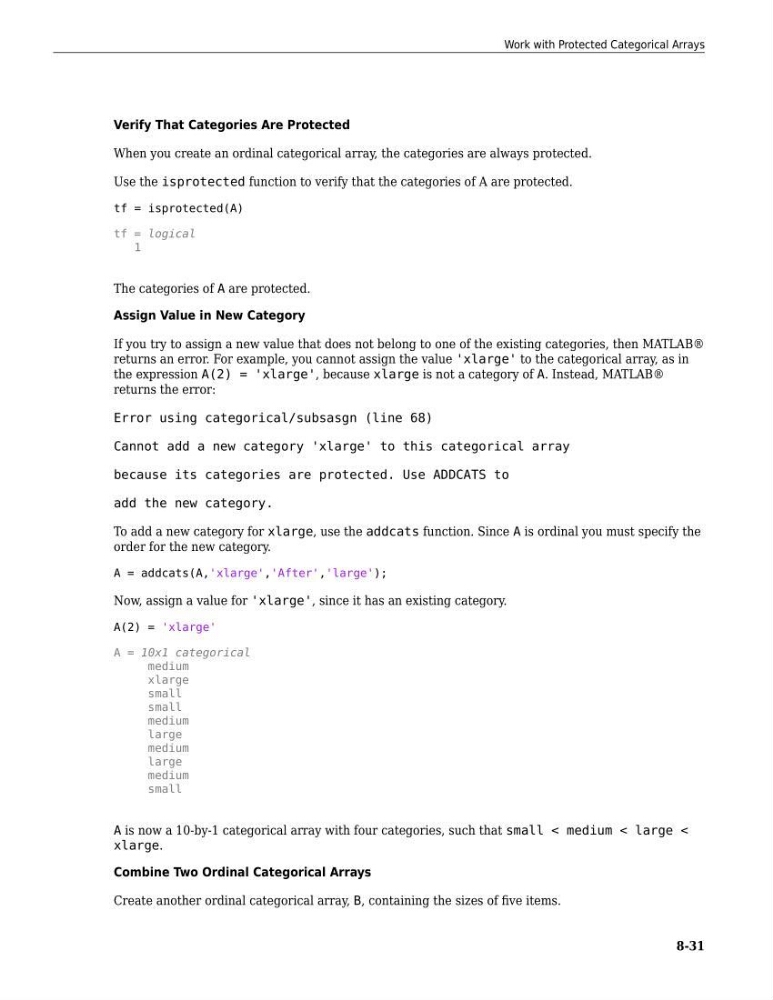
Use the isprotected function to verify that the categories of A are protected.
tf = isprotected(A)
tf = logical
1
The categories of A are protected.
Assign Value in New Category
If you try to assign a new value that does not belong to one of the existing categories, then MATLAB®
returns an error. For example, you cannot assign the value 'xlarge' to the categorical array, as in
the expression A(2) = 'xlarge', because xlarge is not a category of A. Instead, MATLAB®
returns the error:
Error using categorical/subsasgn (line 68)
Cannot add a new category 'xlarge' to this categorical array
because its categories are protected. Use ADDCATS to
add the new category.
To add a new category for xlarge, use the addcats function. Since A is ordinal you must specify the
order for the new category.
A = addcats(A,'xlarge','After','large');
Now, assign a value for 'xlarge', since it has an existing category.
A(2) = 'xlarge'
A = 10x1 categorical
medium
xlarge
small
small
medium
large
medium
large
medium
small
A is now a 10-by-1 categorical array with four categories, such that small < medium < large <
xlarge.
Combine Two Ordinal Categorical Arrays
Create another ordinal categorical array, B, containing the sizes of five items.
Work with Protected Categorical Arrays
8-31
When you create an ordinal categorical array, the categories are always protected.
Use the isprotected function to verify that the categories of A are protected.
tf = isprotected(A)
tf = logical
1
The categories of A are protected.
Assign Value in New Category
If you try to assign a new value that does not belong to one of the existing categories, then MATLAB®
returns an error. For example, you cannot assign the value 'xlarge' to the categorical array, as in
the expression A(2) = 'xlarge', because xlarge is not a category of A. Instead, MATLAB®
returns the error:
Error using categorical/subsasgn (line 68)
Cannot add a new category 'xlarge' to this categorical array
because its categories are protected. Use ADDCATS to
add the new category.
To add a new category for xlarge, use the addcats function. Since A is ordinal you must specify the
order for the new category.
A = addcats(A,'xlarge','After','large');
Now, assign a value for 'xlarge', since it has an existing category.
A(2) = 'xlarge'
A = 10x1 categorical
medium
xlarge
small
small
medium
large
medium
large
medium
small
A is now a 10-by-1 categorical array with four categories, such that small < medium < large <
xlarge.
Combine Two Ordinal Categorical Arrays
Create another ordinal categorical array, B, containing the sizes of five items.
Work with Protected Categorical Arrays
8-31