

CHAPTER 4 ■ COMPLEX FLOWS: NODE-RED
64
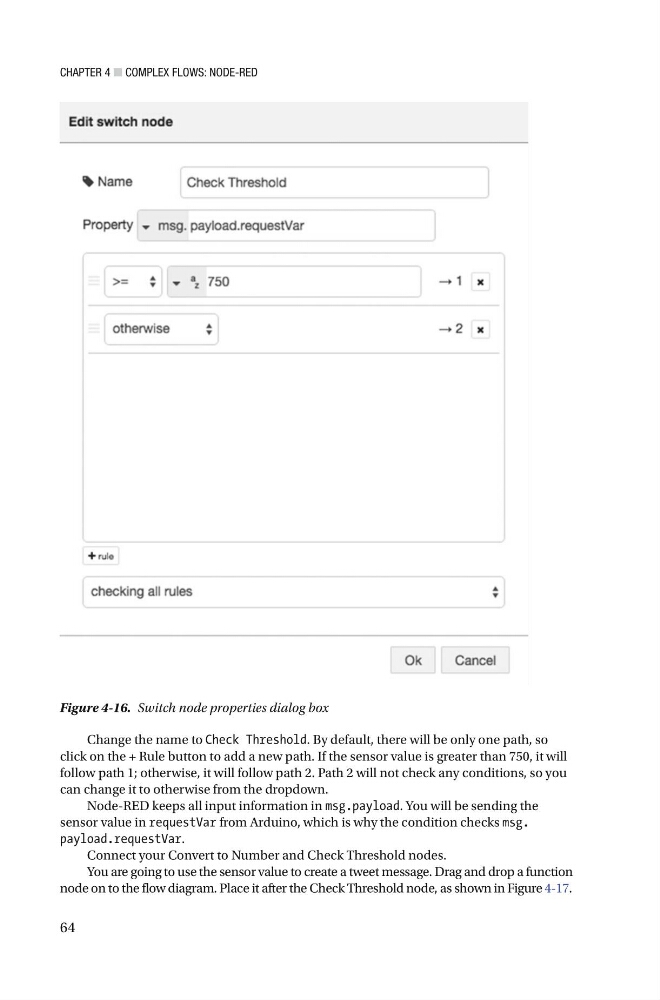
Change the name to Check Threshold . By default, there will be only one path, so
click on the + Rule button to add a new path. If the sensor value is greater than 750, it will
follow path 1; otherwise, it will follow path 2. Path 2 will not check any conditions, so you
can change it to otherwise from the dropdown.
Node-RED keeps all input information in msg.payload . You will be sending the
sensor value in requestVar from Arduino, which is why the condition checks msg.
payload.requestVar .
Connect your Convert to Number and Check Threshold nodes.
You are going to use the sensor value to create a tweet message. Drag and drop a function
node on to the flow diagram. Place it after the Check Threshold node, as shown in Figure 4-17 .
Figure 4-16. Switch node properties dialog box
64
Change the name to Check Threshold . By default, there will be only one path, so
click on the + Rule button to add a new path. If the sensor value is greater than 750, it will
follow path 1; otherwise, it will follow path 2. Path 2 will not check any conditions, so you
can change it to otherwise from the dropdown.
Node-RED keeps all input information in msg.payload . You will be sending the
sensor value in requestVar from Arduino, which is why the condition checks msg.
payload.requestVar .
Connect your Convert to Number and Check Threshold nodes.
You are going to use the sensor value to create a tweet message. Drag and drop a function
node on to the flow diagram. Place it after the Check Threshold node, as shown in Figure 4-17 .
Figure 4-16. Switch node properties dialog box