

149
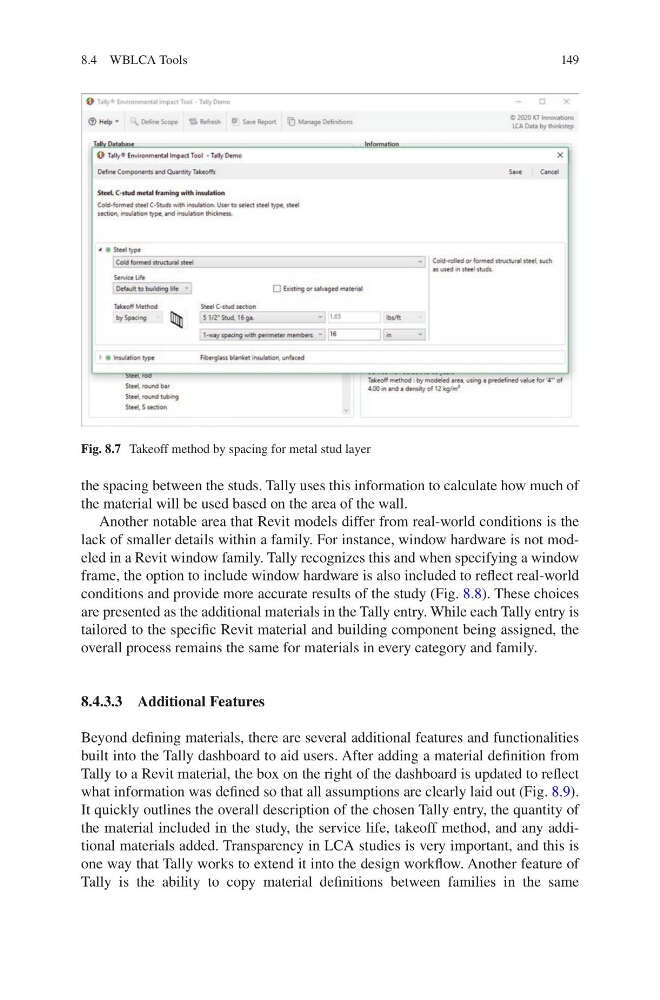
the spacing between the studs. Tally uses this information to calculate how much of
the material will be used based on the area of the wall.
Another notable area that Revit models differ from real-world conditions is the
lack of smaller details within a family. For instance, window hardware is not modeled in a Revit window family. Tally recognizes this and when specifying a window
frame, the option to include window hardware is also included to reflect real-world
conditions and provide more accurate results of the study (Fig. 8.8). These choices
are presented as the additional materials in the Tally entry. While each Tally entry is
tailored to the specific Revit material and building component being assigned, the
overall process remains the same for materials in every category and family.
8.4.3.3 Additional Features
Beyond defining materials, there are several additional features and functionalities
built into the Tally dashboard to aid users. After adding a material definition from
Tally to a Revit material, the box on the right of the dashboard is updated to reflect
what information was defined so that all assumptions are clearly laid out (Fig. 8.9).
It quickly outlines the overall description of the chosen Tally entry, the quantity of
the material included in the study, the service life, takeoff method, and any additional materials added. Transparency in LCA studies is very important, and this is
one way that Tally works to extend it into the design workflow. Another feature of
Tally is the ability to copy material definitions between families in the same
Fig. 8.7 Takeoff method by spacing for metal stud layer
8.4 WBLCA Tools
the spacing between the studs. Tally uses this information to calculate how much of
the material will be used based on the area of the wall.
Another notable area that Revit models differ from real-world conditions is the
lack of smaller details within a family. For instance, window hardware is not modeled in a Revit window family. Tally recognizes this and when specifying a window
frame, the option to include window hardware is also included to reflect real-world
conditions and provide more accurate results of the study (Fig. 8.8). These choices
are presented as the additional materials in the Tally entry. While each Tally entry is
tailored to the specific Revit material and building component being assigned, the
overall process remains the same for materials in every category and family.
8.4.3.3 Additional Features
Beyond defining materials, there are several additional features and functionalities
built into the Tally dashboard to aid users. After adding a material definition from
Tally to a Revit material, the box on the right of the dashboard is updated to reflect
what information was defined so that all assumptions are clearly laid out (Fig. 8.9).
It quickly outlines the overall description of the chosen Tally entry, the quantity of
the material included in the study, the service life, takeoff method, and any additional materials added. Transparency in LCA studies is very important, and this is
one way that Tally works to extend it into the design workflow. Another feature of
Tally is the ability to copy material definitions between families in the same
Fig. 8.7 Takeoff method by spacing for metal stud layer
8.4 WBLCA Tools