

148
After setting the service life, the next category asks for the material’s takeoff
method. This is how Tally interprets the information from Revit to know how much
of a material is being used in the project. For a steel column, this can be done by the
volume modeled in the Revit file or by the linear length of column (present in the
file) and the section of the column, as defined by the user in Tally. Understanding
how the Revit model was built will help the user to pick the most appropriate takeoff
method. These options vary based on the type of building element being defined.
These initial components of the LCI definition (material, service life, and takeoff) are common across all Tally entries. After these are defined, Tally presents
additional options relevant to the specific building element being defined, if there
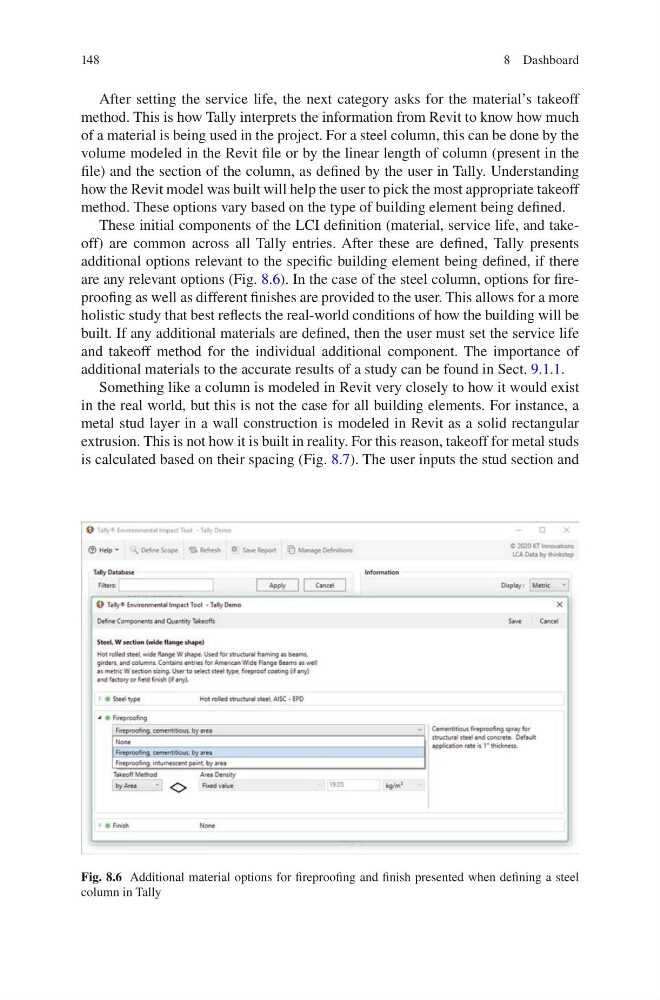
are any relevant options (Fig. 8.6). In the case of the steel column, options for fireproofing as well as different finishes are provided to the user. This allows for a more
holistic study that best reflects the real-world conditions of how the building will be
built. If any additional materials are defined, then the user must set the service life
and takeoff method for the individual additional component. The importance of
additional materials to the accurate results of a study can be found in Sect. 9.1.1.
Something like a column is modeled in Revit very closely to how it would exist
in the real world, but this is not the case for all building elements. For instance, a
metal stud layer in a wall construction is modeled in Revit as a solid rectangular
extrusion. This is not how it is built in reality. For this reason, takeoff for metal studs
is calculated based on their spacing (Fig. 8.7). The user inputs the stud section and
Fig. 8.6 Additional material options for fireproofing and finish presented when defining a steel
column in Tally
8 Dashboard
After setting the service life, the next category asks for the material’s takeoff
method. This is how Tally interprets the information from Revit to know how much
of a material is being used in the project. For a steel column, this can be done by the
volume modeled in the Revit file or by the linear length of column (present in the
file) and the section of the column, as defined by the user in Tally. Understanding
how the Revit model was built will help the user to pick the most appropriate takeoff
method. These options vary based on the type of building element being defined.
These initial components of the LCI definition (material, service life, and takeoff) are common across all Tally entries. After these are defined, Tally presents
additional options relevant to the specific building element being defined, if there
are any relevant options (Fig. 8.6). In the case of the steel column, options for fireproofing as well as different finishes are provided to the user. This allows for a more
holistic study that best reflects the real-world conditions of how the building will be
built. If any additional materials are defined, then the user must set the service life
and takeoff method for the individual additional component. The importance of
additional materials to the accurate results of a study can be found in Sect. 9.1.1.
Something like a column is modeled in Revit very closely to how it would exist
in the real world, but this is not the case for all building elements. For instance, a
metal stud layer in a wall construction is modeled in Revit as a solid rectangular
extrusion. This is not how it is built in reality. For this reason, takeoff for metal studs
is calculated based on their spacing (Fig. 8.7). The user inputs the stud section and
Fig. 8.6 Additional material options for fireproofing and finish presented when defining a steel
column in Tally
8 Dashboard