

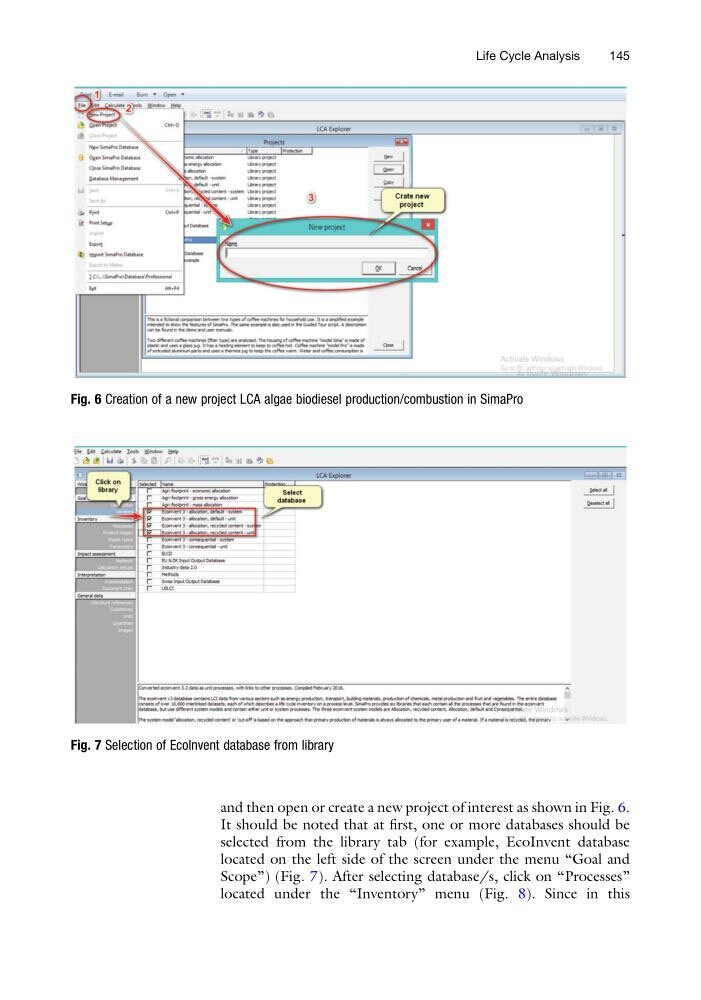
and then open or create a new project of interest as shown in Fig. 6.
It should be noted that at first, one or more databases should be
selected from the library tab (for example, EcoInvent database
located on the left side of the screen under the menu “Goal and
Scope”) (Fig. 7). After selecting database/s, click on “Processes”
located under the “Inventory” menu (Fig. 8). Since in this
Fig. 6 Creation of a new project LCA algae biodiesel production/combustion in SimaPro
Fig. 7 Selection of EcoInvent database from library
Life Cycle Analysis
145
It should be noted that at first, one or more databases should be
selected from the library tab (for example, EcoInvent database
located on the left side of the screen under the menu “Goal and
Scope”) (Fig. 7). After selecting database/s, click on “Processes”
located under the “Inventory” menu (Fig. 8). Since in this
Fig. 6 Creation of a new project LCA algae biodiesel production/combustion in SimaPro
Fig. 7 Selection of EcoInvent database from library
Life Cycle Analysis
145