

92
10.3 Take Advantage of Action Buttons During
the Question Period
A very convenient use for Action Buttons is to directly move anywhere in your
deck, without having to flip through all intermediary slides. Flipping through multiple slides happens the most during the question period at the end of a talk. One
person from the audience might demand that you display again a specific graph or
photo from the early part of your presentation. To go back there, you could flip
through all intermediate slides, or leave the presentation view and search the appropriate slide within your PowerPoint edit screen.
However, a much better option would be to anticipate questions you might get
from the audience and introduce action buttons that will quickly take you back to
specific slides of interest. Even if you can’t anticipate exact questions, having
“links” to specific key slides makes it much quicker to navigate back and arrive at
destination.
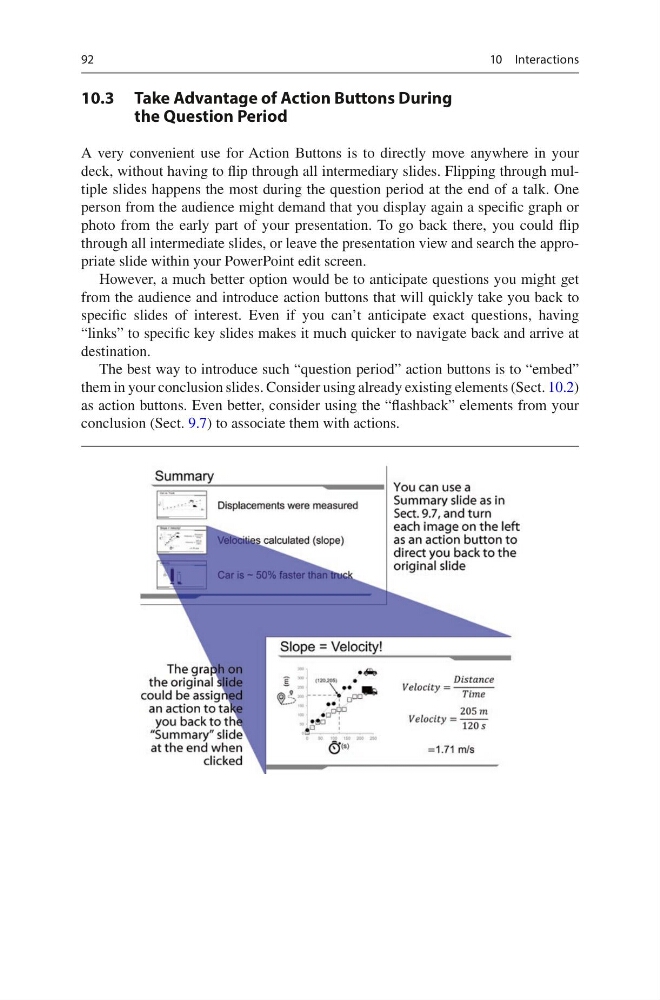
The best way to introduce such “question period” action buttons is to “embed”
them in your conclusion slides. Consider using already existing elements (Sect. 10.2)
as action buttons. Even better, consider using the “flashback” elements from your
conclusion (Sect. 9.7) to associate them with actions.
10 Interactions
10.3 Take Advantage of Action Buttons During
the Question Period
A very convenient use for Action Buttons is to directly move anywhere in your
deck, without having to flip through all intermediary slides. Flipping through multiple slides happens the most during the question period at the end of a talk. One
person from the audience might demand that you display again a specific graph or
photo from the early part of your presentation. To go back there, you could flip
through all intermediate slides, or leave the presentation view and search the appropriate slide within your PowerPoint edit screen.
However, a much better option would be to anticipate questions you might get
from the audience and introduce action buttons that will quickly take you back to
specific slides of interest. Even if you can’t anticipate exact questions, having
“links” to specific key slides makes it much quicker to navigate back and arrive at
destination.
The best way to introduce such “question period” action buttons is to “embed”
them in your conclusion slides. Consider using already existing elements (Sect. 10.2)
as action buttons. Even better, consider using the “flashback” elements from your
conclusion (Sect. 9.7) to associate them with actions.
10 Interactions