

22 On the Modeling of the University Education …
331
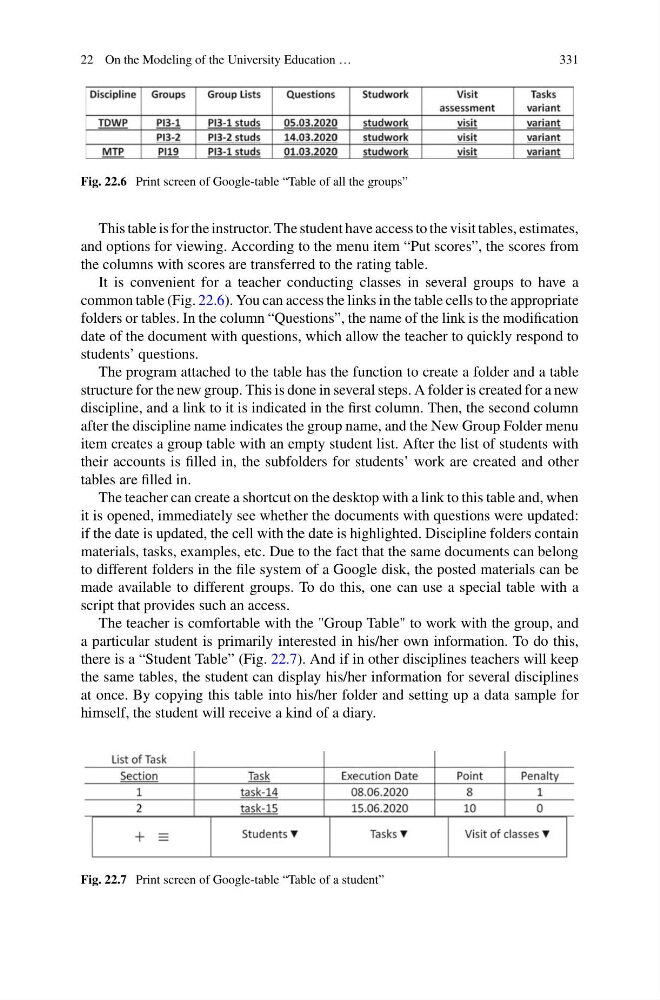
Fig. 22.6 Print screen of Google-table “Table of all the groups”
This table is for the instructor. The student have access to the visit tables, estimates,
and options for viewing. According to the menu item “Put scores”, the scores from
the columns with scores are transferred to the rating table.
It is convenient for a teacher conducting classes in several groups to have a
common table (Fig. 22.6). You can access the links in the table cells to the appropriate
folders or tables. In the column “Questions”, the name of the link is the modification
date of the document with questions, which allow the teacher to quickly respond to
students’ questions.
The program attached to the table has the function to create a folder and a table
structure for the new group. This is done in several steps. A folder is created for a new
discipline, and a link to it is indicated in the first column. Then, the second column
after the discipline name indicates the group name, and the New Group Folder menu
item creates a group table with an empty student list. After the list of students with
their accounts is filled in, the subfolders for students’ work are created and other
tables are filled in.
The teacher can create a shortcut on the desktop with a link to this table and, when
it is opened, immediately see whether the documents with questions were updated:
if the date is updated, the cell with the date is highlighted. Discipline folders contain
materials, tasks, examples, etc. Due to the fact that the same documents can belong
to different folders in the file system of a Google disk, the posted materials can be
made available to different groups. To do this, one can use a special table with a
script that provides such an access.
The teacher is comfortable with the "Group Table" to work with the group, and
a particular student is primarily interested in his/her own information. To do this,
there is a “Student Table” (Fig. 22.7). And if in other disciplines teachers will keep
the same tables, the student can display his/her information for several disciplines
at once. By copying this table into his/her folder and setting up a data sample for
himself, the student will receive a kind of a diary.
Fig. 22.7 Print screen of Google-table “Table of a student”
331
Fig. 22.6 Print screen of Google-table “Table of all the groups”
This table is for the instructor. The student have access to the visit tables, estimates,
and options for viewing. According to the menu item “Put scores”, the scores from
the columns with scores are transferred to the rating table.
It is convenient for a teacher conducting classes in several groups to have a
common table (Fig. 22.6). You can access the links in the table cells to the appropriate
folders or tables. In the column “Questions”, the name of the link is the modification
date of the document with questions, which allow the teacher to quickly respond to
students’ questions.
The program attached to the table has the function to create a folder and a table
structure for the new group. This is done in several steps. A folder is created for a new
discipline, and a link to it is indicated in the first column. Then, the second column
after the discipline name indicates the group name, and the New Group Folder menu
item creates a group table with an empty student list. After the list of students with
their accounts is filled in, the subfolders for students’ work are created and other
tables are filled in.
The teacher can create a shortcut on the desktop with a link to this table and, when
it is opened, immediately see whether the documents with questions were updated:
if the date is updated, the cell with the date is highlighted. Discipline folders contain
materials, tasks, examples, etc. Due to the fact that the same documents can belong
to different folders in the file system of a Google disk, the posted materials can be
made available to different groups. To do this, one can use a special table with a
script that provides such an access.
The teacher is comfortable with the "Group Table" to work with the group, and
a particular student is primarily interested in his/her own information. To do this,
there is a “Student Table” (Fig. 22.7). And if in other disciplines teachers will keep
the same tables, the student can display his/her information for several disciplines
at once. By copying this table into his/her folder and setting up a data sample for
himself, the student will receive a kind of a diary.
Fig. 22.7 Print screen of Google-table “Table of a student”