

Here, “halfmap1.mrc” and “halfmap2.mrc” are the two
half volumes. The resolution cutoff here is set to 0.143 (see
Notes 4 and 5). The output is the “resolution.txt” file, which
describes the global resolution (also computed in all refinement
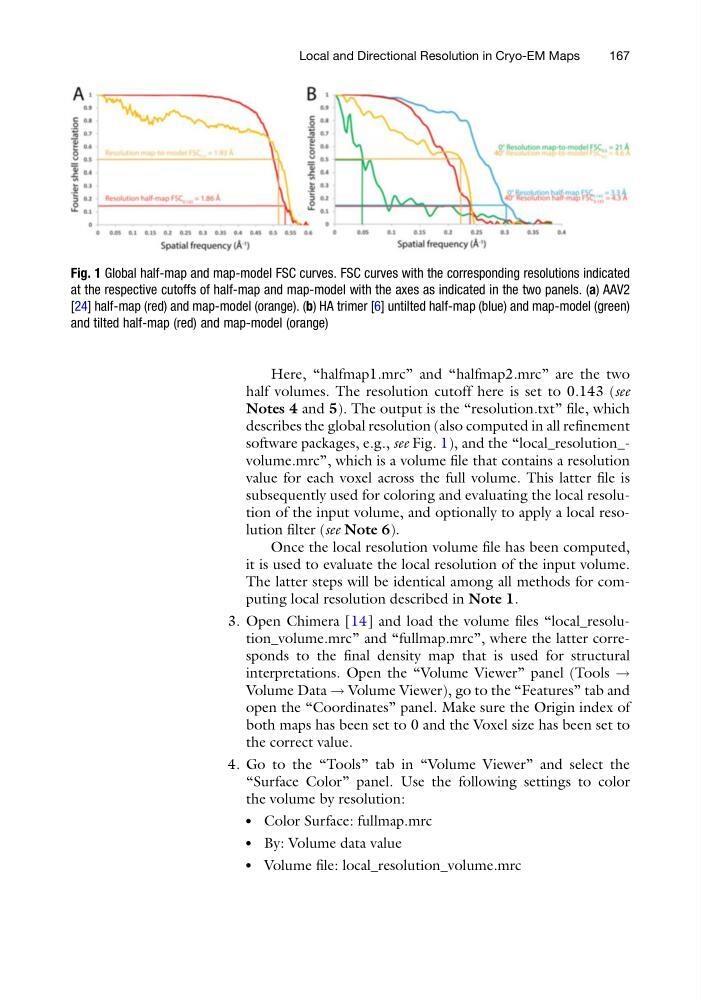
software packages, e.g., see Fig. 1), and the “local_resolution_volume.mrc”, which is a volume file that contains a resolution
value for each voxel across the full volume. This latter file is
subsequently used for coloring and evaluating the local resolution of the input volume, and optionally to apply a local resolution filter (see Note 6).
Once the local resolution volume file has been computed,
it is used to evaluate the local resolution of the input volume.
The latter steps will be identical among all methods for computing local resolution described in Note 1.
3. Open Chimera [14] and load the volume files “local_resolution_volume.mrc” and “fullmap.mrc”, where the latter corresponds to the final density map that is used for structural
interpretations. Open the “Volume Viewer” panel (Tools !
Volume Data ! Volume Viewer), go to the “Features” tab and
open the “Coordinates” panel. Make sure the Origin index of
both maps has been set to 0 and the Voxel size has been set to
the correct value.
4. Go to the “Tools” tab in “Volume Viewer” and select the
“Surface Color” panel. Use the following settings to color
the volume by resolution:
l
Color Surface: fullmap.mrc
l
By: Volume data value
l
Volume file: local_resolution_volume.mrc
Fig. 1 Global half-map and map-model FSC curves. FSC curves with the corresponding resolutions indicated
at the respective cutoffs of half-map and map-model with the axes as indicated in the two panels. (a) AAV2
[24] half-map (red) and map-model (orange). (b) HA trimer [6] untilted half-map (blue) and map-model (green)
and tilted half-map (red) and map-model (orange)
Local and Directional Resolution in Cryo-EM Maps
167
half volumes. The resolution cutoff here is set to 0.143 (see
Notes 4 and 5). The output is the “resolution.txt” file, which
describes the global resolution (also computed in all refinement
software packages, e.g., see Fig. 1), and the “local_resolution_volume.mrc”, which is a volume file that contains a resolution
value for each voxel across the full volume. This latter file is
subsequently used for coloring and evaluating the local resolution of the input volume, and optionally to apply a local resolution filter (see Note 6).
Once the local resolution volume file has been computed,
it is used to evaluate the local resolution of the input volume.
The latter steps will be identical among all methods for computing local resolution described in Note 1.
3. Open Chimera [14] and load the volume files “local_resolution_volume.mrc” and “fullmap.mrc”, where the latter corresponds to the final density map that is used for structural
interpretations. Open the “Volume Viewer” panel (Tools !
Volume Data ! Volume Viewer), go to the “Features” tab and
open the “Coordinates” panel. Make sure the Origin index of
both maps has been set to 0 and the Voxel size has been set to
the correct value.
4. Go to the “Tools” tab in “Volume Viewer” and select the
“Surface Color” panel. Use the following settings to color
the volume by resolution:
l
Color Surface: fullmap.mrc
l
By: Volume data value
l
Volume file: local_resolution_volume.mrc
Fig. 1 Global half-map and map-model FSC curves. FSC curves with the corresponding resolutions indicated
at the respective cutoffs of half-map and map-model with the axes as indicated in the two panels. (a) AAV2
[24] half-map (red) and map-model (orange). (b) HA trimer [6] untilted half-map (blue) and map-model (green)
and tilted half-map (red) and map-model (orange)
Local and Directional Resolution in Cryo-EM Maps
167