

has been set up to acquire images from 6 serial sections. The Navigator works with
images called maps, about which it stores all the information needed to move to a
specific point on the sample. A key to success in the automatic acquisition of tilt
series from multiple positions is to make a map of the desired area at the final
magnification for recording data and then drop the magnification to a take a medium
magnification map that will be used for realigning reliably to the specimen position
after the stage is moved to its nominal coordinates. Described below is a sequence
of steps used to automatically acquire tilt series of single or montaged images from
serial sections.
Steps to auto-acquire tilt series from multiple positions:
1. Insert grid and run the rough eucentricity operation, which can find the
eucentric height even if it is 200 µm away.
2. Open the Navigator window from the top SerialEM menu bar.
3. Find an area/cell of interest and preirradiate the area to *2000e-/A
2 .
4. Take a Record (full-resolution) image at the tilt series magnification.
– if montage images are used, calibrate image shift, open montage file and set
the number of pieces and overlap in x and y.
5. Save the image.
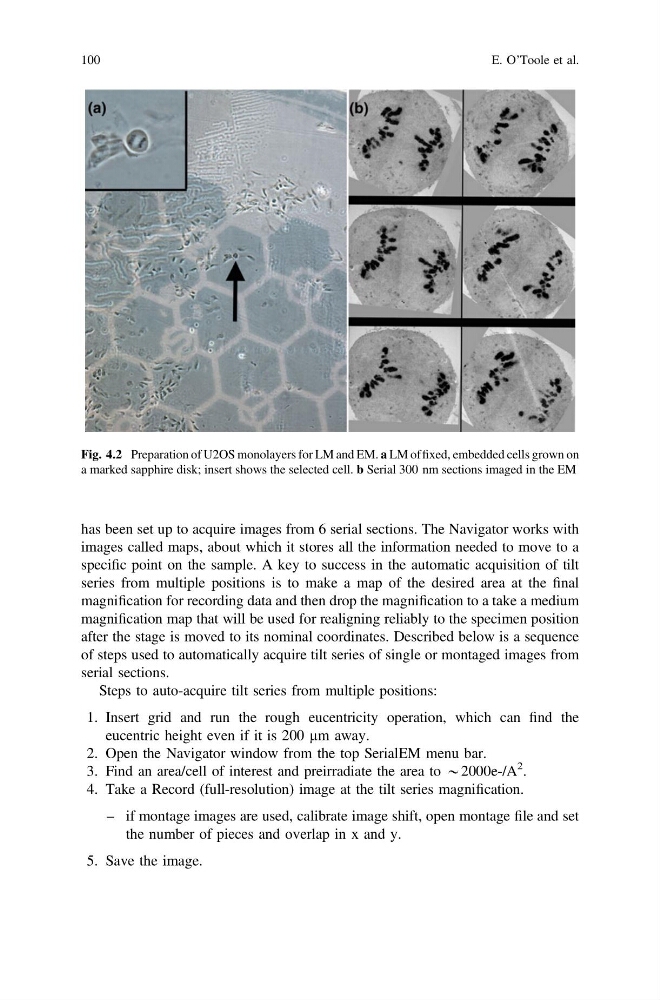
Fig. 4.2 Preparation of U2OS monolayers for LM and EM. a LM of fixed, embedded cells grown on
a marked sapphire disk; insert shows the selected cell. b Serial 300 nm sections imaged in the EM
100
E. O’Toole et al.
images called maps, about which it stores all the information needed to move to a
specific point on the sample. A key to success in the automatic acquisition of tilt
series from multiple positions is to make a map of the desired area at the final
magnification for recording data and then drop the magnification to a take a medium
magnification map that will be used for realigning reliably to the specimen position
after the stage is moved to its nominal coordinates. Described below is a sequence
of steps used to automatically acquire tilt series of single or montaged images from
serial sections.
Steps to auto-acquire tilt series from multiple positions:
1. Insert grid and run the rough eucentricity operation, which can find the
eucentric height even if it is 200 µm away.
2. Open the Navigator window from the top SerialEM menu bar.
3. Find an area/cell of interest and preirradiate the area to *2000e-/A
2 .
4. Take a Record (full-resolution) image at the tilt series magnification.
– if montage images are used, calibrate image shift, open montage file and set
the number of pieces and overlap in x and y.
5. Save the image.
Fig. 4.2 Preparation of U2OS monolayers for LM and EM. a LM of fixed, embedded cells grown on
a marked sapphire disk; insert shows the selected cell. b Serial 300 nm sections imaged in the EM
100
E. O’Toole et al.