

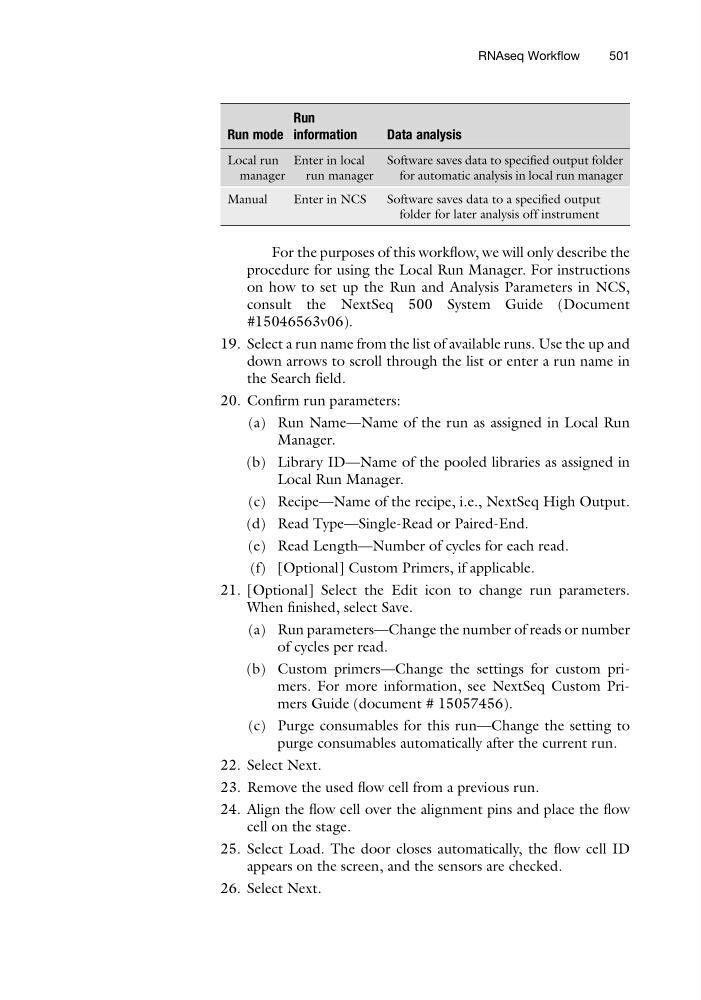
Run mode
Run
information
Data analysis
Local run
manager
Enter in local
run manager
Software saves data to specified output folder
for automatic analysis in local run manager
Manual
Enter in NCS
Software saves data to a specified output
folder for later analysis off instrument
For the purposes of this workflow, we will only describe the
procedure for using the Local Run Manager. For instructions
on how to set up the Run and Analysis Parameters in NCS,
consult the NextSeq 500 System Guide (Document
#15046563v06).
19. Select a run name from the list of available runs. Use the up and
down arrows to scroll through the list or enter a run name in
the Search field.
20. Confirm run parameters:
(a) Run Name—Name of the run as assigned in Local Run
Manager.
(b) Library ID—Name of the pooled libraries as assigned in
Local Run Manager.
(c) Recipe—Name of the recipe, i.e., NextSeq High Output.
(d) Read Type—Single-Read or Paired-End.
(e) Read Length—Number of cycles for each read.
(f) [Optional] Custom Primers, if applicable.
21. [Optional] Select the Edit icon to change run parameters.
When finished, select Save.
(a) Run parameters—Change the number of reads or number
of cycles per read.
(b) Custom primers—Change the settings for custom primers. For more information, see NextSeq Custom Primers Guide (document # 15057456).
(c) Purge consumables for this run—Change the setting to
purge consumables automatically after the current run.
22. Select Next.
23. Remove the used flow cell from a previous run.
24. Align the flow cell over the alignment pins and place the flow
cell on the stage.
25. Select Load. The door closes automatically, the flow cell ID
appears on the screen, and the sensors are checked.
26. Select Next.
RNAseq Workflow
501
Run
information
Data analysis
Local run
manager
Enter in local
run manager
Software saves data to specified output folder
for automatic analysis in local run manager
Manual
Enter in NCS
Software saves data to a specified output
folder for later analysis off instrument
For the purposes of this workflow, we will only describe the
procedure for using the Local Run Manager. For instructions
on how to set up the Run and Analysis Parameters in NCS,
consult the NextSeq 500 System Guide (Document
#15046563v06).
19. Select a run name from the list of available runs. Use the up and
down arrows to scroll through the list or enter a run name in
the Search field.
20. Confirm run parameters:
(a) Run Name—Name of the run as assigned in Local Run
Manager.
(b) Library ID—Name of the pooled libraries as assigned in
Local Run Manager.
(c) Recipe—Name of the recipe, i.e., NextSeq High Output.
(d) Read Type—Single-Read or Paired-End.
(e) Read Length—Number of cycles for each read.
(f) [Optional] Custom Primers, if applicable.
21. [Optional] Select the Edit icon to change run parameters.
When finished, select Save.
(a) Run parameters—Change the number of reads or number
of cycles per read.
(b) Custom primers—Change the settings for custom primers. For more information, see NextSeq Custom Primers Guide (document # 15057456).
(c) Purge consumables for this run—Change the setting to
purge consumables automatically after the current run.
22. Select Next.
23. Remove the used flow cell from a previous run.
24. Align the flow cell over the alignment pins and place the flow
cell on the stage.
25. Select Load. The door closes automatically, the flow cell ID
appears on the screen, and the sensors are checked.
26. Select Next.
RNAseq Workflow
501