

System design and organization, access to data
Data dictionary
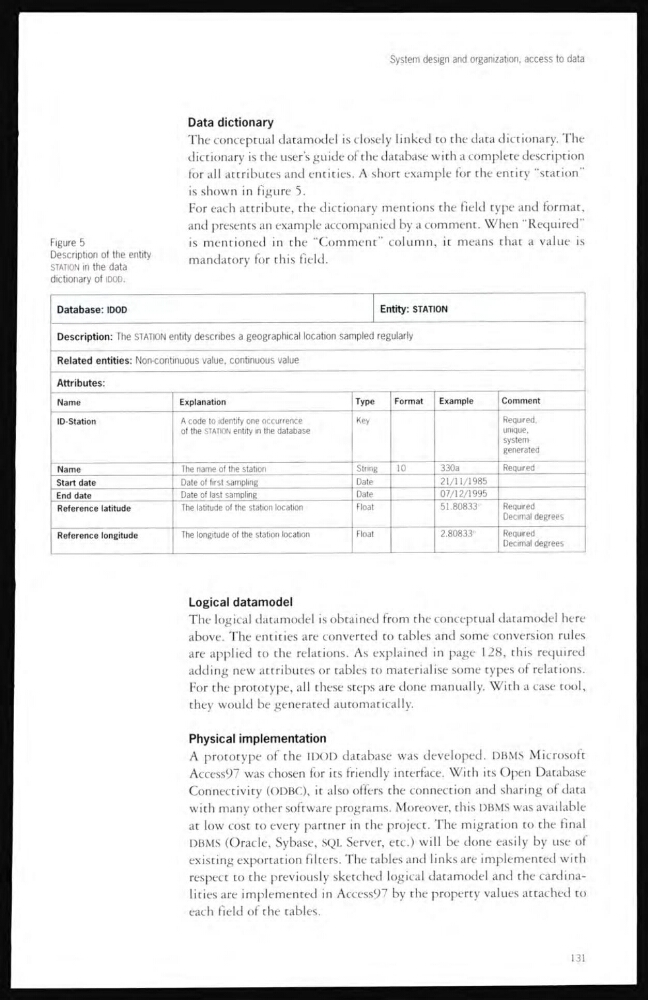
The conceptual datamodel is closely linked to the data dictionary. The
dictionary is the user’s guide of the database with a complete description
for all attributes and entities. A short example for the entity “station”
is shown in figure 5.
For each attribute, the dictionary mentions the field type and format,
and presents an example accompanied by a comment. When “Required”
is mentioned in the “Comment” column, it means that a value is
mandatory for this field.
Figure 5
Description of the entity
STATION in the data
dictionary of IDOO.
Database: IDOD
Entity: STATION
Description: The STATION entity describes a geographical location sampled regularly
Related entities: Non-continuous value, continuous value
Attributes:
Name
Explanation
Type
Format
Example
Comment
ID-Station
A code to identify one occurrence
of the STATION entity in the database
Key
Required,
unique,
systemgenerated
Name
The name of the station
String
10
330a
Required
Start date
Date of first sampling
Date
21/11/1985
End date
Date of last sampling
Date
07/12/1995
Reference latitude
The latitude of the station location
Float
51.80833°
Required
Decimal degrees
Reference longitude
The longitude of the station location
Float
2.80833°
Required
Decimal degrees
Logical datamodel
The logical datamodel is obtained from the conceptual datamodel here
above. The entities are converted to tables ancl some conversion rules
are applied to the relations. As explained in page 128, this required
adding new attributes or tables to materialise some types of relations.
For the prototype, all these steps are done manually. With a case tool,
they would be generated automatically.
Physical implementation
A prototype of the IDOD database was developed. DBMS Microsoft
Access97 was chosen for its friendly interface. With its Open Database
Connectivity (ODBC), it also offers the connection and sharing of data
with many other software programs. Moreover, this DBMS was available
at low cost to every partner in the project. The migration to the final
DBMS (Oracle, Sybase, SQL Server, etc.) will be done easily by use of
existing exportation filters. The tables and links are implemented with
respect to the previously sketched logical datamodel and the cardinalities are implemented in Access97 by the property values attached to
each field of the tables.
131
Data dictionary
The conceptual datamodel is closely linked to the data dictionary. The
dictionary is the user’s guide of the database with a complete description
for all attributes and entities. A short example for the entity “station”
is shown in figure 5.
For each attribute, the dictionary mentions the field type and format,
and presents an example accompanied by a comment. When “Required”
is mentioned in the “Comment” column, it means that a value is
mandatory for this field.
Figure 5
Description of the entity
STATION in the data
dictionary of IDOO.
Database: IDOD
Entity: STATION
Description: The STATION entity describes a geographical location sampled regularly
Related entities: Non-continuous value, continuous value
Attributes:
Name
Explanation
Type
Format
Example
Comment
ID-Station
A code to identify one occurrence
of the STATION entity in the database
Key
Required,
unique,
systemgenerated
Name
The name of the station
String
10
330a
Required
Start date
Date of first sampling
Date
21/11/1985
End date
Date of last sampling
Date
07/12/1995
Reference latitude
The latitude of the station location
Float
51.80833°
Required
Decimal degrees
Reference longitude
The longitude of the station location
Float
2.80833°
Required
Decimal degrees
Logical datamodel
The logical datamodel is obtained from the conceptual datamodel here
above. The entities are converted to tables ancl some conversion rules
are applied to the relations. As explained in page 128, this required
adding new attributes or tables to materialise some types of relations.
For the prototype, all these steps are done manually. With a case tool,
they would be generated automatically.
Physical implementation
A prototype of the IDOD database was developed. DBMS Microsoft
Access97 was chosen for its friendly interface. With its Open Database
Connectivity (ODBC), it also offers the connection and sharing of data
with many other software programs. Moreover, this DBMS was available
at low cost to every partner in the project. The migration to the final
DBMS (Oracle, Sybase, SQL Server, etc.) will be done easily by use of
existing exportation filters. The tables and links are implemented with
respect to the previously sketched logical datamodel and the cardinalities are implemented in Access97 by the property values attached to
each field of the tables.
131