

5.2. Arrays in the Population Cohort Model
91
l-D Array
FIGURE 5.14
2-D Array
Once you have spe cified YEAR 0 1 as a 1-D array, go to the Editor and
specify the dimension as "Length." This lets STELLA identify each row of
the array with a different length of fish. Create three elements within this
array: type in "Short" as the first element name, then use the navigation
arrow in the array editor to navigate to a new entry, call it "Med" for
medium-sized fish, and navigate to another new element, which you
should call "Long." Click on OK and provide an initial value of 100. Leave
the "Apply to All" box clicked on, so each of the initial values of the stocks
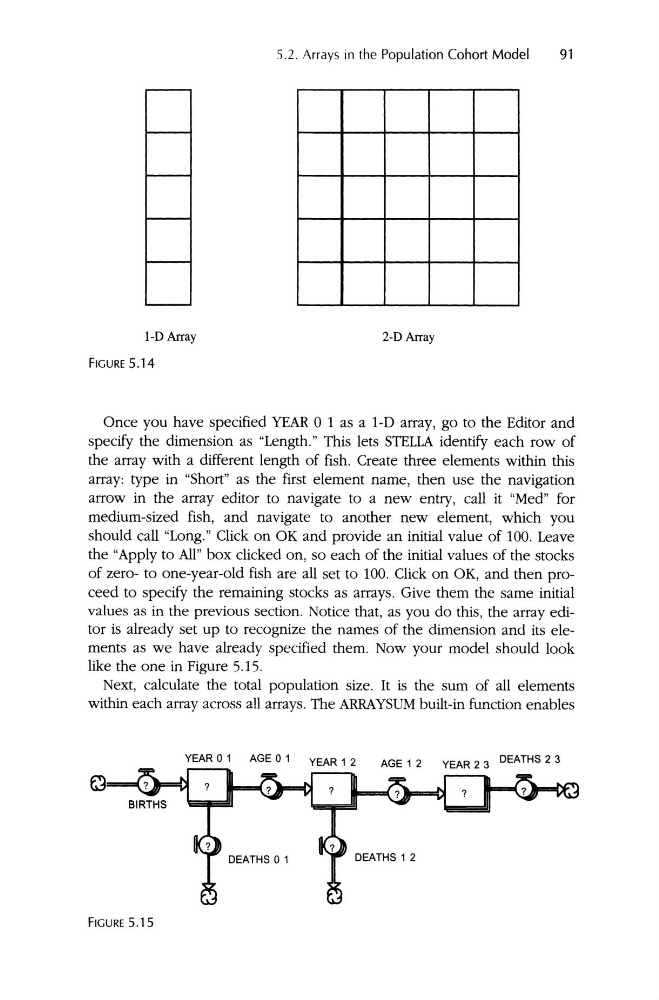
of zero- to one-year-old fish are all set to 100. Click on OK, and then proceed to specify the remaining stocks as arrays. Give them the same initial
values as in the previous section. Notice that, as you do this, the array editor is already set up to recognize the names of the dimension and its elements as we have already specified them . Now your model should look
like the one in Figure 5.15.
Next, calculate the total popul ation size. It is the sum of all elements
within each array across all arrays. The ARRAYSUM built-in function enables
YEAR 0 1
AGE 0 1
YEAR 1 2
DEATHS 2 3
AGE 1 2
FIGURE 5.15
91
l-D Array
FIGURE 5.14
2-D Array
Once you have spe cified YEAR 0 1 as a 1-D array, go to the Editor and
specify the dimension as "Length." This lets STELLA identify each row of
the array with a different length of fish. Create three elements within this
array: type in "Short" as the first element name, then use the navigation
arrow in the array editor to navigate to a new entry, call it "Med" for
medium-sized fish, and navigate to another new element, which you
should call "Long." Click on OK and provide an initial value of 100. Leave
the "Apply to All" box clicked on, so each of the initial values of the stocks
of zero- to one-year-old fish are all set to 100. Click on OK, and then proceed to specify the remaining stocks as arrays. Give them the same initial
values as in the previous section. Notice that, as you do this, the array editor is already set up to recognize the names of the dimension and its elements as we have already specified them . Now your model should look
like the one in Figure 5.15.
Next, calculate the total popul ation size. It is the sum of all elements
within each array across all arrays. The ARRAYSUM built-in function enables
YEAR 0 1
AGE 0 1
YEAR 1 2
DEATHS 2 3
AGE 1 2
FIGURE 5.15