

340
V. Mittard-Runte et al.
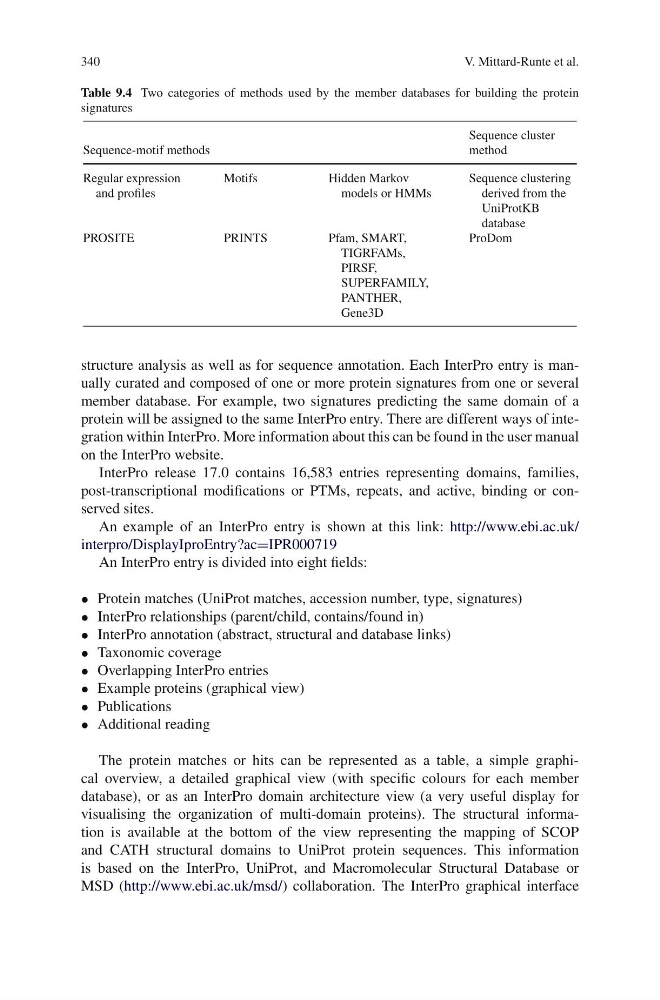
Table 9.4 Two categories of methods used by the member databases for building the protein
signatures
Sequence-motif methods
Sequence cluster
method
Regular expression
and profiles
Motifs
Hidden Markov
models or HMMs
Sequence clustering
derived from the
UniProtKB
database
PROSITE
PRINTS
Pfam, SMART,
TIGRFAMs,
PIRSF,
SUPERFAMILY,
PANTHER,
Gene3D
ProDom
structure analysis as well as for sequence annotation. Each InterPro entry is manually curated and composed of one or more protein signatures from one or several
member database. For example, two signatures predicting the same domain of a
protein will be assigned to the same InterPro entry. There are different ways of integration within InterPro. More information about this can be found in the user manual
on the InterPro website.
InterPro release 17.0 contains 16,583 entries representing domains, families,
post-transcriptional modifications or PTMs, repeats, and active, binding or conserved sites.
An example of an InterPro entry is shown at this link: http://www.ebi.ac.uk/
interpro/DisplayIproEntry?ac=IPR000719
An InterPro entry is divided into eight fields:
• Protein matches (UniProt matches, accession number, type, signatures)
• InterPro relationships (parent/child, contains/found in)
• InterPro annotation (abstract, structural and database links)
• Taxonomic coverage
• Overlapping InterPro entries
• Example proteins (graphical view)
• Publications
• Additional reading
The protein matches or hits can be represented as a table, a simple graphical overview, a detailed graphical view (with specific colours for each member
database), or as an InterPro domain architecture view (a very useful display for
visualising the organization of multi-domain proteins). The structural information is available at the bottom of the view representing the mapping of SCOP
and CATH structural domains to UniProt protein sequences. This information
is based on the InterPro, UniProt, and Macromolecular Structural Database or
MSD (http://www.ebi.ac.uk/msd/) collaboration. The InterPro graphical interface
V. Mittard-Runte et al.
Table 9.4 Two categories of methods used by the member databases for building the protein
signatures
Sequence-motif methods
Sequence cluster
method
Regular expression
and profiles
Motifs
Hidden Markov
models or HMMs
Sequence clustering
derived from the
UniProtKB
database
PROSITE
PRINTS
Pfam, SMART,
TIGRFAMs,
PIRSF,
SUPERFAMILY,
PANTHER,
Gene3D
ProDom
structure analysis as well as for sequence annotation. Each InterPro entry is manually curated and composed of one or more protein signatures from one or several
member database. For example, two signatures predicting the same domain of a
protein will be assigned to the same InterPro entry. There are different ways of integration within InterPro. More information about this can be found in the user manual
on the InterPro website.
InterPro release 17.0 contains 16,583 entries representing domains, families,
post-transcriptional modifications or PTMs, repeats, and active, binding or conserved sites.
An example of an InterPro entry is shown at this link: http://www.ebi.ac.uk/
interpro/DisplayIproEntry?ac=IPR000719
An InterPro entry is divided into eight fields:
• Protein matches (UniProt matches, accession number, type, signatures)
• InterPro relationships (parent/child, contains/found in)
• InterPro annotation (abstract, structural and database links)
• Taxonomic coverage
• Overlapping InterPro entries
• Example proteins (graphical view)
• Publications
• Additional reading
The protein matches or hits can be represented as a table, a simple graphical overview, a detailed graphical view (with specific colours for each member
database), or as an InterPro domain architecture view (a very useful display for
visualising the organization of multi-domain proteins). The structural information is available at the bottom of the view representing the mapping of SCOP
and CATH structural domains to UniProt protein sequences. This information
is based on the InterPro, UniProt, and Macromolecular Structural Database or
MSD (http://www.ebi.ac.uk/msd/) collaboration. The InterPro graphical interface