

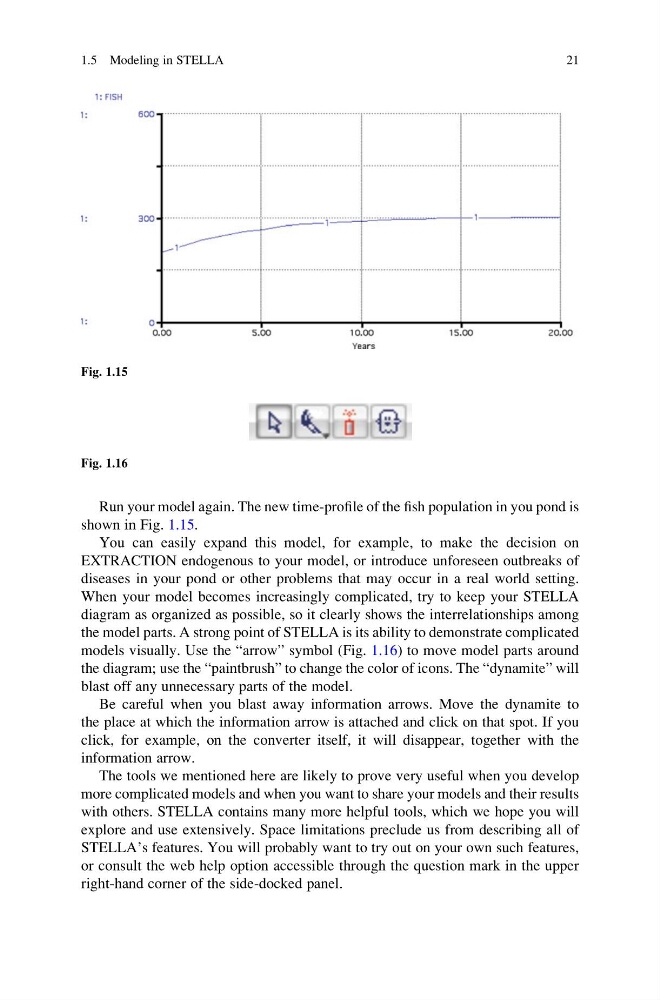
Run your model again. The new time-profile of the fish population in you pond is
shown in Fig. 1.15.
You can easily expand this model, for example, to make the decision on
EXTRACTION endogenous to your model, or introduce unforeseen outbreaks of
diseases in your pond or other problems that may occur in a real world setting.
When your model becomes increasingly complicated, try to keep your STELLA
diagram as organized as possible, so it clearly shows the interrelationships among
the model parts. A strong point of STELLA is its ability to demonstrate complicated
models visually. Use the “arrow” symbol (Fig. 1.16) to move model parts around
the diagram; use the “paintbrush” to change the color of icons. The “dynamite” will
blast off any unnecessary parts of the model.
Be careful when you blast away information arrows. Move the dynamite to
the place at which the information arrow is attached and click on that spot. If you
click, for example, on the converter itself, it will disappear, together with the
information arrow.
The tools we mentioned here are likely to prove very useful when you develop
more complicated models and when you want to share your models and their results
with others. STELLA contains many more helpful tools, which we hope you will
explore and use extensively. Space limitations preclude us from describing all of
STELLA’s features. You will probably want to try out on your own such features,
or consult the web help option accessible through the question mark in the upper
right-hand corner of the side-docked panel.
Fig. 1.15
Fig. 1.16
1.5 Modeling in STELLA
21
shown in Fig. 1.15.
You can easily expand this model, for example, to make the decision on
EXTRACTION endogenous to your model, or introduce unforeseen outbreaks of
diseases in your pond or other problems that may occur in a real world setting.
When your model becomes increasingly complicated, try to keep your STELLA
diagram as organized as possible, so it clearly shows the interrelationships among
the model parts. A strong point of STELLA is its ability to demonstrate complicated
models visually. Use the “arrow” symbol (Fig. 1.16) to move model parts around
the diagram; use the “paintbrush” to change the color of icons. The “dynamite” will
blast off any unnecessary parts of the model.
Be careful when you blast away information arrows. Move the dynamite to
the place at which the information arrow is attached and click on that spot. If you
click, for example, on the converter itself, it will disappear, together with the
information arrow.
The tools we mentioned here are likely to prove very useful when you develop
more complicated models and when you want to share your models and their results
with others. STELLA contains many more helpful tools, which we hope you will
explore and use extensively. Space limitations preclude us from describing all of
STELLA’s features. You will probably want to try out on your own such features,
or consult the web help option accessible through the question mark in the upper
right-hand corner of the side-docked panel.
Fig. 1.15
Fig. 1.16
1.5 Modeling in STELLA
21