

194
Le logiciel R - Maˆ ıtriser le langage
+
col.main = "red",type = "n")
+ text(1, 0, "abc", col = "red", cex = 2)
+ abline(h = 0, lty = 2)
+ abline(v = 1, lty = 2)
+ }
> abline(v=0.8,h=-0.5,lty=2)
> text(0.8, -0.5, "abc", col = "red", cex = 2,adj=c(0,1))
> abline(h=0.5,v=0.5,lty=2)
> text(0.8,0.5,"ABC",col="red",cex=2,adj=c(0.5,0.5),srt=120)
0.6
1.0
1.4
−1.0
−0.5
0.0
0.5
1.0
adj = 0
Index
0
abc
0.6
1.0
1.4
−1.0
−0.5
0.0
0.5
1.0
adj = 0.5
Index
0
abc
0.6
1.0
1.4
−1.0
−0.5
0.0
0.5
1.0
adj = 1
Index
0
abc
abc
A
B
C
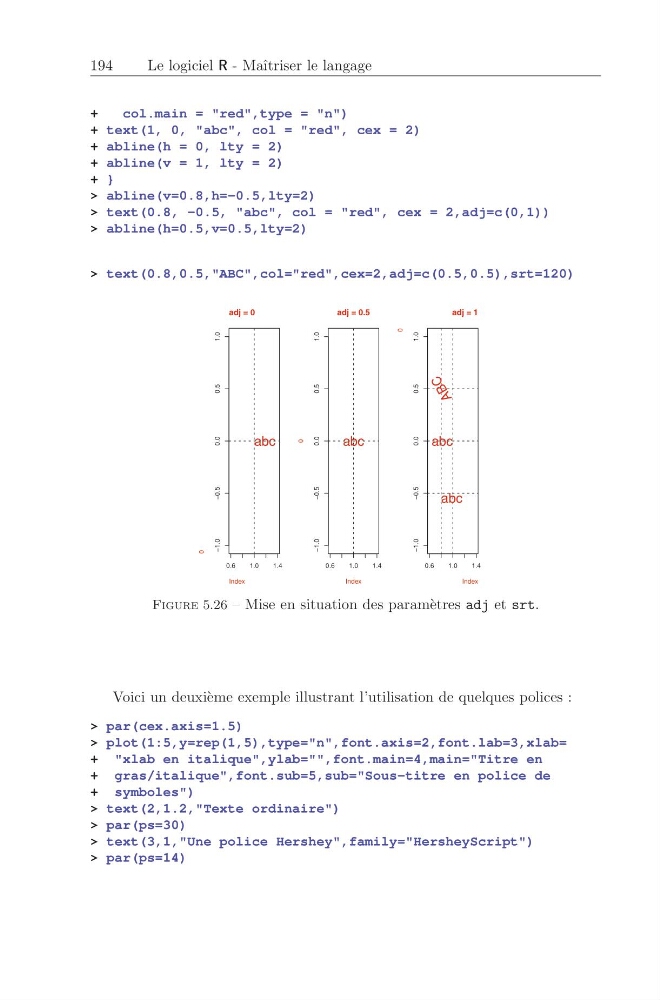
Figure 5.26 – Mise en situation des param` etres adj et srt.
Voici un deuxi` eme exemple illustrant l’utilisation de quelques polices :
> par(cex.axis=1.5)
> plot(1:5,y=rep(1,5),type="n",font.axis=2,font.lab=3,xlab=
+ "xlab en italique",ylab="",font.main=4,main="Titre en
+ gras/italique",font.sub=5,sub="Sous-titre en police de
+ symboles")
> text(2,1.2,"Texte ordinaire")
> par(ps=30)
> text(3,1,"Une police Hershey",family="HersheyScript")
> par(ps=14)
Le logiciel R - Maˆ ıtriser le langage
+
col.main = "red",type = "n")
+ text(1, 0, "abc", col = "red", cex = 2)
+ abline(h = 0, lty = 2)
+ abline(v = 1, lty = 2)
+ }
> abline(v=0.8,h=-0.5,lty=2)
> text(0.8, -0.5, "abc", col = "red", cex = 2,adj=c(0,1))
> abline(h=0.5,v=0.5,lty=2)
> text(0.8,0.5,"ABC",col="red",cex=2,adj=c(0.5,0.5),srt=120)
0.6
1.0
1.4
−1.0
−0.5
0.0
0.5
1.0
adj = 0
Index
0
abc
0.6
1.0
1.4
−1.0
−0.5
0.0
0.5
1.0
adj = 0.5
Index
0
abc
0.6
1.0
1.4
−1.0
−0.5
0.0
0.5
1.0
adj = 1
Index
0
abc
abc
A
B
C
Figure 5.26 – Mise en situation des param` etres adj et srt.
Voici un deuxi` eme exemple illustrant l’utilisation de quelques polices :
> par(cex.axis=1.5)
> plot(1:5,y=rep(1,5),type="n",font.axis=2,font.lab=3,xlab=
+ "xlab en italique",ylab="",font.main=4,main="Titre en
+ gras/italique",font.sub=5,sub="Sous-titre en police de
+ symboles")
> text(2,1.2,"Texte ordinaire")
> par(ps=30)
> text(3,1,"Une police Hershey",family="HersheyScript")
> par(ps=14)