

program Schedule_Generation(Spatial_data, Total_Dur):
1 AS_canbe_perform := Process_Input(Spatial_data)
2 T, D, f := Generate_Resident_Profile()
3 x := Calculate_Increse_rate(T, D, f)
4 MV, Init_time := Initialize_MVs&time(T, D, f)
5 Current_ASnum, time := 1, Init_time
6 ASnum_list, time_list := [], []
7 while time < Init_time + Total_Dur do:
8
AT := Determine_actual_duration(Current_ASnum, T)
9
MV := Update_MV(Current_ASnum, time, MV, x, T, AT)
10 time := time + AT
11 Next_ASnum = Sample_next_ActSeq(MV)
12 If Next_ASnum != Current_ASnum do:
13
ASnum_list.append(Next_ASnum)
14
time_list.append(time)
15
Current_ASnum := Next_ASnum
16 Activity_Schedule = Post_Process(ASnum_list, time_list, Spatial_
data)
17 return Activity_Schedule
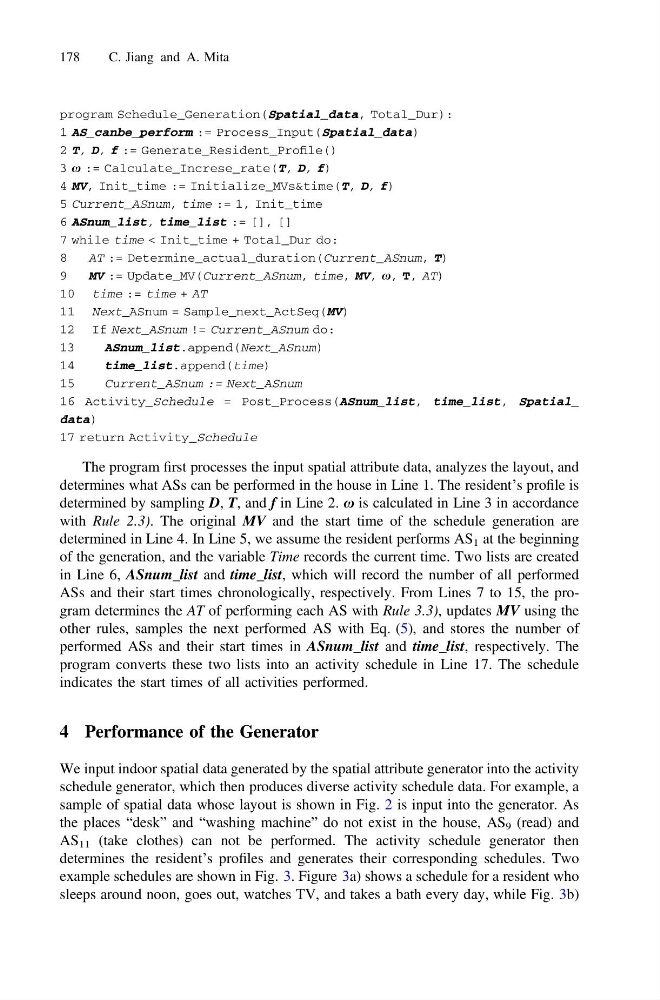
The program first processes the input spatial attribute data, analyzes the layout, and
determines what ASs can be performed in the house in Line 1. The resident’s profile is
determined by sampling D, T, and f in Line 2. x is calculated in Line 3 in accordance
with Rule 2.3). The original MV and the start time of the schedule generation are
determined in Line 4. In Line 5, we assume the resident performs AS 1 at the beginning
of the generation, and the variable Time records the current time. Two lists are created
in Line 6, ASnum_list and time_list, which will record the number of all performed
ASs and their start times chronologically, respectively. From Lines 7 to 15, the program determines the AT of performing each AS with Rule 3.3), updates MV using the
other rules, samples the next performed AS with Eq. (5), and stores the number of
performed ASs and their start times in ASnum_list and time_list, respectively. The
program converts these two lists into an activity schedule in Line 17. The schedule
indicates the start times of all activities performed.
4 Performance of the Generator
We input indoor spatial data generated by the spatial attribute generator into the activity
schedule generator, which then produces diverse activity schedule data. For example, a
sample of spatial data whose layout is shown in Fig. 2 is input into the generator. As
the places “desk” and “washing machine” do not exist in the house, AS 9 (read) and
AS 11 (take clothes) can not be performed. The activity schedule generator then
determines the resident’s profiles and generates their corresponding schedules. Two
example schedules are shown in Fig. 3. Figure 3a) shows a schedule for a resident who
sleeps around noon, goes out, watches TV, and takes a bath every day, while Fig. 3b)
178
C. Jiang and A. Mita
1 AS_canbe_perform := Process_Input(Spatial_data)
2 T, D, f := Generate_Resident_Profile()
3 x := Calculate_Increse_rate(T, D, f)
4 MV, Init_time := Initialize_MVs&time(T, D, f)
5 Current_ASnum, time := 1, Init_time
6 ASnum_list, time_list := [], []
7 while time < Init_time + Total_Dur do:
8
AT := Determine_actual_duration(Current_ASnum, T)
9
MV := Update_MV(Current_ASnum, time, MV, x, T, AT)
10 time := time + AT
11 Next_ASnum = Sample_next_ActSeq(MV)
12 If Next_ASnum != Current_ASnum do:
13
ASnum_list.append(Next_ASnum)
14
time_list.append(time)
15
Current_ASnum := Next_ASnum
16 Activity_Schedule = Post_Process(ASnum_list, time_list, Spatial_
data)
17 return Activity_Schedule
The program first processes the input spatial attribute data, analyzes the layout, and
determines what ASs can be performed in the house in Line 1. The resident’s profile is
determined by sampling D, T, and f in Line 2. x is calculated in Line 3 in accordance
with Rule 2.3). The original MV and the start time of the schedule generation are
determined in Line 4. In Line 5, we assume the resident performs AS 1 at the beginning
of the generation, and the variable Time records the current time. Two lists are created
in Line 6, ASnum_list and time_list, which will record the number of all performed
ASs and their start times chronologically, respectively. From Lines 7 to 15, the program determines the AT of performing each AS with Rule 3.3), updates MV using the
other rules, samples the next performed AS with Eq. (5), and stores the number of
performed ASs and their start times in ASnum_list and time_list, respectively. The
program converts these two lists into an activity schedule in Line 17. The schedule
indicates the start times of all activities performed.
4 Performance of the Generator
We input indoor spatial data generated by the spatial attribute generator into the activity
schedule generator, which then produces diverse activity schedule data. For example, a
sample of spatial data whose layout is shown in Fig. 2 is input into the generator. As
the places “desk” and “washing machine” do not exist in the house, AS 9 (read) and
AS 11 (take clothes) can not be performed. The activity schedule generator then
determines the resident’s profiles and generates their corresponding schedules. Two
example schedules are shown in Fig. 3. Figure 3a) shows a schedule for a resident who
sleeps around noon, goes out, watches TV, and takes a bath every day, while Fig. 3b)
178
C. Jiang and A. Mita