

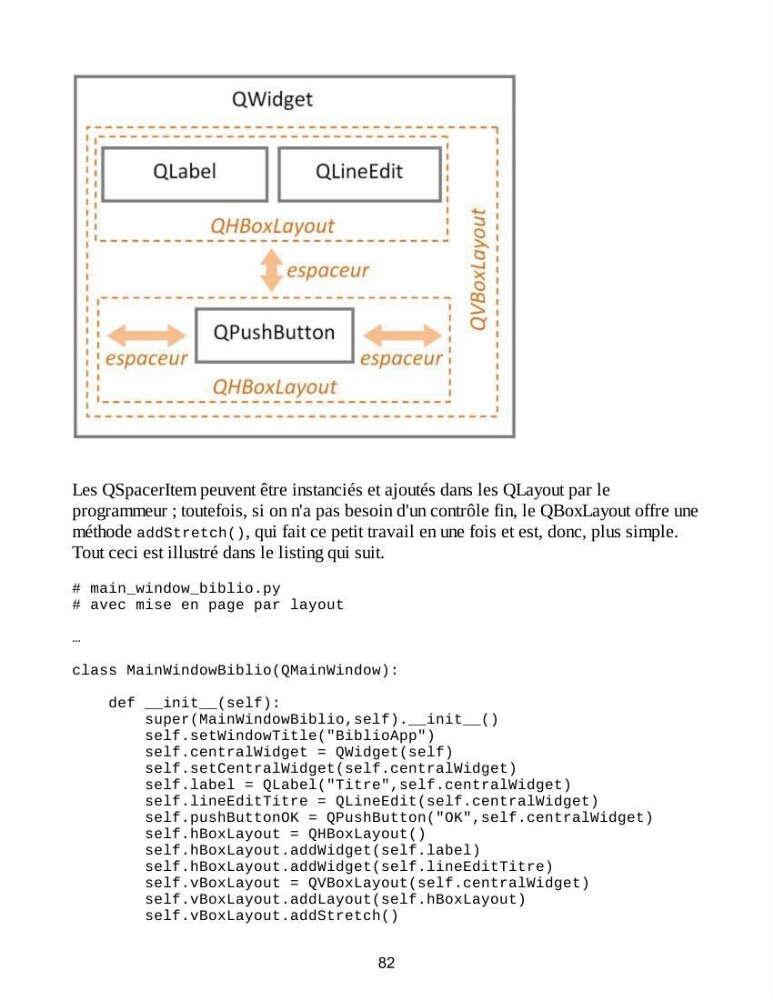
Les QSpacerItem peuvent être instanciés et ajoutés dans les QLayout par le
programmeur ; toutefois, si on n'a pas besoin d'un contrôle fin, le QBoxLayout offre une
méthode addStretch(), qui fait ce petit travail en une fois et est, donc, plus simple.
Tout ceci est illustré dans le listing qui suit.
# main_window_biblio.py
# avec mise en page par layout
…
class MainWindowBiblio(QMainWindow):
def __init__(self):
super(MainWindowBiblio,self).__init__()
self.setWindowTitle("BiblioApp")
self.centralWidget = QWidget(self)
self.setCentralWidget(self.centralWidget)
self.label = QLabel("Titre",self.centralWidget)
self.lineEditTitre = QLineEdit(self.centralWidget)
self.pushButtonOK = QPushButton("OK",self.centralWidget)
self.hBoxLayout = QHBoxLayout()
self.hBoxLayout.addWidget(self.label)
self.hBoxLayout.addWidget(self.lineEditTitre)
self.vBoxLayout = QVBoxLayout(self.centralWidget)
self.vBoxLayout.addLayout(self.hBoxLayout)
self.vBoxLayout.addStretch()
82
programmeur ; toutefois, si on n'a pas besoin d'un contrôle fin, le QBoxLayout offre une
méthode addStretch(), qui fait ce petit travail en une fois et est, donc, plus simple.
Tout ceci est illustré dans le listing qui suit.
# main_window_biblio.py
# avec mise en page par layout
…
class MainWindowBiblio(QMainWindow):
def __init__(self):
super(MainWindowBiblio,self).__init__()
self.setWindowTitle("BiblioApp")
self.centralWidget = QWidget(self)
self.setCentralWidget(self.centralWidget)
self.label = QLabel("Titre",self.centralWidget)
self.lineEditTitre = QLineEdit(self.centralWidget)
self.pushButtonOK = QPushButton("OK",self.centralWidget)
self.hBoxLayout = QHBoxLayout()
self.hBoxLayout.addWidget(self.label)
self.hBoxLayout.addWidget(self.lineEditTitre)
self.vBoxLayout = QVBoxLayout(self.centralWidget)
self.vBoxLayout.addLayout(self.hBoxLayout)
self.vBoxLayout.addStretch()
82