

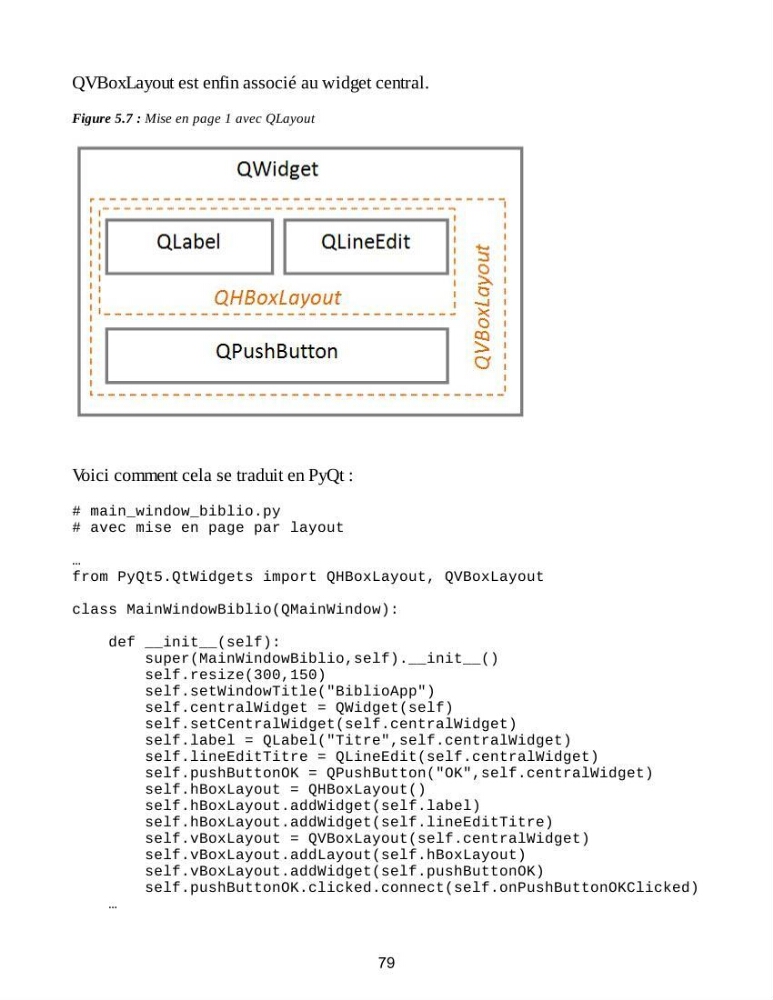
QVBoxLayout est enfin associé au widget central.
Figure 5.7 : Mise en page 1 avec QLayout
Voici comment cela se traduit en PyQt :
# main_window_biblio.py
# avec mise en page par layout
…
from PyQt5.QtWidgets import QHBoxLayout, QVBoxLayout
class MainWindowBiblio(QMainWindow):
def __init__(self):
super(MainWindowBiblio,self).__init__()
self.resize(300,150)
self.setWindowTitle("BiblioApp")
self.centralWidget = QWidget(self)
self.setCentralWidget(self.centralWidget)
self.label = QLabel("Titre",self.centralWidget)
self.lineEditTitre = QLineEdit(self.centralWidget)
self.pushButtonOK = QPushButton("OK",self.centralWidget)
self.hBoxLayout = QHBoxLayout()
self.hBoxLayout.addWidget(self.label)
self.hBoxLayout.addWidget(self.lineEditTitre)
self.vBoxLayout = QVBoxLayout(self.centralWidget)
self.vBoxLayout.addLayout(self.hBoxLayout)
self.vBoxLayout.addWidget(self.pushButtonOK)
self.pushButtonOK.clicked.connect(self.onPushButtonOKClicked)
…
79
Figure 5.7 : Mise en page 1 avec QLayout
Voici comment cela se traduit en PyQt :
# main_window_biblio.py
# avec mise en page par layout
…
from PyQt5.QtWidgets import QHBoxLayout, QVBoxLayout
class MainWindowBiblio(QMainWindow):
def __init__(self):
super(MainWindowBiblio,self).__init__()
self.resize(300,150)
self.setWindowTitle("BiblioApp")
self.centralWidget = QWidget(self)
self.setCentralWidget(self.centralWidget)
self.label = QLabel("Titre",self.centralWidget)
self.lineEditTitre = QLineEdit(self.centralWidget)
self.pushButtonOK = QPushButton("OK",self.centralWidget)
self.hBoxLayout = QHBoxLayout()
self.hBoxLayout.addWidget(self.label)
self.hBoxLayout.addWidget(self.lineEditTitre)
self.vBoxLayout = QVBoxLayout(self.centralWidget)
self.vBoxLayout.addLayout(self.hBoxLayout)
self.vBoxLayout.addWidget(self.pushButtonOK)
self.pushButtonOK.clicked.connect(self.onPushButtonOKClicked)
…
79