

4.2 Programming as a Step-Wise Strategy
93
and points. Often, however, it is a good idea to finalize one function at a time,
particularly with larger and/or more complicated functions.
The reader should take a moment to reflect on the use of functions in general
(ask_user and points here). They represent “logical units”, each dedicated to a
special task. Structuring code this way, may greatly ease human code interpretation,
which in turn makes debugging and future code changes much simpler. “Seen” from
the main program, ask_user, for example, is given the factors of a*b and returns
the answer. The inner workings of ask_user is neither known, nor of any concern,
to the main program. It just calls the function and waits for the returned value.
Moreover, the inner workings of ask_user may be changed in any way, without
affecting the code elsewhere in the program, as long as function input and output
stays the same.
By setting N = 10 in times_tables_2.py, and confirming that the dialogue
runs correctly, we have a program that carries out the required test. However, we
have yet another step to make, which means we have to figure out how the questions
can be randomized. Let us see what we can make out of it.
4.2.4 The 3rd Version of Our Code
How can we randomize the 100 questions, while keeping to the plan of asking
each question only once? Based on our previous version(s) of the code, it would
be natural to first think of something like
i =
j =
user_answer = ask_user(i, j)
# ...NOT what we want!
However, it is immediately realized that some products a*b then will come several
times, whereas others, are likely to not appear at all. Clearly, this is not what we
want. Some more reasoning is required.
One solution, the one presented here, is based on two key observations. The first
observation, is that the integers 0 to 99 can be used to uniquely represent each of
our 100 products. We might demonstrate this by the following little piece of code:
for i in range(0, 100, 1):
a = i//10 + 1
# integer division
b = i%10 + 1
# modulo
print(’i = {:d}, {:d}*{:d} = ’.format(i, a, b))
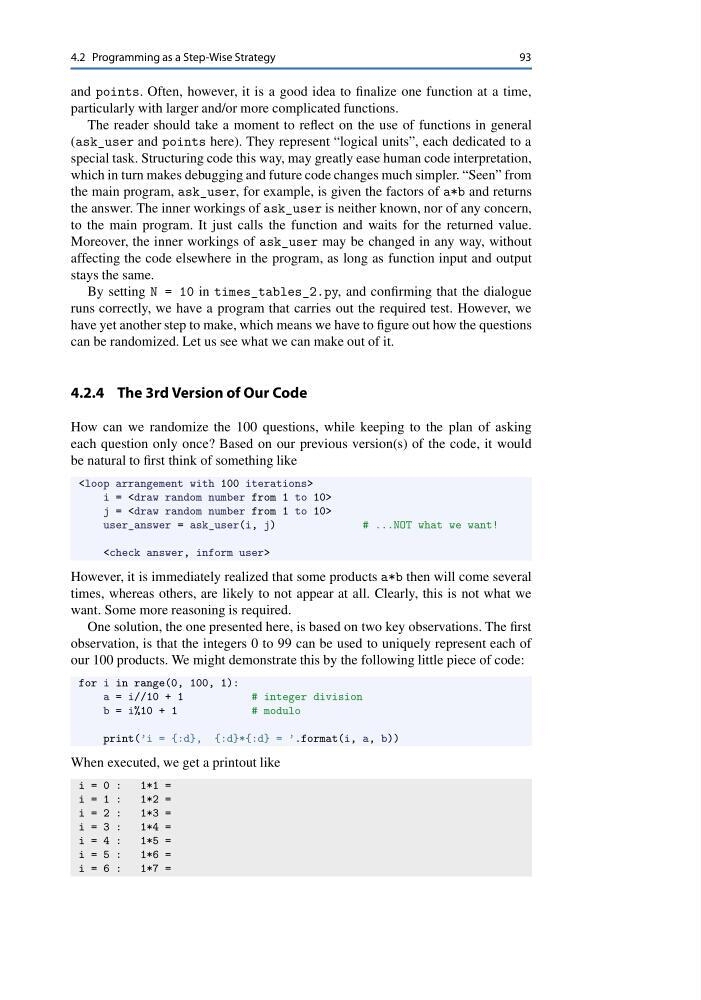
When executed, we get a printout like
i = 0 :
1*1 =
i = 1 :
1*2 =
i = 2 :
1*3 =
i = 3 :
1*4 =
i = 4 :
1*5 =
i = 5 :
1*6 =
i = 6 :
1*7 =
93
and points. Often, however, it is a good idea to finalize one function at a time,
particularly with larger and/or more complicated functions.
The reader should take a moment to reflect on the use of functions in general
(ask_user and points here). They represent “logical units”, each dedicated to a
special task. Structuring code this way, may greatly ease human code interpretation,
which in turn makes debugging and future code changes much simpler. “Seen” from
the main program, ask_user, for example, is given the factors of a*b and returns
the answer. The inner workings of ask_user is neither known, nor of any concern,
to the main program. It just calls the function and waits for the returned value.
Moreover, the inner workings of ask_user may be changed in any way, without
affecting the code elsewhere in the program, as long as function input and output
stays the same.
By setting N = 10 in times_tables_2.py, and confirming that the dialogue
runs correctly, we have a program that carries out the required test. However, we
have yet another step to make, which means we have to figure out how the questions
can be randomized. Let us see what we can make out of it.
4.2.4 The 3rd Version of Our Code
How can we randomize the 100 questions, while keeping to the plan of asking
each question only once? Based on our previous version(s) of the code, it would
be natural to first think of something like
i =
j =
user_answer = ask_user(i, j)
# ...NOT what we want!
However, it is immediately realized that some products a*b then will come several
times, whereas others, are likely to not appear at all. Clearly, this is not what we
want. Some more reasoning is required.
One solution, the one presented here, is based on two key observations. The first
observation, is that the integers 0 to 99 can be used to uniquely represent each of
our 100 products. We might demonstrate this by the following little piece of code:
for i in range(0, 100, 1):
a = i//10 + 1
# integer division
b = i%10 + 1
# modulo
print(’i = {:d}, {:d}*{:d} = ’.format(i, a, b))
When executed, we get a printout like
i = 0 :
1*1 =
i = 1 :
1*2 =
i = 2 :
1*3 =
i = 3 :
1*4 =
i = 4 :
1*5 =
i = 5 :
1*6 =
i = 6 :
1*7 =