

397
The default package manager utility for your operating system will allow you to
query the package repository using regular expressions to identify packages to install.
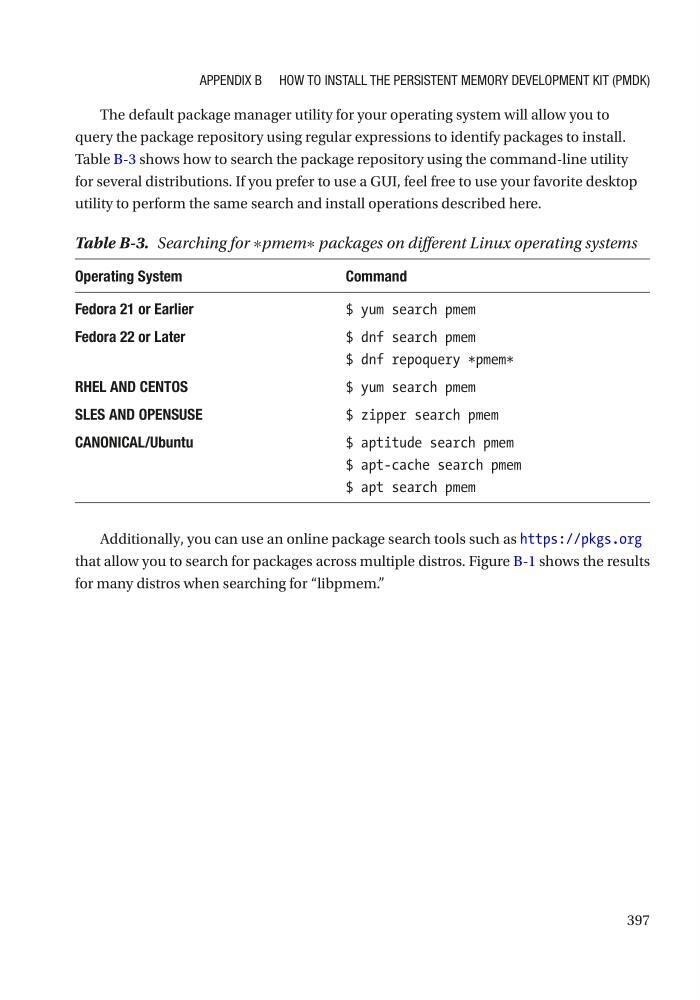
Table B-3 shows how to search the package repository using the command-line utility
for several distributions. If you prefer to use a GUI, feel free to use your favorite desktop
utility to perform the same search and install operations described here.
Additionally, you can use an online package search tools such as https://pkgs.org
that allow you to search for packages across multiple distros. Figure B-1 shows the results
for many distros when searching for “libpmem.”
Table B-3. Searching for ∗pmem∗ packages on different Linux operating systems
Operating System
Command
Fedora 21 or Earlier
$ yum search pmem
Fedora 22 or Later
$ dnf search pmem
$ dnf repoquery * pmem *
RHEL AND CENTOS
$ yum search pmem
SLES AND OPENSUSE
$ zipper search pmem
CANONICAL/Ubuntu
$ aptitude search pmem
$ apt-cache search pmem
$ apt search pmem
APPenDix B HOw TO inSTALL THe PeRSiSTenT MeMORy DeveLOPMenT KiT (PMDK)
The default package manager utility for your operating system will allow you to
query the package repository using regular expressions to identify packages to install.
Table B-3 shows how to search the package repository using the command-line utility
for several distributions. If you prefer to use a GUI, feel free to use your favorite desktop
utility to perform the same search and install operations described here.
Additionally, you can use an online package search tools such as https://pkgs.org
that allow you to search for packages across multiple distros. Figure B-1 shows the results
for many distros when searching for “libpmem.”
Table B-3. Searching for ∗pmem∗ packages on different Linux operating systems
Operating System
Command
Fedora 21 or Earlier
$ yum search pmem
Fedora 22 or Later
$ dnf search pmem
$ dnf repoquery * pmem *
RHEL AND CENTOS
$ yum search pmem
SLES AND OPENSUSE
$ zipper search pmem
CANONICAL/Ubuntu
$ aptitude search pmem
$ apt-cache search pmem
$ apt search pmem
APPenDix B HOw TO inSTALL THe PeRSiSTenT MeMORy DeveLOPMenT KiT (PMDK)