

391
Searching for Packages Within a Package Repository
The default package manager utility for your operating system will allow you to query
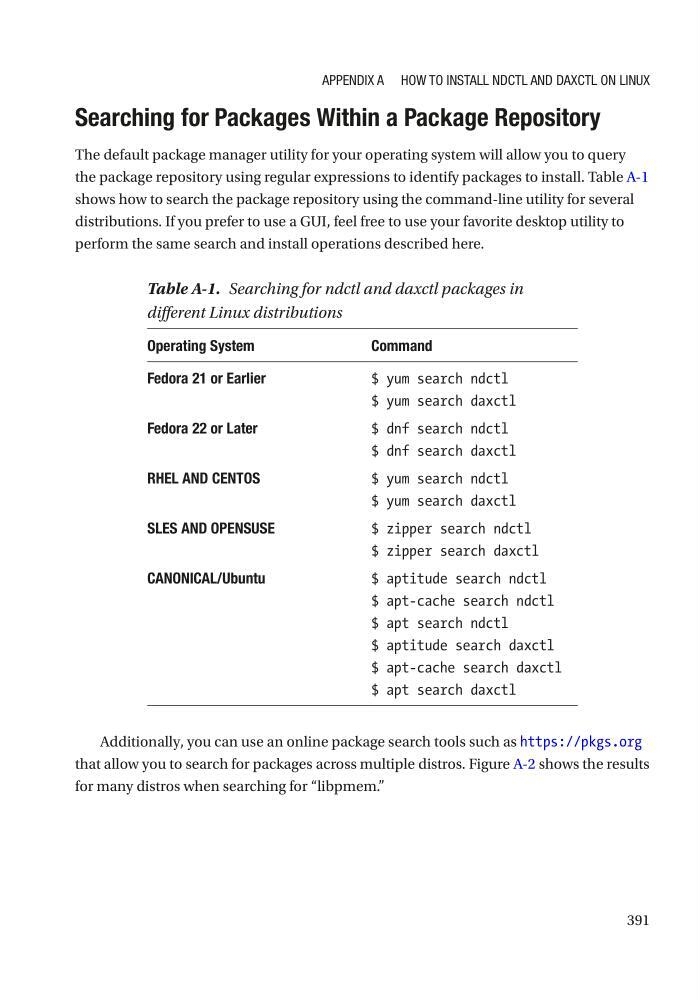
the package repository using regular expressions to identify packages to install. Table A-1
shows how to search the package repository using the command-line utility for several
distributions. If you prefer to use a GUI, feel free to use your favorite desktop utility to
perform the same search and install operations described here.
Additionally, you can use an online package search tools such as https://pkgs.org
that allow you to search for packages across multiple distros. Figure A-2 shows the results
for many distros when searching for “libpmem.”
Table A-1. Searching for ndctl and daxctl packages in
different Linux distributions
Operating System
Command
Fedora 21 or Earlier
$ yum search ndctl
$ yum search daxctl
Fedora 22 or Later
$ dnf search ndctl
$ dnf search daxctl
RHEL AND CENTOS
$ yum search ndctl
$ yum search daxctl
SLES AND OPENSUSE
$ zipper search ndctl
$ zipper search daxctl
CANONICAL/Ubuntu
$ aptitude search ndctl
$ apt-cache search ndctl
$ apt search ndctl
$ aptitude search daxctl
$ apt-cache search daxctl
$ apt search daxctl
Appendix A How to instAll ndCtl And dAxCtl on linux
Searching for Packages Within a Package Repository
The default package manager utility for your operating system will allow you to query
the package repository using regular expressions to identify packages to install. Table A-1
shows how to search the package repository using the command-line utility for several
distributions. If you prefer to use a GUI, feel free to use your favorite desktop utility to
perform the same search and install operations described here.
Additionally, you can use an online package search tools such as https://pkgs.org
that allow you to search for packages across multiple distros. Figure A-2 shows the results
for many distros when searching for “libpmem.”
Table A-1. Searching for ndctl and daxctl packages in
different Linux distributions
Operating System
Command
Fedora 21 or Earlier
$ yum search ndctl
$ yum search daxctl
Fedora 22 or Later
$ dnf search ndctl
$ dnf search daxctl
RHEL AND CENTOS
$ yum search ndctl
$ yum search daxctl
SLES AND OPENSUSE
$ zipper search ndctl
$ zipper search daxctl
CANONICAL/Ubuntu
$ aptitude search ndctl
$ apt-cache search ndctl
$ apt search ndctl
$ aptitude search daxctl
$ apt-cache search daxctl
$ apt search daxctl
Appendix A How to instAll ndCtl And dAxCtl on linux