

How to Hack WiFi Networks that Use WEP Encryption
More and more people are using wireless networks. Thus, every hacker needs to know
how to attack this kind of target. In this section, you’ll use Kali Linux to hack a WEPencrypted WiFi password.
Important Note: You’re still practicing so don’t use it on other people’s network. It would
be best if you’ll create your own wireless network. There are a lot of videos on YouTube
regarding that task. Watching videos and installing a network is better than getting arrested
for attacking your neighbor’s WiFi. Never forget: unauthorized hacking is illegal.
To hack a WEP-encrypted password, you should do the following:
1. Determine the ID of your computer’s wireless adapter.
Each computer contains multiple network adapters. Your first task is to look for the
wireless adapter and view its name. This step is quick and painless: you just have to open
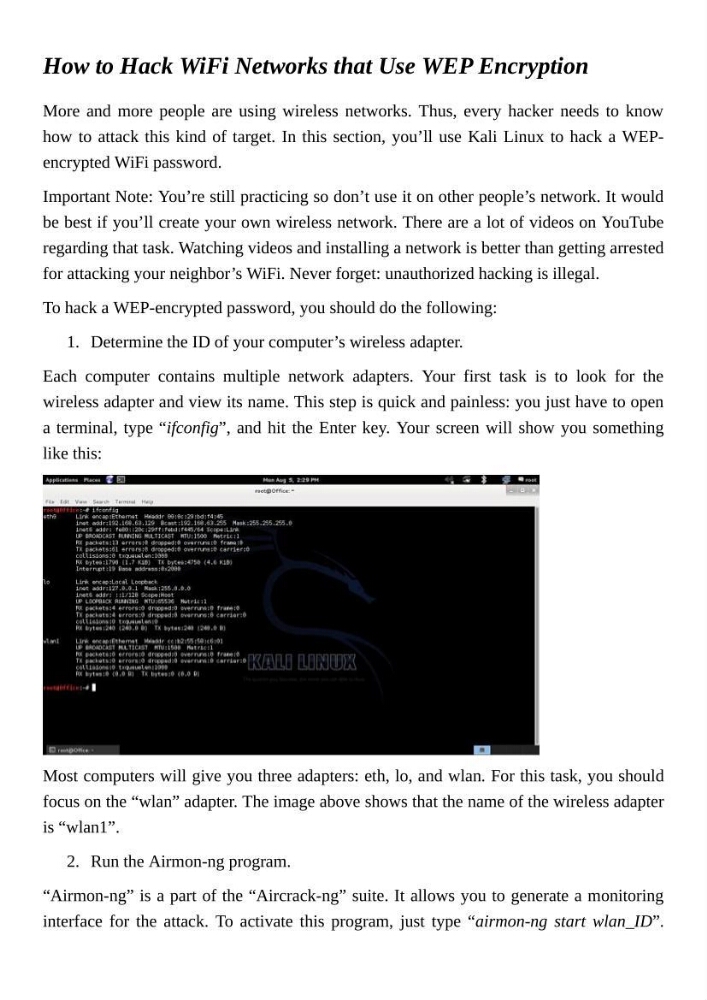
a terminal, type “ifconfig”, and hit the Enter key. Your screen will show you something
like this:
Most computers will give you three adapters: eth, lo, and wlan. For this task, you should
focus on the “wlan” adapter. The image above shows that the name of the wireless adapter
is “wlan1”.
2. Run the Airmon-ng program.
“Airmon-ng” is a part of the “Aircrack-ng” suite. It allows you to generate a monitoring
interface for the attack. To activate this program, just type “airmon-ng start wlan_ID”.
More and more people are using wireless networks. Thus, every hacker needs to know
how to attack this kind of target. In this section, you’ll use Kali Linux to hack a WEPencrypted WiFi password.
Important Note: You’re still practicing so don’t use it on other people’s network. It would
be best if you’ll create your own wireless network. There are a lot of videos on YouTube
regarding that task. Watching videos and installing a network is better than getting arrested
for attacking your neighbor’s WiFi. Never forget: unauthorized hacking is illegal.
To hack a WEP-encrypted password, you should do the following:
1. Determine the ID of your computer’s wireless adapter.
Each computer contains multiple network adapters. Your first task is to look for the
wireless adapter and view its name. This step is quick and painless: you just have to open
a terminal, type “ifconfig”, and hit the Enter key. Your screen will show you something
like this:
Most computers will give you three adapters: eth, lo, and wlan. For this task, you should
focus on the “wlan” adapter. The image above shows that the name of the wireless adapter
is “wlan1”.
2. Run the Airmon-ng program.
“Airmon-ng” is a part of the “Aircrack-ng” suite. It allows you to generate a monitoring
interface for the attack. To activate this program, just type “airmon-ng start wlan_ID”.