

5. Access the directory you created by entering:
Kali > cd python-nmap-.03.4/
6. Issue the code given below to finish the process:
Kali > python setup.py install
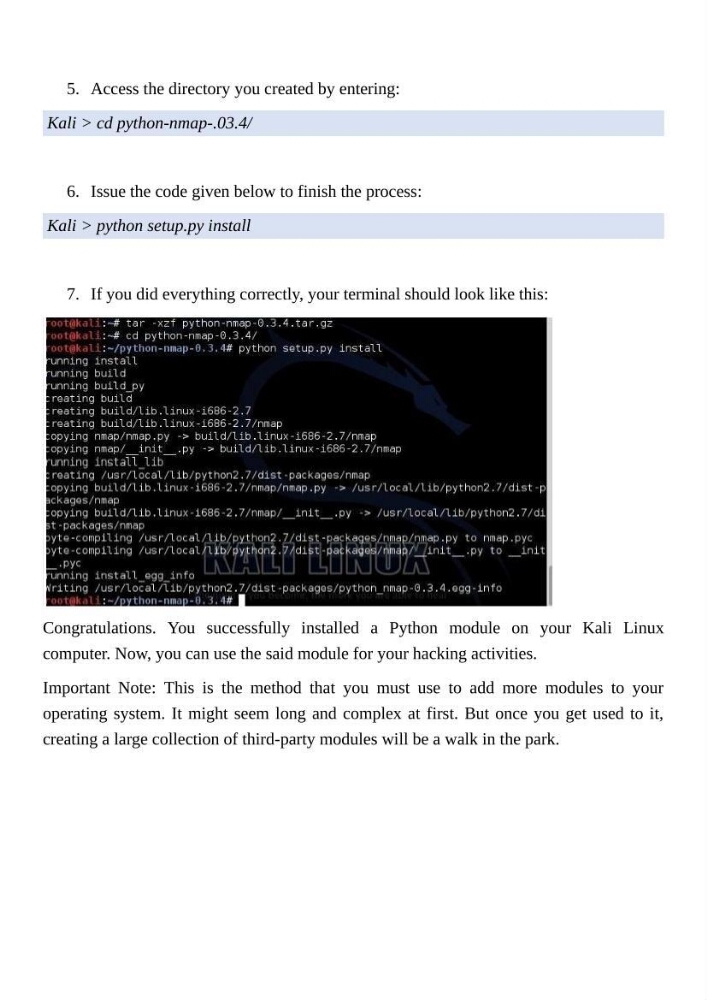
7. If you did everything correctly, your terminal should look like this:
Congratulations. You successfully installed a Python module on your Kali Linux
computer. Now, you can use the said module for your hacking activities.
Important Note: This is the method that you must use to add more modules to your
operating system. It might seem long and complex at first. But once you get used to it,
creating a large collection of third-party modules will be a walk in the park.
Kali > cd python-nmap-.03.4/
6. Issue the code given below to finish the process:
Kali > python setup.py install
7. If you did everything correctly, your terminal should look like this:
Congratulations. You successfully installed a Python module on your Kali Linux
computer. Now, you can use the said module for your hacking activities.
Important Note: This is the method that you must use to add more modules to your
operating system. It might seem long and complex at first. But once you get used to it,
creating a large collection of third-party modules will be a walk in the park.