

4.2 Monitoring Management Software Design
4.2.1 PC Side Management Software
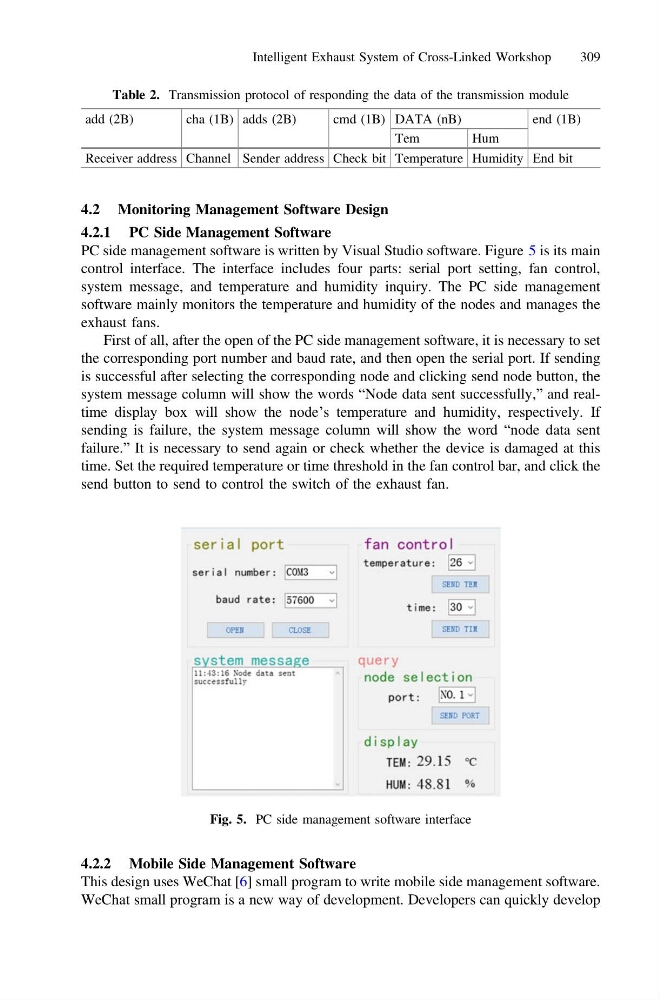
PC side management software is written by Visual Studio software. Figure 5 is its main
control interface. The interface includes four parts: serial port setting, fan control,
system message, and temperature and humidity inquiry. The PC side management
software mainly monitors the temperature and humidity of the nodes and manages the
exhaust fans.
First of all, after the open of the PC side management software, it is necessary to set
the corresponding port number and baud rate, and then open the serial port. If sending
is successful after selecting the corresponding node and clicking send node button, the
system message column will show the words “Node data sent successfully,” and realtime display box will show the node’s temperature and humidity, respectively. If
sending is failure, the system message column will show the word “node data sent
failure.” It is necessary to send again or check whether the device is damaged at this
time. Set the required temperature or time threshold in the fan control bar, and click the
send button to send to control the switch of the exhaust fan.
4.2.2 Mobile Side Management Software
This design uses WeChat [6] small program to write mobile side management software.
WeChat small program is a new way of development. Developers can quickly develop
Table 2. Transmission protocol of responding the data of the transmission module
add (2B)
cha (1B) adds (2B)
cmd (1B) DATA (nB)
end (1B)
Tem
Hum
Receiver address Channel Sender address Check bit Temperature Humidity End bit
Fig. 5. PC side management software interface
Intelligent Exhaust System of Cross-Linked Workshop
309
4.2.1 PC Side Management Software
PC side management software is written by Visual Studio software. Figure 5 is its main
control interface. The interface includes four parts: serial port setting, fan control,
system message, and temperature and humidity inquiry. The PC side management
software mainly monitors the temperature and humidity of the nodes and manages the
exhaust fans.
First of all, after the open of the PC side management software, it is necessary to set
the corresponding port number and baud rate, and then open the serial port. If sending
is successful after selecting the corresponding node and clicking send node button, the
system message column will show the words “Node data sent successfully,” and realtime display box will show the node’s temperature and humidity, respectively. If
sending is failure, the system message column will show the word “node data sent
failure.” It is necessary to send again or check whether the device is damaged at this
time. Set the required temperature or time threshold in the fan control bar, and click the
send button to send to control the switch of the exhaust fan.
4.2.2 Mobile Side Management Software
This design uses WeChat [6] small program to write mobile side management software.
WeChat small program is a new way of development. Developers can quickly develop
Table 2. Transmission protocol of responding the data of the transmission module
add (2B)
cha (1B) adds (2B)
cmd (1B) DATA (nB)
end (1B)
Tem
Hum
Receiver address Channel Sender address Check bit Temperature Humidity End bit
Fig. 5. PC side management software interface
Intelligent Exhaust System of Cross-Linked Workshop
309